
Replace an asset’s underlying file with a new version — the existing download links keep working, the new version is what customers download going forward. Optionally, you can notify everyone who already bought the asset that there’s a new version available, so they can grab the update.
Replace function: Basic plan and above. Email template customization: Growth plan and above. Notifying customers triggers an email per past buyer of any product the asset is attached to — daily cap of 10,000 bulk emails per day.
When you’d use this
- You found a typo in a PDF and want to fix it for past buyers.
- You’re shipping software updates and want all customers on the latest version.
- You’re delivering ongoing courseware that gets revised periodically.
- You compressed a too-large PDF and want it on the smaller version.
- You replaced a URL asset’s destination and want to push the new link.
Replace an uploaded file
1. (Optional) Customize the file-replace email template
If you want to send a custom message with the update notification (Growth+ required to edit):
- Fileflare → Settings → Edit email templates → File Replace template.
- Edit the message and save.
If you skip this, the default text is used:
Hi (customer name),

We have updated some files from your recent order with (store name).

You can download your files with the following links:

- (Assets)

Thanks!
2. Replace the file
- Fileflare → Assets → click the asset you want to update.
- Click Replace asset.
- Choose the new file from your computer.
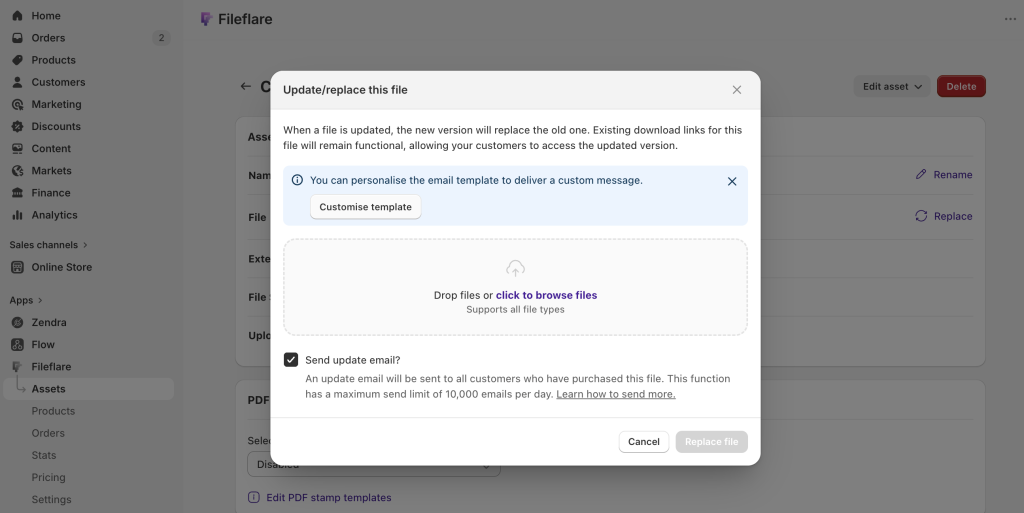
3. Notify customers (optional)
Fileflare prompts: Send update email to past buyers?
- Yes — Fileflare sends the file-replace email to every customer who ordered a Shopify product this asset is attached to (at the time of update). Also reaches any orders that had the asset directly attached.
- No — file is replaced silently. Future downloads use the new version; no one is emailed.
Replace a URL asset
If you change the underlying file at Dropbox / Drive / etc., the URL it generates often changes — meaning your URL asset points to a dead link. To swap:
- Upload the new file to your hosting service and copy its new URL.
- Fileflare → Assets → open the URL asset → Edit.
- Click Next until step 3, paste the new URL.
- On step 4, choose whether to notify previous customers (uses the same File replace email template).
- Save.
Bulk-update strategies
Method 1: Fileflare’s notify (simple, broad)
Update files in Fileflare and click “yes” to notify. Fileflare emails everyone who bought any product the asset is attached to. Pros: simple, one-click. Cons: no filtering — emails go to all past buyers regardless of whether they’re still active.
Method 2: your own email tool (filtered, recommended for big lists)
Update files in Fileflare without notifying, then send the announcement from your own email platform (Klaviyo, Omnisend, Shopify Email). Use a link to the customer download page so customers re-fetch the latest:
https://yourstore.com/apps/digital-downloadsPros: filter by tags, recency, or any segment. Better deliverability tracking. Cons: more setup. Recommended for stores with thousands of past buyers.
Limits and notes
- Daily bulk-send cap: 10,000 emails per day across file-replace and release-date sends combined.
- Single asset at a time: the notify flow only handles one asset per replace. For multiple updates, repeat or use Method 2.
- Existing download links keep working: the URL itself doesn’t change on replace — customers using the original link still hit the new file.
- No filtering by order status: can’t exclude cancelled or refunded orders from the notify. Use Method 2 if filtering matters.
Common issues
- Customer didn’t get the update email — confirm the asset was attached to the products they ordered. If it wasn’t (e.g., you attached after their order), they wouldn’t be on the recipient list.
- I want to undo a replace — replace again with the original file. Existing links stay valid.
- Email tracking shows X for the original fulfillment — by design. The order list only tracks the original fulfillment email, not file-replace or release emails. Per-order email tracking shows everything.