
We see a lot of new Shopify stores at Fileflare, and the mistakes first-time digital-product sellers make cluster into a tight set. Most aren’t dramatic — they’re small decisions early on that limit the store’s ceiling later. A fresh look at each can recover meaningful revenue without changing the product.
Here’s the dozen most common mistakes, and the alternative approaches we recommend.
Pricing mistakes
1. Pricing too low
Low pricing is the single biggest mistake new digital sellers make. First-time sellers look at a $9 ebook and think that’s “the going rate,” then anchor everything to that price. In practice, buyers read low prices as signals of low quality from unknown sellers, and low prices compress your pricing ladder (a $5 cheat sheet makes it hard to charge $50 for the workbook).
Fix: Price 2–3× your instinct. If a product feels like it should be $9, try $29. Test for a month, adjust. Most first-time sellers who raise prices find revenue increases and conversion stays roughly flat — because the higher price signals quality to buyers who were passing over the cheap version.
2. No price differentiation across the catalog
While it can be tempting to simplify pricing and charge $9 for everything, flat pricing can make your catalog feel flat and removes any hierarchy for the buyer. Some people will always want the most or least expensive thing, and flat pricing can be disorienting.
Fix: Build a real pricing ladder. A free or cheap lead magnet, a mid-tier core product, a premium tier with extras. $5 cheat sheet → $29 workbook → $99 course bundle. Different price points serve different buyer intents and raise the overall average order value.
3. Running too many sales
A constant 30% off sale trains buyers to wait for discounts and resets the anchor price. Buyers learn your “real” price is the sale price and won’t convert at full price.
Fix: Keep discounts rare, tied to specific events (launches, holidays, anniversaries), and capped in duration. A full-year of Black Friday is not a Black Friday.
Delivery mistakes
4. Sending download emails from a generic sender
Shopify’s native Digital Products emails come from a generic Shopify-owned domain, not yours. These hit spam more often, look less trustworthy, and miss a brand-building opportunity on the most-opened post purchase email you’ll send.
Fix: Connect a custom SMTP service or SendGrid on Fileflare (available on premium plans) so delivery emails come from files@yourdomain.com. You’ll have better brand recognition and can fine-time your deliverability.

5. No re-download flow
Buyers lose files. Their computer crashes, they switch devices, they bookmark the wrong URL, and the list goes on. If your setup doesn’t give them a self-serve way to re-download, you’ll get “I lost my file” support tickets forever.
Fix: Make sure customers can access their downloads through the Shopify customer account area, plus deliver to their account page on your own domain. Fileflare’s download page lives at yourstore.com/apps/digital-downloads by default — link to it from your order confirmation and customer account templates.

6. Per-download limits that strand honest buyers
The native Shopify Digital Products app defaults to 5 downloads per link, then the link dies. Honest customers who re-download twice on their laptop, twice on their phone, and once on their tablet are suddenly locked out. Then they email you.
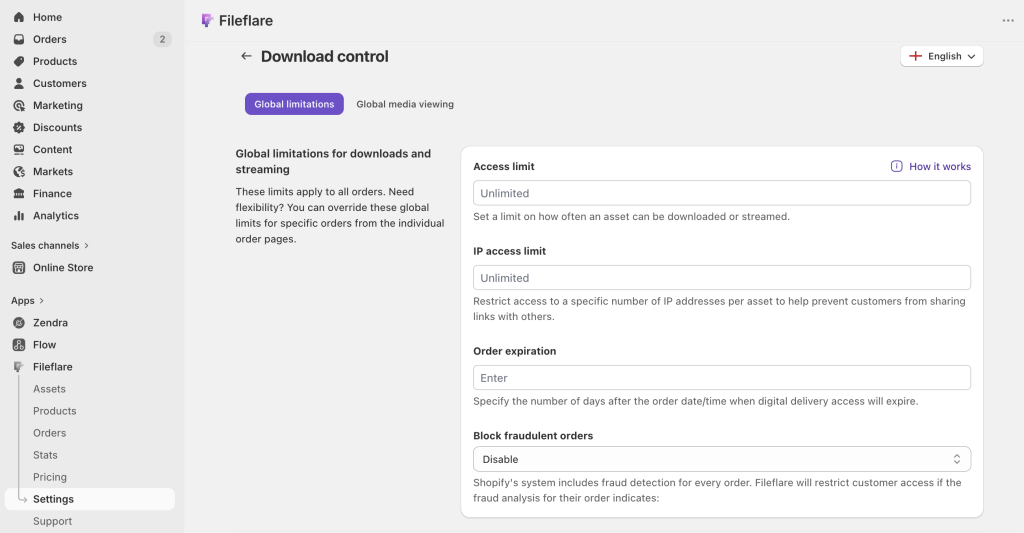
Fix: Switch to per-IP limits. Allowing 3 to 5 unique IP addresses per order gives buyers tons of headroom while still cutting off abuse. Fileflare does this per-order on paid tiers; it’s one of the bigger operational wins of moving off the native app.
Protection mistakes
7. Treating right-click blocking as “security”
A common first-time seller move: install a right-click blocker on the storefront and consider the site “protected.” Right-click blocking stops nothing — it’s a visual gesture, not a security layer. We wrote a whole post on this.
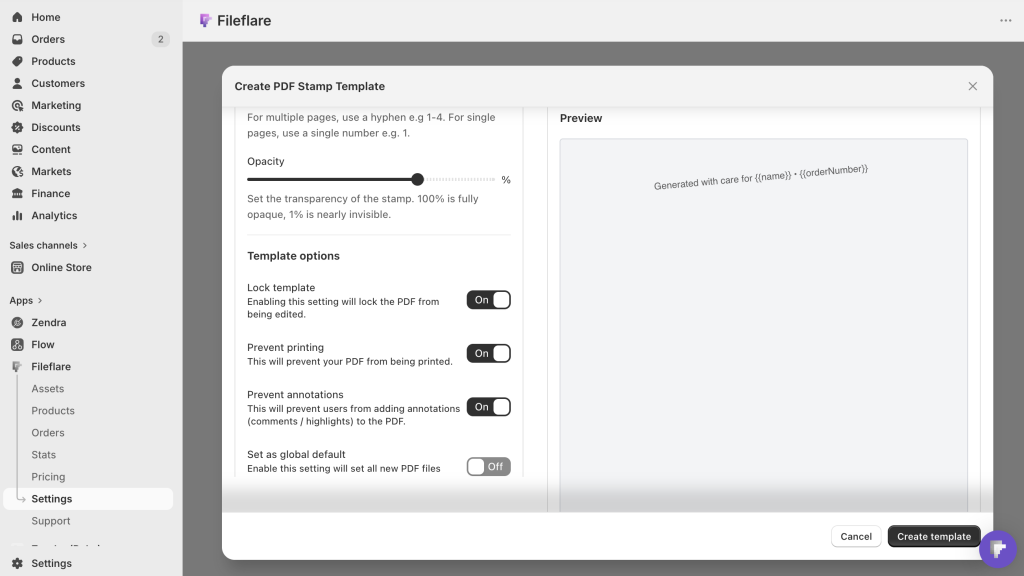
Fix: For PDF products, use buyer-data stamping (every page shows the buyer’s name and email) and IP-limit the download link. For files where stamping doesn’t apply (videos, zip bundles), rely on IP limits and fraud auto-blocking. The combination deters sharing far more than right-click blocking ever will.
8. No fraud blocking on digital delivery
Shopify’s fraud analysis flags risky orders, but the native Digital Products app doesn’t read those flags — the file ships before you can cancel. Every PDF or video seller we talk to has at least one story of a fraudulent high-dollar order that shipped the file before the chargeback hit.
Fix: Fileflare’s fraud auto-blocking reads Shopify’s risk flags and blocks download access on medium- to high-risk orders automatically. The buyer can’t access the file until you review; you keep the order.
9. Shipping the file with a password
The seller-side equivalent of right-click blocking. Password-protect the ZIP, email the password separately, assume buyers won’t share. Then they forget the password or lose the file and email you. Meanwhile anyone who wants to share the ZIP copies the password along with it.
Fix: Skip archive passwords. Protect at the delivery layer (IP limits, expiration) and at the content layer (PDF stamping). Let the ZIP itself be unlocked — it’s less friction for honest buyers and doesn’t meaningfully slow down sharers.
Marketing and catalog mistakes
10. Shopify store launched with one product
A single-product store gives buyers one thing to evaluate. If they don’t want that specific thing, they leave. No cross-sells, no browsing depth, no “maybe this instead” conversion path.
Fix: Even if your strategy is for a single product, consider tiers or use some other capture as a “release valve” to get marketing contacts from visitors who aren’t ready to buy yet. Launch with 3 to 5 products that feel like a cohesive collection, add a free lead magnet, or have a regular and “pro” tier for your single product (even if the pro tier is just talking to you!). Even if some products are smaller (a $5 cheat sheet alongside your $29 main ebook), the breadth tells buyers you’re a real shop, and cross-sells increase AOV.
11. No email list
Digital-product buyers convert at much higher rates after 2–4 touches than on the first visit. Without an email list, every buyer you don’t convert on visit one is gone — you have no way to reach them again.
Fix: Lead magnet, signup form, basic welcome sequence. Shopify’s built-in email marketing handles simple flows, while Klaviyo or Mailchimp easily handle more robust series. An email list is often the single highest-leverage asset a digital store has.
12. Product pages that don’t answer the buyer’s questions
“What format is this?” “What size?” “Does it include a Word version?” “Can I use it for commercial work?” “How do I download it after I buy?” These questions are in every digital buyer’s head. Product pages that don’t answer them lose conversions over buyer hesitation.
Fix: Audit your product pages for the questions buyers actually ask, and add a short FAQ to each product description. Make sure it covers specific sizes, file formats, licensing terms, delivery timing — explicit beats implicit.
Bonus round: no post-purchase follow-up
You delivered the file, now what? Most digital sellers send zero follow-up emails after the initial delivery. That’s leaving money on the table — repeat buyers are the highest-margin customers you’ll have, and they need a reason to come back.
Fix: A week after delivery, send a short “how are you getting on with it?” email that asks for a review and soft-pitches a complementary product. Two weeks later, a “here’s something you might like next” email with a cross-sell. Simple sequences like this reliably add 15–25% to revenue without changing your product or pricing.
Get started
Fileflare handles the delivery, protection, and email-sender pieces of this list — stamped PDFs, IP limits, fraud blocking, custom sender domain, re-download flows. Free plan includes 1 GB storage, unlimited products, unlimited bandwidth.
For the full setup, the complete guide to selling digital downloads on Shopify covers the whole stack.