
If you sell digital products on Shopify, the question, “How do I stop people from sharing this?” comes up sooner or later — usually right after a buyer’s email lands in your spam folder asking why their friend can’t access the file they “borrowed.”
Piracy is real; it’s also frequently overstated. Most buyers don’t share, and most pirates wouldn’t have bought anyway. The job isn’t to build digital Fort Knox — it’s to make casual sharing annoying enough that most people don’t bother (and to know who leaked it when somebody does).
You can achieve both deterrence and attribution on Shopify without turning your store into an anti-customer, digital-American Ninja Warrior obstacle course.
This guide walks through the layers worth combining for digital products on Shopify, what each layer actually does, and the moves that look like protection, but mostly hurt your trust with honest buyers.
What digital sellers defend against
It helps to be specific. “Piracy” covers very different threats, and the right protections depend on which of these matter for your product:
- Casual sharing: A buyer forwards their download link to a friend. Sharing is the most common scenario, and lowest stakes per incident, but the cumulative effect compounds for popular products.
- Public link leaking: A buyer posts the download link to a forum, Discord, Reddit thread, or Telegram group. This “pirates” one link, but results in hundreds or thousands of downloads and real revenue impact.
- Bot scraping and aggregator sites: Automated scripts pull files from publicly indexed download URLs. Shopify’s standard URL structure makes this rare; URLs gated behind order verification (which Fileflare does by default) make it functionally impossible.
- Professional repackaging: Someone buys, strips identifying information, repackages, and resells your file as their own. This kind of piracy represents the highest stakes, but lowest volume; usually the right response is a DMCA takedown rather than a technical countermeasure.
The first two are the threats you can do something about with technical layers. The third is mostly handled by using a real delivery app instead of Shopify’s built-in flow. The fourth is a legal problem more than a software problem, and we’ll come back to it briefly at the end.
Two pillars, not one
A useful frame for thinking about protection is to split it into two pillars:
- Deterrence — make sharing annoying enough that most people don’t bother. Download limits, IP caps, expiration dates, login requirements. The idea is friction. None of these stop a determined sharer; they all stop the casual one.
- Attribution — when something does leak a product, know who leaked it. PDF stamping is the cleanest example: the buyer’s name and order number are baked into every page of every downloaded copy, so a leaked file points back to the buyer. The point isn’t to sue them; the point is that the buyer knows their personal details are on the file, which is itself a deterrent.
Hard DRM — encrypted files that only open in a custom reader, key-server-validated downloads, hardware-locked decryption — sits in a third category that we’d argue is almost never worthwhile on Shopify. DRM hits both deterrence and attribution, but at a cost: the buyer experience falls apart, support ticket volume explodes, and the protection itself routinely gets cracked. The juice is rarely worth the squeeze.
Stick with deterrence and attribution in layers, and skip the hard stuff.
Layer 1: Download limits and expiration
The simplest protection is also one of the most effective: cap how many times each order’s download link can be used.
A reasonable default is 10 to 25 downloads per order. An appropriate limit is high enough that legitimate re-downloads (different device, lost file, switched browsers) work without friction, but low enough that a buyer who shares their link to a Reddit thread sees the link burn out before fifty strangers can pull the file. You can override the limit on individual orders if a buyer needs more.
Expiration dates are the same idea, applied to time. For evergreen products (templates, ebooks, reference content), a hard expiration is usually overkill — you want past buyers to keep their access. For time-sensitive content (a workshop replay that’s only relevant for a season, a limited-run digital download), an expiration of 30 to 90 days makes sense.
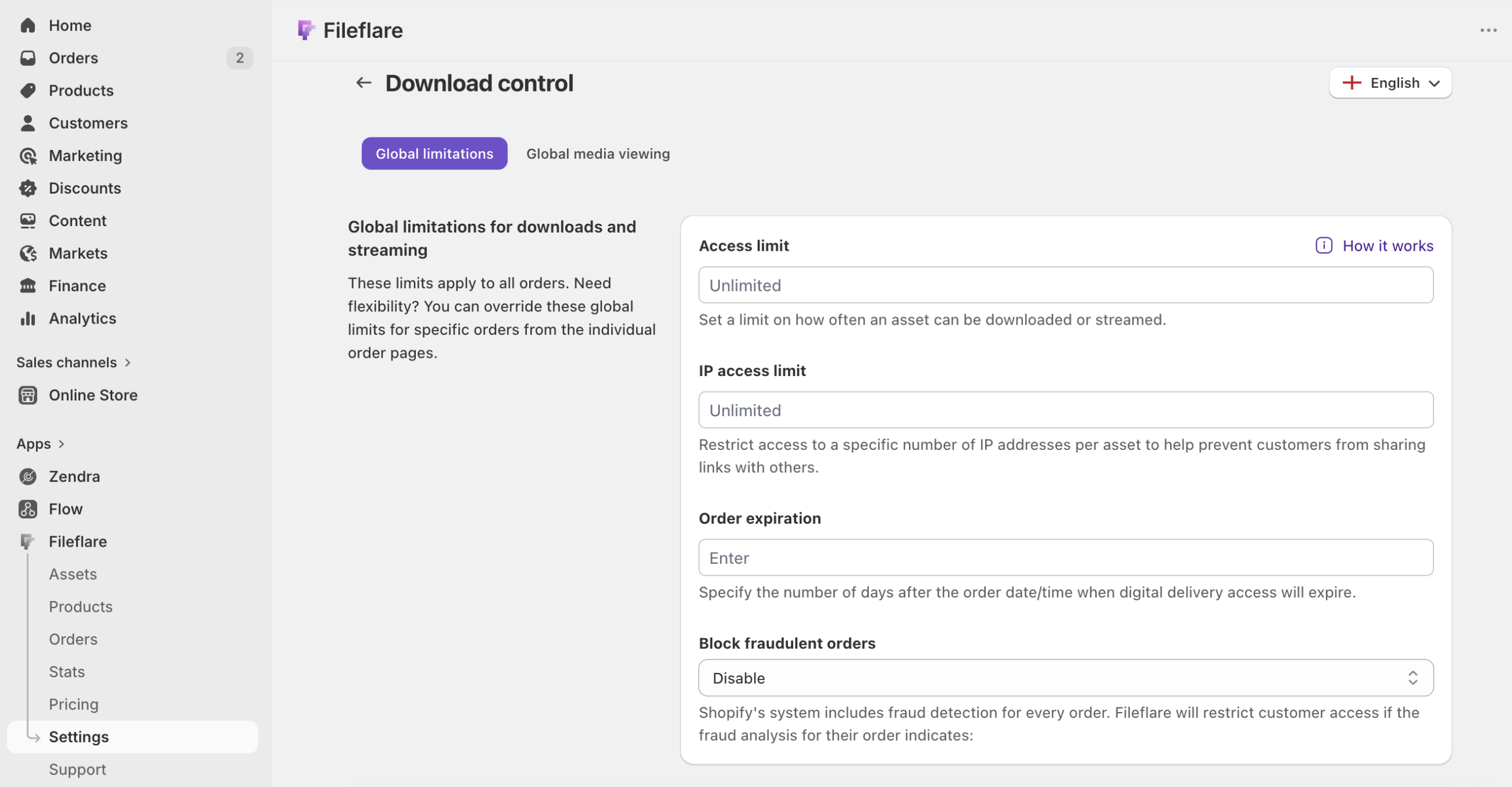
A practical note: don’t set the download limit too low. Capping at 3 downloads per order generates more support tickets (“I lost my file when my computer died”) than it prevents piracy. The cap is supposed to be invisible to honest buyers and lethal to link-sharers; aim accordingly.
Layer 2: IP address restriction
Where the download limit caps total downloads, the IP cap caps unique devices.
Each download from a new IP address counts against the cap. Same buyer, same Wi-Fi, ten downloads? Tthat’s one IP. Same link posted to Discord, fifty strangers trying to download from fifty different IPs? That’s fifty unique IPs, and the link shuts off after your cap.
We find that a reasonable default is to allow 3 to 5 unique IPs per order. Most legitimate buyers won’t exceed this cap. Some buyers truly download a few times (at home, again at the coffee shop, again on their phone over LTE), so set the cap with a little slack. The point is to catch obvious public-link-sharing, not to micromanage where buyers download from.
IP restriction is on Premium plans and above on Fileflare. If your store is at risk of forum-link-leaking — high-priced PDFs, popular templates, anything that gets discussed in private creator communities — it’s the highest-leverage single control beyond download limits.
Layer 3: PDF stamping
For PDF-heavy stores, this is the differentiator.
Dynamic PDF stamping (also called PDF watermarking) modifies each downloaded PDF on the fly to include the buyer’s identifying information: name, email, order number, date of purchase, IP address, and more. Every buyer’s copy is uniquely watermarked. If the file ends up on a torrent or in a forum thread, the buyer’s name is on every page.
The deterrent effect is significant. Most buyers see the stamp and immediately understand they shouldn’t share — their personal information is on the file. The 1-in-200 buyer who emails your support about it gets a one-line explanation about preventing unauthorized sharing, and almost always lands without further issue.
Stamping is on our Basic plan and above. We’ve covered the configuration in depth in our PDF watermarking guide — what to include in the stamp, where to position it, how to set up per-asset templates, and how retroactive stamping works for existing orders.
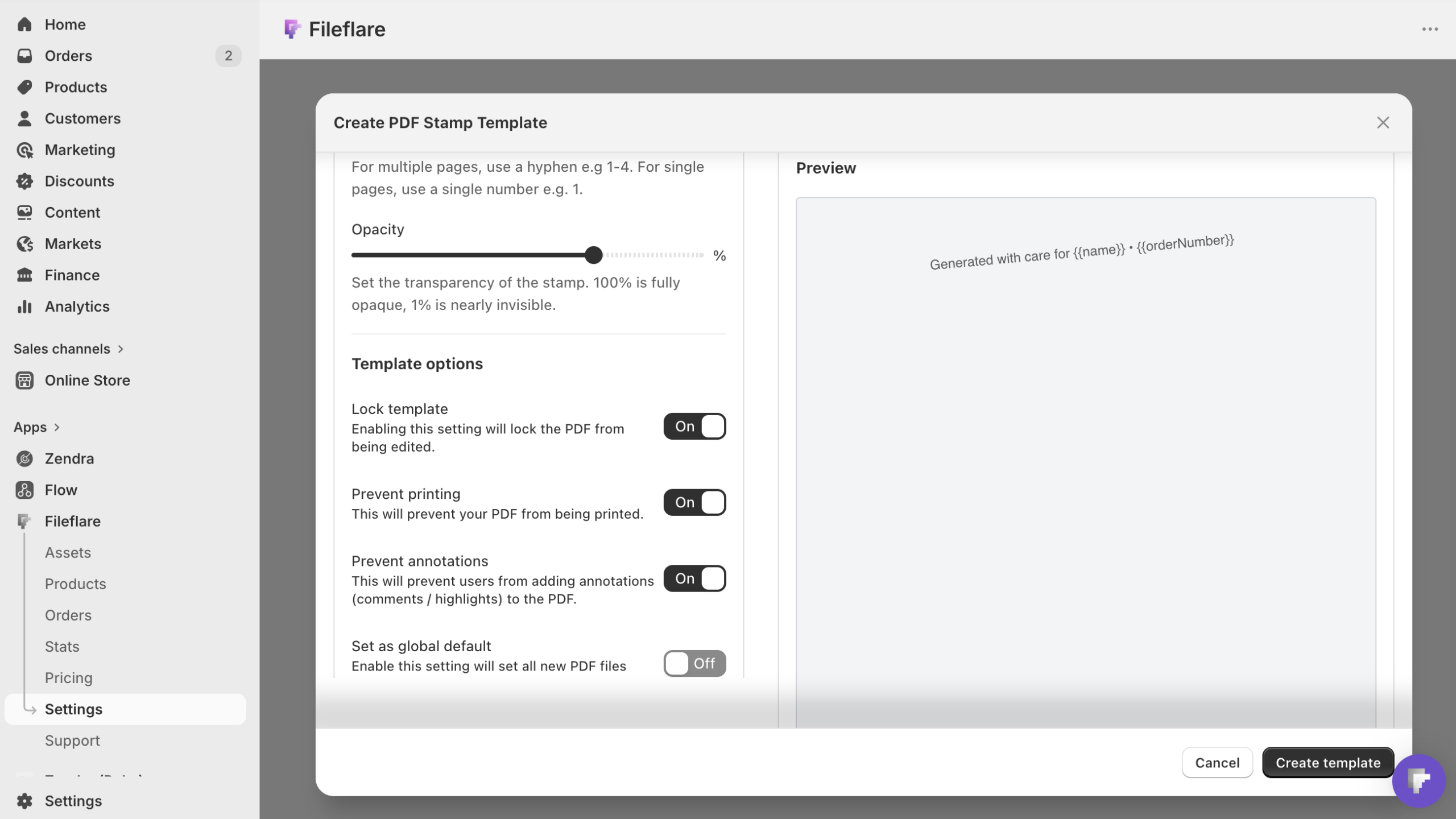
If you sell anything in PDF format and care about protection, this is probably the first thing to turn on.
Layer 4: Streaming-only mode
For video, audio, and PDF assets, Fileflare can disable the download button entirely. The buyer can view or listen to the file directly on their download page (in-browser video player, audio player, or PDF reader), but they can’t save the file locally.
Streaming-only mode is useful for video tutorials and courses where buyers don’t need offline access, premium audio content (sample packs, audiobooks), reference PDFs that buyers will read once. It’s less useful if you sell printables, templates, and anything the buyer needs to use offline.
We want to note: streaming-only is a UI-level deterrent, not DRM. The video file is still served via a temporary signed URL that’s visible in the browser’s developer tools. A technically inclined buyer can grab that URL and download the file directly. It’s a strong deterrent for the 95% of buyers who don’t open DevTools, not a lock against the 5% who do. (We do have some extra server-level blocks for video files to make this harder, but nothing is foolproof.)
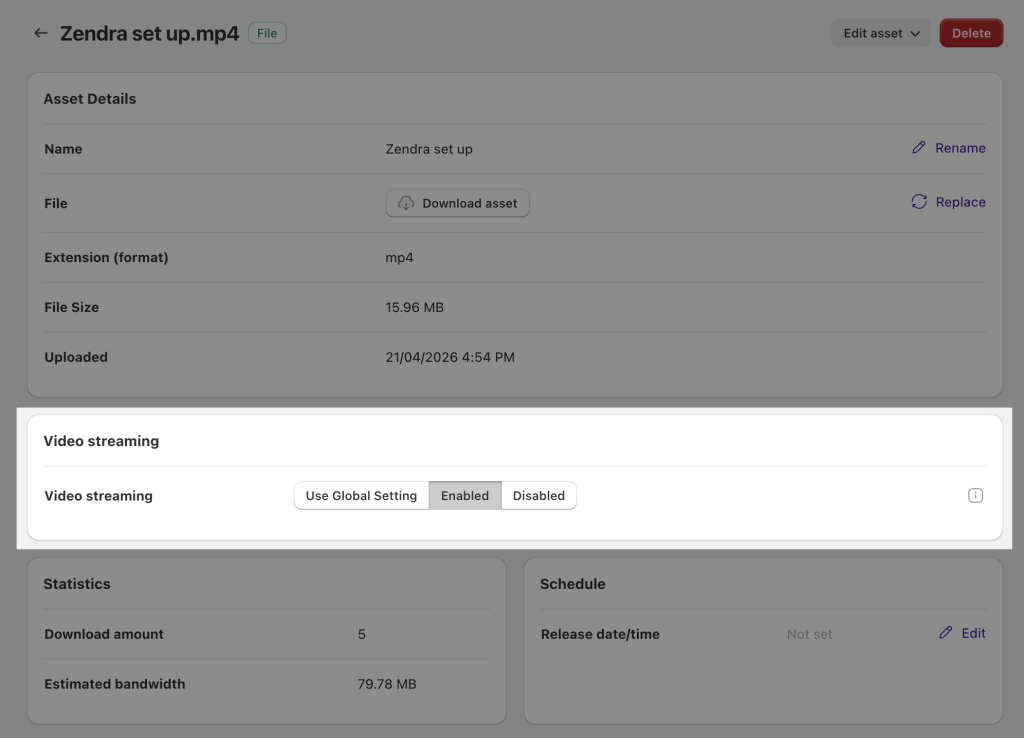
Streaming-only mode is on Premium plans and above. If your products are mostly video or premium audio, this is the section where the upgrade pays for itself.
Layer 5: Fraud auto-blocking and manual blocks
Not all of your “piracy” problem is buyers sharing files. Some of it is from fraudulent orders — stolen credit cards, where the chargeback comes through after the file has already been delivered.
Fileflare has two protections worth combining for this scenario:
- Fraud auto-blocking. Shopify’s order analysis flags orders as low, medium, or high risk based on payment signals (mismatched billing addresses, suspicious IP geography, etc.). Fileflare can automatically block downloads on any order Shopify flags as medium or high risk. The buyer sees a “your order is being verified” message; you get a chance to manually review before they get the file. Real fraud usually doesn’t bother contesting the verification — they move on to easier targets.
- Manual order blocking. For the obvious abuse cases — a customer who keeps ordering and charging back, or one whose download patterns scream “I’m sharing this” — you can block downloads on any individual order with one click from the admin. The block is reversible if you change your mind.
Auto-blocking is on Growth plans and above. The combination handles 80% of the “where did all these chargebacks come from” pirates.
Layer 6: Login-required downloads
For higher-priced products, requiring buyers to log in to their Shopify customer account before they can access downloads adds a meaningful friction layer. The download link in the email becomes one step in a flow rather than a direct URL, so forwarding an email no longer works to share files.
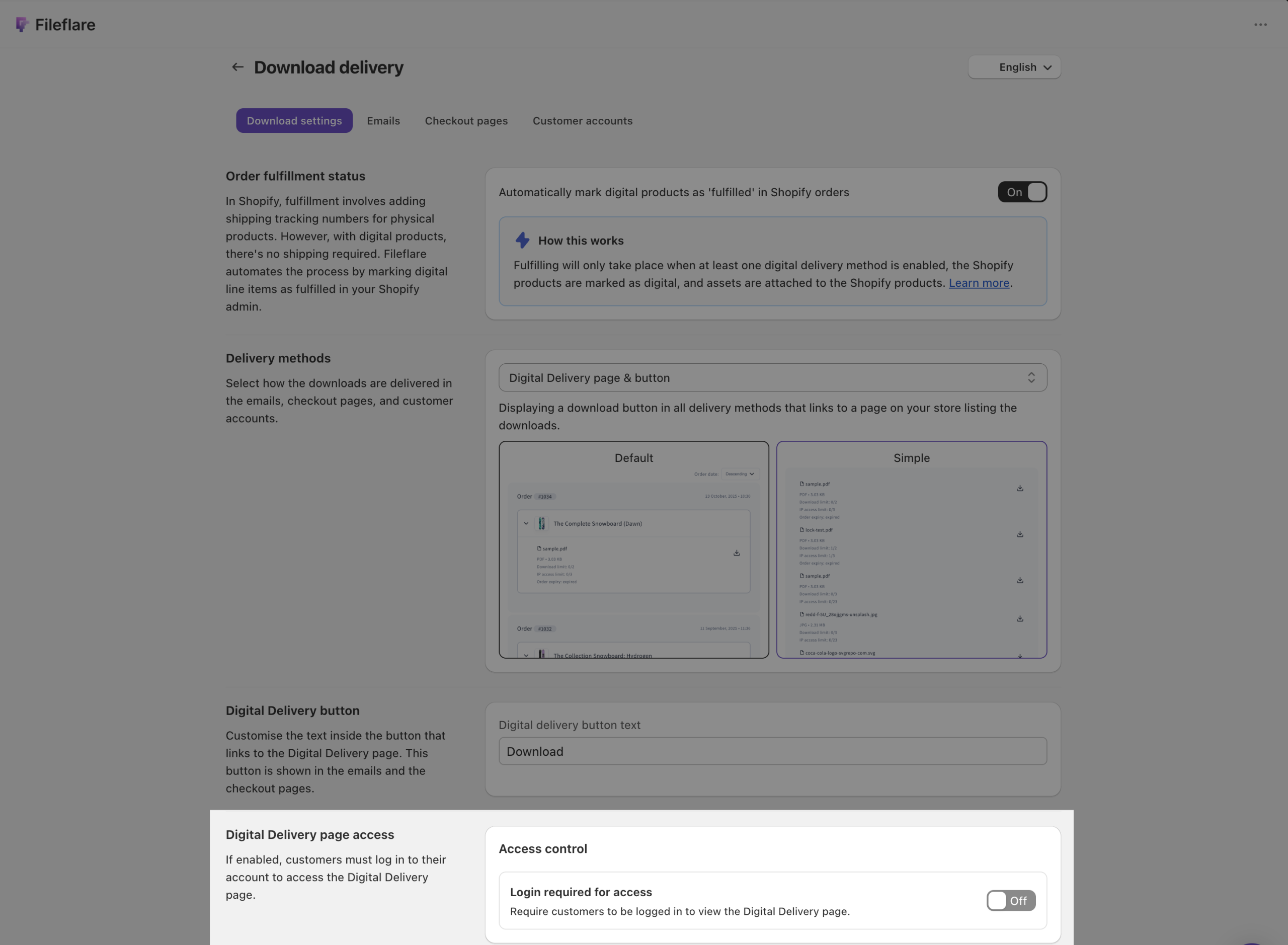
There are tradeoffs to requiring login, though. Sign in adds friction for legitimate buyers (some won’t realize they need to create or sign in to a store account), and you lose the “click email link, get file” instant gratification that buyers expect for sub-$50 digital products.
We’d recommend reserving login-required downloads for premium SKUs ($100+) where the protection trade is worth the friction. For a $9 printable, leave it off; for a $499 course, turn it on.
What NOT to do
Protection is one half of the equation. The other half is trust — buyers being able to use what they bought without feeling like they have to outsmart your store. The tactics below trade trust for protection theater. They make your store harder to buy from without making files meaningfully harder to share.
- Disabling right-click on your storefront. This stops the casual user who tries to save your storefront image, but doesn’t stop anybody who knows about Ctrl+U, F12, or the dozen browser extensions that re-enable context menus. We have a separate post on this if you want the technical implementation, but the short version is: it’s lightweight cosmetic friction at best, and it confuses honest buyers who hit it without warning.
- Hard DRM that requires a custom reader. Selling encrypted PDF formats that only open in a specific app, video files locked to a particular player, anything that asks the buyer to install proprietary software to view what they bought. The buyer experience is awful, the support load is large, and the protection itself routinely gets cracked. For nearly every Shopify digital seller, the costs outweigh the benefits.
- Watermarking the PDF yourself before upload. Static watermarks (your logo, your store name) that appear identically on every buyer’s copy don’t deter sharing — they identify the source of the file (you), not the leaker (the buyer). Use dynamic stamping if you want the deterrent and attribution; static watermarks just make your file look more processed without doing protection work.
- Aggressive download caps. Capping at 1 to 2 downloads per order generates support tickets faster than it prevents piracy. Buyers lose files: computers die, browsers cache weirdly on mobile, phones get lost. You want the cap to be invisible to honest buyers; if you’re hearing from buyers about it, it’s too low.
- Making buyers prove they bought it. Email-the-store-for-access flows, registration-with-receipt-upload requirements, anything that puts a human-review gate between buyer and file. The friction cost is enormous, the protection benefit is small, and you’re communicating distrust to people who paid you.
The protections that work — download limits, IP caps, stamping, fraud auto-blocking — are invisible to honest buyers. They run in the background. The buyer gets their file the same way they would in a standard store. That’s the design constraint: protection should never feel like punishment.
Choose the right protection by product type
Different products carry different risks, and benefit from the right combinations of layers. We’ve developed our own “rules of thumb” based on what works well across our sellers.
- PDFs (workbooks, ebooks, templates, premium reference): dynamic stamping + download limits + IP caps. Stamping is the deterrent; the caps are the backstop.
- Printables (multi-file PDF + JPG products): stamping if you’re selling premium designs; download limits and IP caps for everything else. Copy attribution is the constraint for sharing designs, and caps cover sharing for use.
- Video (tutorials, courses, music tutorials): streaming-only mode + IP caps + fraud auto-blocking. Fileflare gives you unlimited bandwidth, use it for streaming and cap the IPs aggressively if you allow download.
- Audio (sample packs, audiobooks, podcast premium): download limits + IP caps. You can use streaming-only mode if you’d rather buyers consume in-browser; this is useful for sample packs where preview-vs-purchase boundaries matter, but typically the value is in download (incorporating in other work) vs listening.
- Software / source code (ZIP delivery): download limits + login-required downloads + a stamped license PDF in the bundle. The license PDF gives you attribution even when the code itself can’t be watermarked for lazy sharing. Combine with license keys for extra protection.
We see merchants have the best results when they pick two or three layers per product type — any more and your buyer experience can degrade with little marginal improvement in security.
Common objections
When we help merchant set up Fileflare, we get common questions about file protection, and how it’s received by customers. Questions like, “Will customers complain about files being watermarked with their information?” Almost never. The 1-in-200 who notice and email about it usually accept a one-line explanation. We’ve seen far more buyers appreciate the implicit “this was made for you” feeling than complain about the stamp.
Some merchants want to back off to a generic “this content is licensed” watermark. You can use it if you feel it improves professionalism with your audience, but it does nothing to deter sharing, and we’ve found personalized stamps have benefits that far outweigh any risks — and the folks who weren’t going to share your files anyway aren’t concerned.
If you want to experiment with file protection, you can always turn it on and off. Retroactive stamping applies your template to past orders on the next download; download limits and IP caps also apply going forward; and fraud auto-blocking starts working on the next risky order. You can turn these protections on or off at any point.
Shopify’s first-party Digital Products app does not offer protections like IP caps, PDF stamping, or stream-only mode. You’ll need a premium app like Fileflare to add them.
Keep learning
If you sell PDFs in any form, our PDF watermarking guide is the deep dive on the single most-leveraged protection most stores can turn on.
For the broader picture on selling digital products on Shopify (setup, delivery, analytics), start with the complete guide to selling digital downloads on Shopify. The companion PDF guide and ebook guide cover format-specific concerns.
When you’re ready to layer in real protection, install Fileflare from the Shopify App Store. The free plan covers download tracking and basic delivery; protection layers (stamping, IP caps, streaming-only) are available on the paid tiers, and the 14-day trial lets you test the combination that fits your products before committing.