
Two kinds of Shopify merchants end up selling ebooks: the first is the dedicated ebook seller — authors, educators, newsletter operators, course creators — building a storefront around their writing. Everything on the store is digital: guides, workbooks, reference manuals, fiction.
The second is the “X plus ebooks” merchant. A physical-product store that adds a digital line alongside the main catalog. A gym apparel brand that also sells workout programs and nutrition ebooks. A ceramics studio with a throwing-techniques PDF. A plant shop with a care guide. The ebook isn’t the whole business: it’s an extension of it, often with better margins than anything else on the site.
This guide works for both. Much of the process is the same: pick your formats, upload the files, attach them to a product, deliver reliably, protect the content, and handle updates when you revise the book. The differences show up in pricing, positioning, and how you bundle with the rest of the catalog — we’ll cover those too.
If you haven’t set up digital delivery on your Shopify store yet, the cornerstone guide how to sell digital downloads on Shopify covers the foundation: product setup, fulfillment, email delivery, and the basics of working with a digital delivery app. This post assumes you’ve read that one, or you already have a working setup and want to go deeper on ebooks specifically.
Choose your ebook formats
The first real decision is format. You have three main options, and most serious ebook merchants offer more than one.
- PDF is the universal default. It preserves your exact layout — fonts, images, margins, page breaks — across every device and reader. It’s the right format for anything where the design matters: illustrated books, workbooks with fill-in fields, cookbooks, design-heavy guides, photography portfolios. It’s also the format most buyers understand without needing to be told what to do with it.
The tradeoff is that PDFs don’t reflow. On a phone, readers pinch and zoom. On a small e-reader, text is often too small. For a 300-page novel, that’s a real accessibility problem. - EPUB is the open ebook standard used by Apple Books, Google Play Books, Kobo, and almost every e-reader that isn’t a Kindle. The text reflows to fit the screen, readers can change font size and typeface, and the file supports bookmarks, search, and accessibility features. If you’re selling novels, long-form non-fiction, memoir, or anything a reader will hold for hours, EPUB is the format they actually want.
- MOBI (and its successor AZW3) is Amazon’s format for Kindle devices. In 2026 most Kindles can read EPUB directly via Amazon’s Send to Kindle service, so MOBI matters less than it did five years ago — but a lot of Kindle users still prefer being handed a file that “just works” without the extra conversion step. If a meaningful slice of your audience reads on Kindle, include it.
A practical default: offer PDF plus EPUB for almost every text-heavy ebook, and add MOBI if your audience skews Kindle-heavy. For visual, design-driven, or fillable ebooks, PDF alone is often fine.
One thing we’d skip worrying about: DRM-encrypted ebook formats (ACSM, encrypted EPUB). Setting up Adobe Content Server or an equivalent is expensive, frustrating for buyers, and breaks for a meaningful percentage of legitimate customers. Direct-to-consumer ebook sellers almost universally do better with a plain EPUB plus a watermark than with hard DRM.
Deliver all three formats from one product
Once you’ve decided on formats, the cleanest pattern on Shopify is to attach all formats to a single product. One “The Complete Keto Guide” listing, and the buyer gets PDF, EPUB, and MOBI after checkout. No variants, no confusion, no separate SKUs to keep in sync.
In Fileflare, you’d upload each file as an asset, then attach all three to the same Shopify product. After checkout, the buyer sees every attached file on their download page and in the delivery email. Fileflare offers unlimited files per product on every plan, including the free tier, so multi-format delivery works from day one.
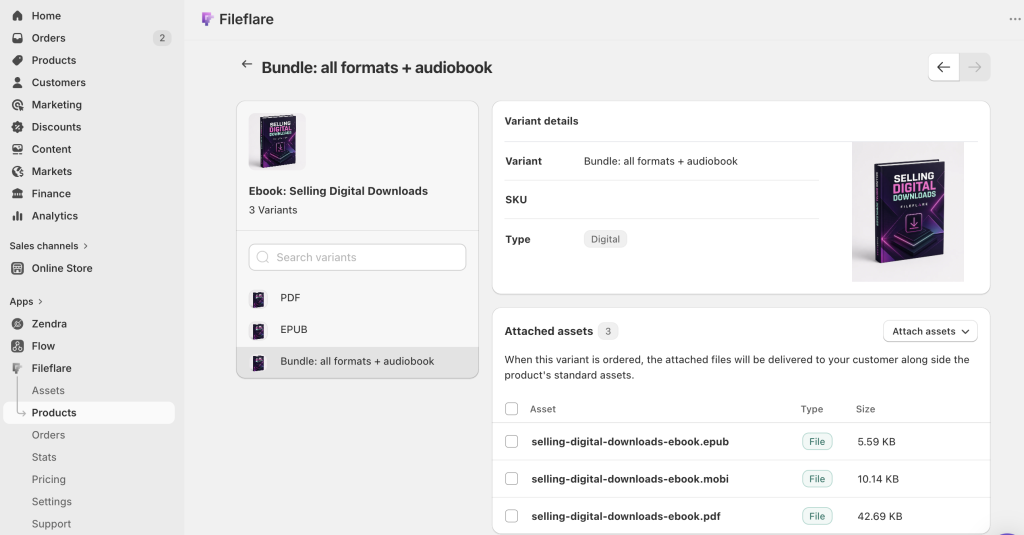
If you want to sell formats separately — say, a PDF-only tier at $9 and a “complete” bundle at $15 — use Shopify variants. Attach the PDF asset to the first variant and all three files to the second. Fileflare supports variant-level attachments natively, so buyers only receive the files that match what they paid for.
Price your ebook
Ebook pricing on Shopify isn’t the same game as pricing a novel on Amazon. You’re not competing against a million $2.99 Kindle books at the top of a search results page; you’re on your own store, in front of an audience that already knows and trusts you, and you set the price.
For pure ebook stores, the right price depends on the book’s category and depth. Short guides, workbooks, and introductory material sell well in the $15 to $29 range. Comprehensive references, full courses in ebook form, and professional-grade content price higher than most authors expect ($49 – $99) and still convert well when the landing page makes the value obvious.
Fiction is genuinely harder — most indie fiction authors on Shopify price in the $7 to $15 range, but many are selling to a superfan audience that would pay more for a special edition or bundle.
For “X plus ebooks” stores, the dynamic flips. Your audience came for the physical product, and the ebook is an adjacent purchase. Two strategies work:
- The first is pricing the ebook as a low-commitment add-on: $9 to $19, presented during checkout or in post-purchase flows. The gym apparel buyer who just spent $85 on leggings might happily add a $9 workout program PDF. It’s a margin booster on an order that was going to happen anyway.
- The second is pricing it as a standalone authority product: $39 to $79, marketed separately. The workout program or nutrition guide isn’t an impulse add-on; it’s the thing that convinces someone you know what you’re talking about, and it often brings in new buyers who then discover the physical line. Both strategies can coexist on the same store.
A pricing note worth calling out: resist the temptation to discount ebooks to oblivion. “$9.99 for everything” stores tend to train customers that the content isn’t valuable. Occasional sales around a launch, seasonal push, or new-edition release are fine, but permanent rock-bottom pricing rarely is.
Make the cover do the selling
An ebook is an intangible product. The buyer can’t feel the paper or flip through the pages. The cover — and the product imagery around it — is doing more of the work than it would for a physical book.
Two things matter most:
- The cover itself should look like a book. Not a rectangle with a title slapped on it. A proper cover with typography, image, and composition that matches the category. Thriller covers look different from cookbook covers for a reason, and browsing buyers are pattern-matching whether they realize it or not. If you don’t have a designer, services like 99designs, Fiverr, MiblArt, and Reedsy’s cover designer marketplace can produce professional covers for $200 – $800. If you’re starting out, consider an AI-generated image; I find I get the best results from having ChatGPT help me with the prompt first (by asking me about the design) so I get the right aesthetics.
- The product page imagery should show the cover in context. A flat cover image alone looks boring. Most top-selling Shopify ebook stores use a mockup: the cover rendered on a tablet screen, a Kindle, an iPad held in a hand, or open on a desk with a coffee mug. Tools like Placeit, Smartmockups, and Canva make these easy to produce in a few minutes.

For multi-format ebooks, consider showing the cover on more than one device: a Kindle for the MOBI version, a phone for EPUB, a laptop for the PDF. It subtly signals that the reader can take the book wherever they actually read.
If your ebook has a table of contents, chapter samples, or illustrated interior pages, include a few interior preview images on the product page. Amazon’s “Look Inside” feature exists because it sells books. Bring that pattern to your store.
Customize the download experience for ebook buyers
Once the buyer has paid, the download experience is where it’s easy to skimp — and easy to make better.
The built-in Shopify experience (a plain email with a link) works. A branded, helpful download page does better. But with a digital delivery app, you can present the files on your own domain, with your logo, with a clear description of what each file is for, and with a reader baked in.
For ebooks specifically, a few things are worth setting up.
- Group and label the files by format. “The Complete Keto Guide – PDF (iPhone, desktop, print)”, “EPUB (iPad, Nook, Kobo, Kindle via Send to Kindle)”, “MOBI (older Kindles)”. Buyers shouldn’t have to guess which file to download.
- Let the buyer read the PDF in the browser. Fileflare includes an in-browser PDF reader that opens the ebook on the download page — no app required, no “where did that file go?” moment. For buyers who just want to start reading immediately, it removes a step.

- Write a short welcome block on the download page: a paragraph that thanks them for buying, explains the formats, points out any resources that go with the book (a companion workbook PDF, an invitation to a newsletter, a discount code for a follow-up product).
This is also where you can link to a “getting started” page if the book needs one — workout programs and course-style ebooks benefit from a “how to get the most out of this” intro.
Protect your ebook — honestly
Piracy is a real concern, but also an overstated one. Most buyers don’t pirate. Most pirates wouldn’t have bought anyway. The realistic goal isn’t zero piracy — it’s making casual sharing less tempting, and making commercial redistribution traceable when it happens.
Fileflare offers three protection layers, in rough order of useful-to-overkill:
- Dynamic PDF watermarking (sometimes called stamping) is the single highest-leverage protection for ebooks. Fileflare can stamp each downloaded PDF with the buyer’s name, email address, order number, and the date of purchase.
The buyer’s copy is visibly personalized. If it ends up on a file-sharing site, it’s the buyer’s copy — a strong deterrent against someone casually uploading it to a forum or group chat, because their name is right there.
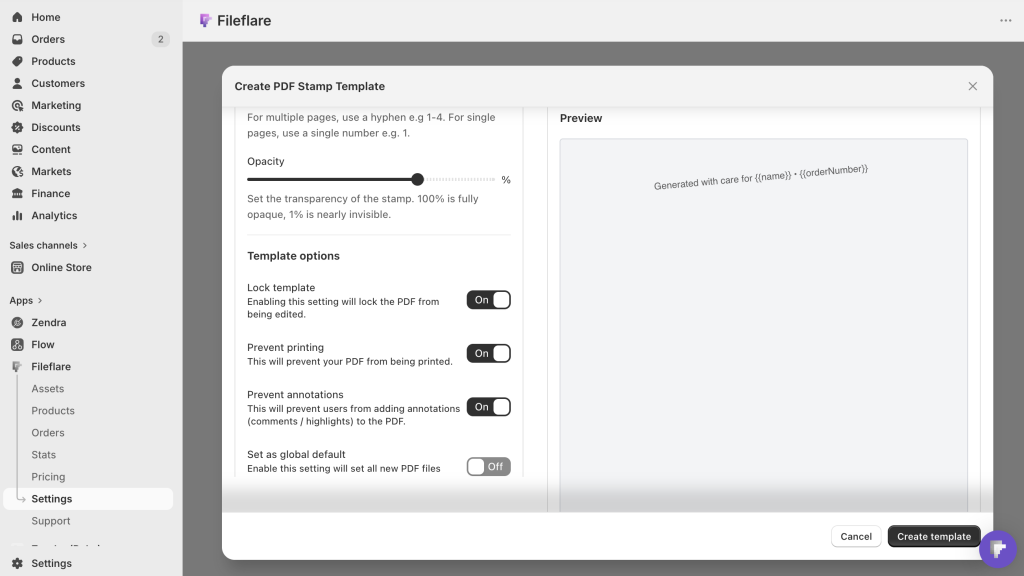
You can set watermarks globally (every PDF stamped the same way), or use per-asset templates when you want different books stamped differently. Existing orders can be retroactively watermarked on their next download, so even past buyers get stamped copies going forward.
- Print and annotation locks disable printing and editing on the stamped PDF. These are worth knowing about but worth being honest about: a determined user can work around PDF restrictions, and we’ve never seen a reason to pretend otherwise. The locks help against casual printing and editing (and are usually a strong enough deterrent for most sharing). They aren’t hard DRM.
- Download controls — a limit on how many times the file can be downloaded per order, a cap on the number of unique IP addresses allowed per order, an expiration date on the download link — cut down on link sharing without punishing legitimate buyers. Defaults of 10-25 downloads and 3-5 IPs per order work for most stores. Anything tighter, and you’ll start creating real support headaches.
One thing we’d advise against: bolting on every possible restriction at once. A 2-download limit plus a 24-hour expiration plus an IP cap plus a login gate is the kind of configuration that annoys every legitimate buyer and barely slows down anyone determined to share the file. Watermark the PDF, set reasonable download limits, and let the rest go.
For non-PDF formats (EPUB and MOBI), watermarking is harder — there’s no universal, non-breakable way to stamp a reflowable ebook file. Most stores publish EPUB and MOBI unwatermarked, rely on download limits for casual protection, and focus watermarking effort on the PDF version that’s most likely to be casually shared.
Update past buyers when you revise the ebook
One of the real advantages of selling ebooks direct instead of on a third-party platform is that you control the file. When you fix a typo, rewrite a chapter, add a new bonus section, or release a second edition, you can push the updated file to everyone who already purchased.
In Fileflare, this is a built-in flow. Upload the new version, replace the old asset, and optionally send a notification email telling past buyers there’s a new version waiting. The buyer goes back to their download page and gets the revised file on the next download.
Their order doesn’t need to be re-fulfilled — the asset is attached to the order as a reference, not the specific file, so updates propagate automatically.
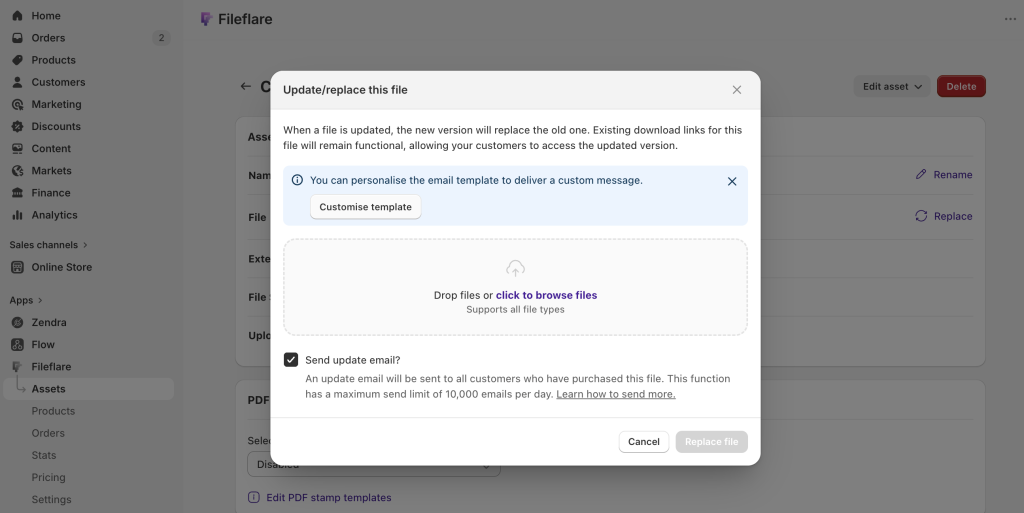
This changes the economics of ebook publishing in a small but real way. You can ship a “1.0” that isn’t perfect, gather feedback, release a better version two months later, and turn the whole revision cycle into a customer-retention moment instead of a silent correction. Subscribers get free upgrades for the life of the book; new buyers always get the latest edition.
A small process note: when you do push an update, the notification email is a light-touch marketing touchpoint too. A paragraph explaining what changed, what’s new, and (if relevant) what else you’re working on lands much better than “your file has been updated.”
Bundle ebooks with physical products
For “X plus ebooks” stores, bundling is where most of the real money shows up. A few patterns that work.
- Post-purchase upsells. The buyer just bought $85 worth of apparel. A post-purchase offer for a $12 nutrition ebook converts at rates that would be absurd on a standalone landing page. The customer already made the purchasing decision, and the cognitive load of adding one more thing is low. Shopify’s native post-purchase pages plus an upsell app make this a straightforward setup.
- Product bundles with an included ebook. “The starter kit” includes two tank tops, a shaker bottle, and the 8-week workout program PDF. The ebook doesn’t appear on the product page as a separate line item — it’s an included bonus that makes the physical bundle feel more complete. In Fileflare, the bundle SKU gets the ebook attached as a digital asset, so the file delivers automatically whether the buyer paid $79 or $120 for the bundle.
- “Free ebook with order over $X” threshold offers. Every order over $100 ships with a bonus ebook. It’s a margin-safe threshold incentive that lifts average order value, and because the incremental cost of a digital file is zero, the economics are attractive all the way up.
One technical note on bundles: if you’re using a bundle app or Shopify’s native bundles feature, double-check that the fulfillment trigger for the ebook still fires. Some bundle implementations fulfill the line items differently, and the digital delivery app needs to see the specific SKU that has the ebook attached. Run a test order through before launch.
We’re also working on ways to make these workflows better when using Fileflare with Zendra! You’ll be able to attach a membership to a physical product, or sell it standalone, and grant free download access (to your entire library or specific files). Get in touch to be added to our beta testers or announcement list.
Grab bag questions
Covering a few miscellaneous notes around ebook sales on Shopify:
- You do not need a dedicated store for digital goods! Sell your ebooks right on your existing storefront. You can launch a digital-only store if it makes sense as a separate brand (like a fiction brand vs a consulting brand), but it’s not necessary. Fileflare works alongside any existing catalog.
- You can sell any format with Fileflare. We’ve used PDF, EPUB, and MOBI in this post, but Fileflare can serve any type of digital download.
- We didn’t cover sales tax in this post, but you should know most US states now tax digital goods, including ebooks (and the EU requires VAT on digital sales, based on location). Talk to an accountant, good ones usually pay for themselves, we promise.
- While we assume you sell ebooks in this post, you can also offer them for free as a lead magnet! They can be a great way to build an email list if your sales cycle takes a couple visits. Queue up your magnet as a free product with Fileflare, and we’ll deliver it all the same when checkout is done for your $0 order.
- A lot of merchants as us about refunds on ebooks. Offering them is up to you; files cost pretty much nothing, but buyers also used the product already. Fileflare tracks downloads if you want to refuse refunds after download; we also have consent gates so the buyer has to acknowledge they won’t get a refund before downloading.
Keep learning
If you’re still working through the basics of digital delivery on Shopify, start with how to sell digital downloads on Shopify: a complete 2026 guide. For a format-specific walkthrough of getting a single PDF onto your store, how to sell a PDF on Shopify covers the mechanics.
When you’re ready to sell, Fileflare’s free plan covers multi-format delivery on unlimited products — plenty to launch an ebook store on. You can install Fileflare from the Shopify App Store and be live in about ten minutes.