
A font is one of the smallest files you’ll ever sell, and one of the few where the file isn’t the product. Your buyer is paying for permission: to set a book cover in your display face, to put your sans on a client’s website, or to ship your script inside an app that a few million people will open. The OTF is how that permission gets delivered, and the license is what they’re buying.
That changes what a font store has to do. Selling a template is mostly a delivery problem (lots of files, lots of formats), and our guide to selling templates and design assets covers that ground. Selling fonts online is a licensing problem first: each buyer needs the right files for the use they paid for, the license terms that go with them, and every update you ship after that. The good news is that Shopify and Fileflare handle that structure well, as long as you set it up around the license rather than the file.
Know what font buyers are buying
Most independent foundries sell some mix of four license types. Your end user license agreement (EULA) is what defines them, and terms vary a lot from one foundry to the next, so treat this as the common pattern rather than a standard:
- Desktop: install the font on computers to design with it, for print, logos, images, and documents. Usually priced by the number of seats or workstations.
- Web: embed the font on a website with
@font-face. Usually tied to a single site and priced by monthly pageviews. - App: embed the font inside a mobile or desktop application. Usually priced per app, and sometimes by the number of app downloads.
- ePub / digital publication: embed the font in an ebook or digital magazine. Usually priced per title.
Some foundries add broadcast, server, or “enterprise, call us” tiers on top, and some sell packages that cover several uses at once. Most, though, sell these as separate licenses with their own pricing, so a buyer who needs desktop and web use usually buys both. (Alphabettes’ look at how foundries measure font licenses is a useful survey if you’re still writing your EULA.)
That’s the structure your store needs to mirror. Each license type is a separate thing a buyer can choose, it often has its own files, and it has a size dimension (seats, pageviews, apps) that changes the price.
Model licenses as Shopify variants
Shopify variants are the cleanest way to sell license tiers, because they give the buyer a choice on the product page and give you a way to deliver different files per choice. A typical setup looks like this:
- One product per family, such as “Brindle Sans,” or one product per single style if you sell weights individually.
- A “License” option with values like Desktop, Web, App, and ePub.
- A “Size” option if your pricing scales, such as “1 to 5 seats” or “Up to 50,000 pageviews / month.”
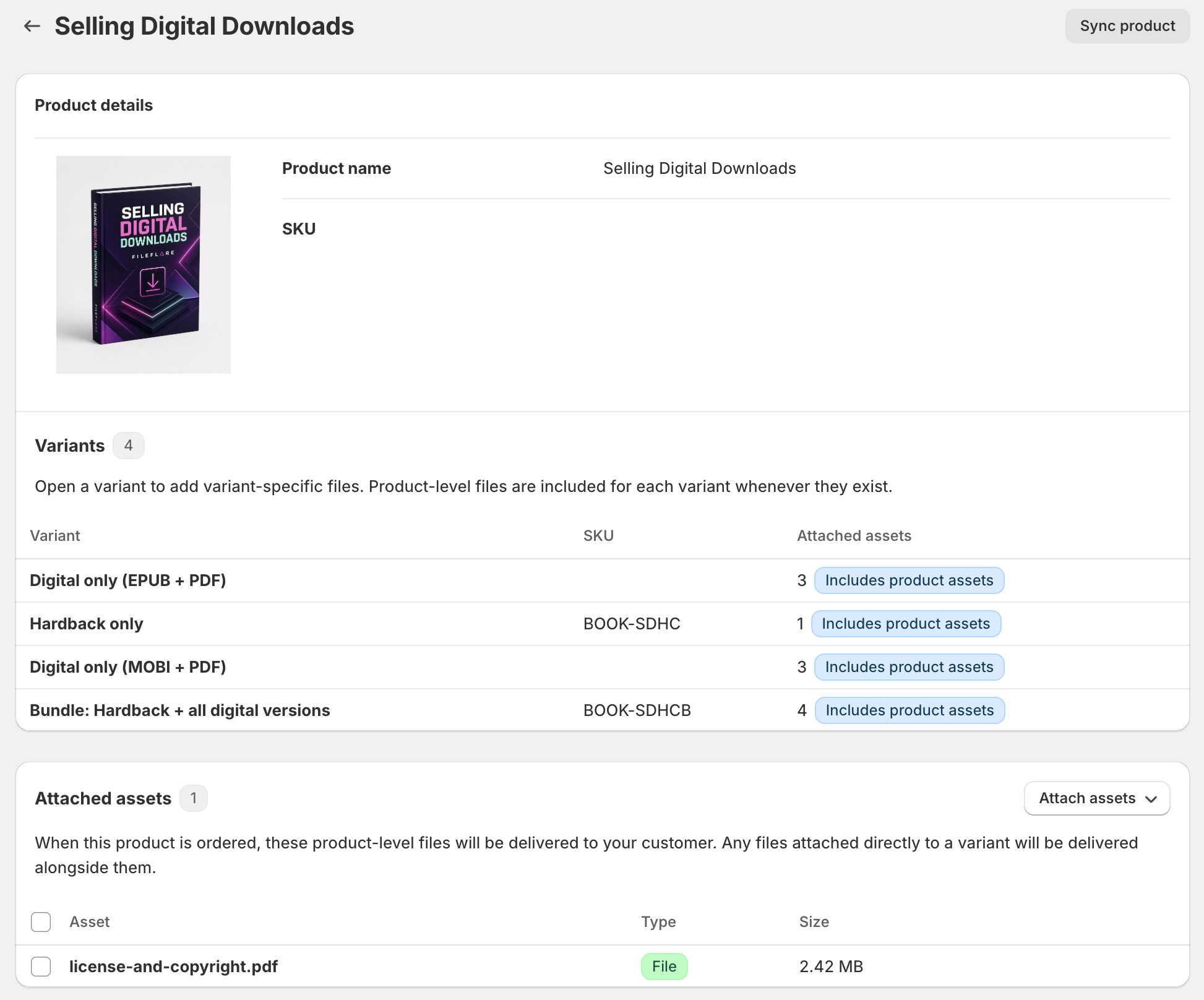
Fileflare attaches files at two levels, which is what makes this work. Files attached to the parent product deliver to every buyer, whichever variant they picked, and files attached to a variant deliver only to that variant’s buyers. When a buyer’s variant inherits parent files and has its own, they get both, with no duplicates.
For a font family, that usually breaks down like this:
| Attached to | Files | Who gets them |
|---|---|---|
| Parent product | EULA PDF, specimen PDF, a “read me first” note | Every buyer |
| Desktop variants | OTF (and TTF, if you offer it), plus a desktop license certificate PDF | Desktop buyers only |
| Web variants | WOFF2 / WOFF files, a sample CSS snippet, plus a web license certificate PDF | Web buyers only |
| App and ePub variants | TTF or OTF for embedding, plus a certificate PDF for that license | App and ePub buyers only |
A web buyer never has to wonder why their order arrived with installable desktop files they didn’t license, and a desktop buyer isn’t handed WOFF2 files they can’t use. (If your EULA lets a web license include desktop files for mockups, attach the desktop files to the web variants, too. The structure bends to your terms.)
Plan for this practical limit: a big family multiplied by four license types and several size tiers adds up to a lot of variants fast. If the variant picker starts to feel like a tax form, split the product — for example, one product for desktop and app licenses, another for web licenses, and cross-link them on the product page.
Package the files buyers expect
Type buyers are a technical crowd, and they notice when the package is off. Keep your support inbox quiet by heading off some common issues:
- Desktop: OTF is the default for most buyers, and some foundries include TTF for older software.
- Web: WOFF2 is the format modern browsers load, and WOFF covers older ones. Fileflare delivers these as downloadable files for the buyer to self-host; it doesn’t serve fonts to the buyer’s website, so make sure the license and the read me say so.
- ZIP or individual files: a ZIP keeps a 12-style family tidy, but individual files let buyers grab one weight without unzipping the whole family. Fileflare puts no limit on files per product, on every plan, so you can offer both: the full family ZIP plus the files. Our ZIP file guide covers when archives help and when they get in the way.
- The license itself: include the EULA as a PDF in every order, attached to the parent so it can’t be missed.
Font files can also carry their own paperwork. The OpenType naming table has fields for a license description (name ID 13), a license info URL (name ID 14), and a version string (name ID 5), all defined in Microsoft’s OpenType specification. Fill them in from your font editor before you export, and the license link travels with the font long after the download page is forgotten. It’s a quiet detail, but it means a font that ends up somewhere unexpected still points back to your terms.
If you’d like the download page to read in a sensible order (EULA first, then the fonts), set the asset sort order by asset name, file size, or date. (Sorting by name with the EULA named “00 License” puts it at the top.) Our guide to attaching multiple files to a digital product walks through this.
Sell families, single weights, and bundles
Most foundries sell at two or three levels: single styles for the buyer who only needs the bold, the full family for everyone else, and sometimes a collection bundle across several families. In Shopify, each of those is its own product with its own license variants, and the files are shared rather than duplicated. Upload the Regular face once, and attach that same asset to the single-style product, the family product, and the collection.
That reuse pays off later, too. When you replace the Regular’s file, every product that delivers it gets the new version, because the order is tied to the asset rather than a copy of the file. (Replacing files is available on the Basic plan and above; more on shipping updates below.)
For a growing catalog, you can attach a set of assets to up to 50 products at once with Shopify’s product picker, rather than clicking into each product. If your SKUs follow a pattern, a CSV import that maps SKUs to asset names does the same in bulk, and it’s available on the Growth plan and above.
Turn the license PDF into a licensee record
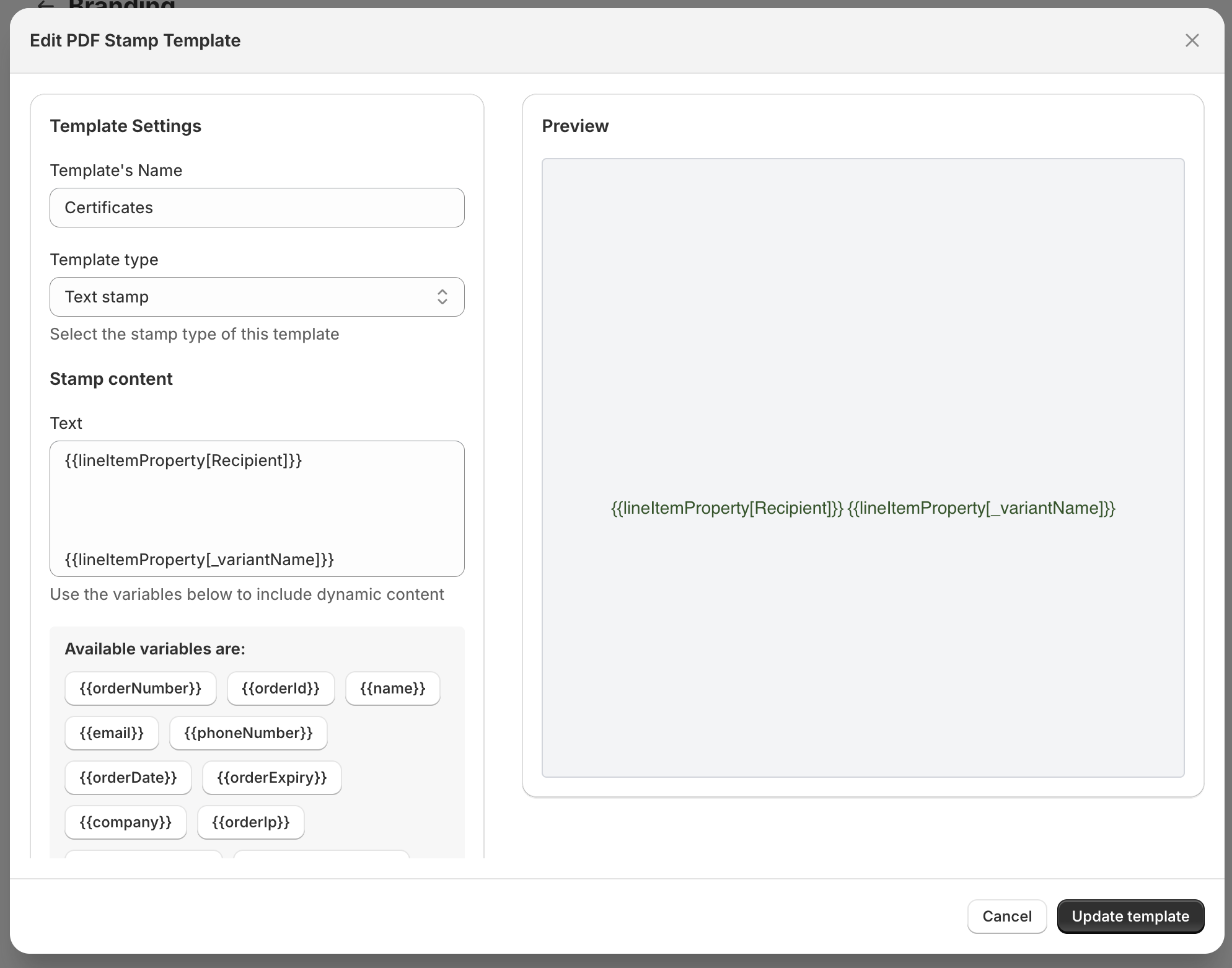
Here’s where a font store can do something a plain file host can’t. With PDF stamping, Fileflare writes buyer details onto a PDF at the moment it’s downloaded. Point that at a one-page license certificate, and every buyer gets a license document with their own details on it:
- Name and email
- Company, if your checkout collects it
- Order number and order date
- Anything collected on the product page as a line item property
That last one matters for fonts more than most products, because the person paying is often not the licensee. A design agency buys a license on behalf of its client, so the license should name the client. Add a “Licensee name” text field to the product page with a product options app that saves it as a line item property, and stamp that field into the certificate. Our guide to selling personalized PDFs shows the full setup, from the product field to the stamp template. The same field is the more reliable route for a company name, too, since a company only stamps when checkout asked for one.
The stamped certificate gives both of you a clear record of who has a license, and when they got it. It doesn’t change what your EULA permits, and it doesn’t verify seat counts or pageviews; it’s a record, not an enforcement mechanism.
PDF stamping is available on the Basic plan and above.
Basic includes one stamp template, and one template can cover every certificate as long as the stamp text and placement are the same on each; the Growth plan’s unlimited templates only matter if they differ from one document to the next. (Stamping works on PDFs you’ve uploaded to Fileflare, not on URL assets.)
You can stamp a specimen PDF the same way, if you include one with the purchase, but the specimen you use for marketing should stay a free, unstamped download on your product page.
Ship new versions to past buyers
Fonts are rarely finished. You add Vietnamese support, draw the missing ligatures, fix a kerning pair that’s bugged you since launch, or release a variable version. Buyers who paid for the family generally expect those updates, and sending them is good for trust.
Fileflare lets you replace an asset’s file in place. Existing download links keep working and deliver the new version from then on, and you can optionally email everyone who already bought a product with that asset to let them know the update is ready. Only paid orders get that email; canceled, refunded, and blocked orders are skipped. Replacing files and notifying buyers is available on the Basic plan and above. (Bump the version string in the font’s metadata before you export, so buyers can tell which version they have installed.)
If you installed Fileflare after you’d already made sales on Shopify, the historical order import gives those past customers access to their downloads, too. It covers Shopify orders only, so sales made on another platform don’t come across.
Protect fonts without pretending
Fonts are hard to protect. Fileflare can stamp a PDF, but not a font file. Fileflare doesn’t track where a font gets installed or how many pageviews a site gets. Your EULA does the legal work; the store’s job is to make honest licensing easy and casual sharing inconvenient.
These are the controls that help:
- Download consent gate: require buyers to agree to your terms, with a link to your license page, before the download links unlock. The gate covers the whole store, so link to a license page that explains every tier. It appears on the Fileflare download page only, not on the thank-you page or in customer accounts.
- Download limits: cap how many times each file can be downloaded per order. Available on every plan, and a sensible cap still leaves room for a buyer setting up a second machine.
- Order expiration: expire download access after a set number of days, so an old link doesn’t keep working forever. Available on the Basic plan and above.
- IP address restriction: limit downloads to a set number of unique IP addresses per order, which stops a link posted in a forum from serving everyone who finds it. Available on the Premium plan.
- Fraud auto-blocking: block downloads on orders Shopify’s fraud analysis flags as medium or high risk, so a likely stolen card doesn’t get your family. Available on the Growth plan and above.
When something does go wrong, such as a chargeback on a family license, the order audit record gives you a printable, document-style record of what was downloaded and when, built to attach to a dispute response. It’s available on every plan. Our piracy protection guide covers the layered approach in more depth, including what isn’t worth your time.
Offer a trial font
Plenty of foundries let designers try a font before buying, usually as a trial version with a limited character set and a license that only covers testing. Fileflare delivers files through orders, so a trial is a $0 product: the designer checks out for free and gets the trial files on the same download page as a paying customer, and you get their email address for when the full family launches. Our guide to selling free digital products on Shopify covers the setup.
Set up your font store on Shopify
Once Shopify and Fileflare are connected, a licensed font product takes four steps:
- Create the product in Shopify. Go to Products » Add product, disable the Track quantity setting (a font license has no stock to count), and disable This is a physical product so checkout doesn’t ask for a shipping address. Add your License and Size options under Variants.
- Upload your files to Fileflare. In the Fileflare app, go to Assets » Add assets and add the font files, the EULA PDF, and anything else in the package.
- Attach files to the parent and the variants. Shared files (EULA, specimen, read me) go on the parent, and the format files go on each license variant.
- Set up the download page. Download page copy is store-wide, so write a short note that works for every license: where the certificate and EULA are, and which files go with which use. Then turn on the download consent gate with a link to your license page. (The gate shows on the download page, not on the thank-you page or in customer accounts, so buyers agree before their first download there.)
Before you announce anything, send a test order from the Fileflare dashboard to confirm delivery works end to end, and double-check each variant’s attachments so every buyer gets exactly the files their license covers. For pricing the tiers themselves, our guide to pricing digital products covers anchoring and tiered pricing.
When you’re ready, install Fileflare from the Shopify App Store. The free plan covers unlimited products, unlimited files per product, and unlimited bandwidth, so you can set up the whole family before you decide whether you want license stamping or the extra protections.