
ZIP files are the default container for anything that’s actually a bundle of things: font packages (regular, bold, italic, license PDF), drum sample libraries (hundreds of WAV files plus documentation), design asset packs (Photoshop files, Procreate brushes, color swatches), software installers with supporting files, course resource bundles. Selling them on Shopify is straightforward — the main questions are file-size math, how to keep the archive from corrupting, and whether to zip at all.
This post covers the practical pieces: when ZIP is the right container, when to use something else, and how to deliver large ZIP archives without the native Digital Products app’s 5 GB ceiling biting.
When ZIP makes sense
A few patterns where zipping is the right answer:
- Multi-file bundles that belong together. Font packs, design asset libraries, sample packs. The buyer wants everything at once, and naming each file individually on the download page adds friction.
- Anything with a nested folder structure. A course with lessons organized in folders, a design bundle with
/brushes/,/textures/,/docs/. ZIP preserves structure; attaching individual files flattens it. - Files that must stay together. Software installers where the main executable references accompanying DLLs or config files. Break them apart and the install fails.
- Archives of raw content. Full project files, multi-page design documents, video project source files.
A few patterns where zipping hurts:
- Multi-format ebooks (PDF + EPUB + MOBI). Buyers want to pick the format they need; hiding all three in a ZIP makes them unzip and figure it out. Attach each file individually with Fileflare’s multi-file per product feature.
- Short audio previews or sample files. Better to attach directly so the buyer can stream without unzipping.
- Single-file products. If you only have one file, don’t zip it. Extra step for the buyer, zero benefit.
File size math
The native Shopify Digital Products app caps files at 5 GB. For most font packs and small sample bundles, a ZIP comes in under 500 MB. For larger libraries — stem packs, course archives, 3D asset collections — you’ll clear 5 GB.
Rough size reference:
- Font pack. 5–50 MB typical. Way under any cap.
- Design bundle (Procreate brushes, Lightroom presets). 100 MB – 2 GB.
- Sample pack (200 WAV files, 24-bit/44.1kHz). 500 MB – 5 GB.
- Video course archive (1080p, 3–5 hours). 5–15 GB. Clears the native cap.
- Stem packs, full mix sessions. 2–30 GB. Clears the native cap routinely.
- Software installer bundles. 500 MB – 20 GB.
For anything clearing 5 GB, you need a dedicated digital downloads app. Fileflare has no file-size cap at any tier — upload a 50 GB ZIP and it works (the constraint is total storage, which is 1 GB on free). Our post on selling large files goes deeper on the infrastructure options.
Zipping properly
Yes, there’s more to just right-click + compress to know!
- Use standard ZIP, not RAR or 7z. Every modern OS opens ZIP natively. RAR requires a separate app; 7z does too on most platforms. Unless your buyers are specifically comfortable with those formats (which is rare), default to ZIP.
- Don’t password-protect the ZIP. Buyers will forget the password, email you, lose the file. If you want content protection, use PDF stamping on the PDF files inside the archive, or IP-based download limits on the link itself — not an archive password.
- Test the archive on a different machine before shipping. A ZIP that opens on your Mac may fail on a buyer’s Windows because of filename encoding or path-length issues. Test on at least one other OS.
- Keep the filename descriptive.
Lo-Fi-Sample-Pack-Vol-1.zipbeatssamples.zip. Helps the buyer file it, helps them find it later. - Include a readme or documentation file inside. What’s in the pack, file naming conventions, licensing terms. Cuts support volume.
Delivery with Fileflare
The setup flow on Shopify with Fileflare:
- Upload the ZIP to Fileflare’s asset library (drag-and-drop or bulk upload).
- Attach it to a Shopify product. Open the product, use Fileflare’s panel to attach the asset. You can attach the ZIP alongside other files (e.g., a standalone preview MP3) if you want.

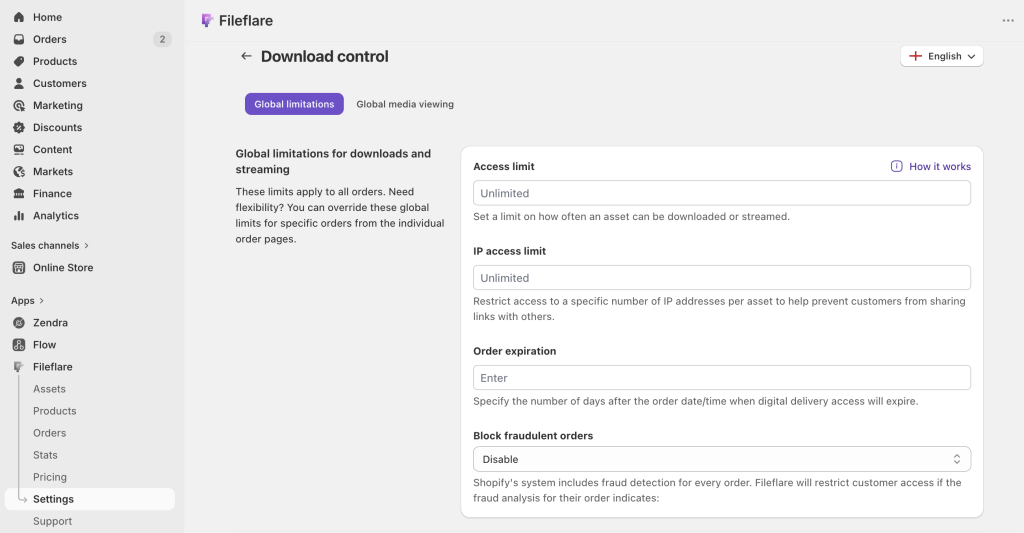
- Configure access controls. For high-value ZIP bundles, cap downloads at 3–5 unique IPs per order and set a 30–90 day expiration. This prevents the link from being posted on a piracy forum and downloaded infinitely while still letting honest buyers re-download from multiple devices.
- Test end-to-end. Place a test order on your own store, confirm the ZIP arrives intact.
A few extras that matter more at volume:
- Custom SMTP for the delivery email on paid tiers, so the ZIP link comes from your own domain rather than a generic Shopify sender.
- IP-based limits instead of per-download limits — explained in the ebook protection post.
- Variant-level attachments if you sell “Basic” vs. “Pro” versions with different ZIP archives.
When a ZIP isn’t working
A few failure modes worth knowing:
- Archive opens but files inside are corrupt. Usually a re-zip issue. Download your own ZIP from the buyer’s perspective and test opening it. If the download itself is truncated (file size doesn’t match upload), that’s a delivery problem — check for file-size caps or network issues.
- Buyer says the ZIP won’t open. Ask them which program they’re using. macOS’s Archive Utility sometimes struggles with ZIP files created on Windows.
The Unarchiver(free, Mac App Store) handles every format reliably and is the right recommendation when a default tool fails. - “Corrupt CRC” errors on decompression. The file was damaged in transit. Re-send the delivery email from the Fileflare order admin to regenerate a fresh download link.
- ZIP opens but only shows one weirdly-named folder inside. Usually a macOS Preview zip with a
__MACOSXmetadata folder. Harmless — the buyer’s files are inside alongside that folder — but looks confusing. To avoid it, zip files from Windows or usezip -Xon Mac to strip macOS metadata.
Get started
Fileflare’s free plan is enough to upload a real ZIP bundle, attach it to a product, and run test orders. 1 GB storage, unlimited products, unlimited bandwidth.
For the full setup end to end, the complete guide to selling digital downloads on Shopify covers everything.