
The first thing worth saying about ebook protection is that nothing short of delivering your book to someone’s brain directly is fully un-hackable. Any file that reaches a buyer’s device can (with enough effort) be ripped, redistributed, and put on a torrent site. That’s not a reason to skip protection — it’s a reason to be clear about what each layer actually does and not pretend that hard DRM solves the problem.
The goals of ebook protection are deterrence and attribution: make it annoying enough to share that most buyers don’t bother, and make it easy to identify where a leak came from when one happens. Both are achievable without wrecking the experience for honest customers. Full DRM-lock is rarely worth the tradeoff.
This post is the practical version of ebook protection: what we recommend doing to protect an ebook you sell on Shopify, what’s worth skipping, and why.
What each protection layer does
Before getting specific, let’s build a mental model of the protection stack, from “weakest” to strongest (specific to software /delivery):
- Legal layer. Copyright notice, terms of use, DMCA takedowns when piracy happens. Doesn’t stop anything technically, but it’s the basis for going after the people who do redistribute.
- Deterrent layer. Things that make sharing feel wrong or mildly annoying: print / copy restrictions, download limits per order. Stops most casual sharing.
- Attribution layer. Making a leaked copy identifiable back to the buyer who leaked it. PDF stamping with buyer name, email, and order number is the easiest version.
- Access-control layer. Restricting how many devices or IPs can access a download link, so a single purchase can’t be re-shared as an infinite stream.
- Delivery-layer protection. Streaming-only modes that don’t expose a downloadable file at all. Works for some content types, not for files the buyer reasonably needs to keep.
- Hard DRM. Adobe Content Server, encrypted EPUB, device-locked files. Technically strongest, but painful enough for buyers that direct-to-consumer sellers almost universally lose more legitimate buyers than they prevent leaks.
The sweet spot for most ebook sellers is layers 2 to 4 done well, with layer 1 as background paperwork and layer 6 skipped.
What works: layer-by-layer
1. PDF stamping with buyer details
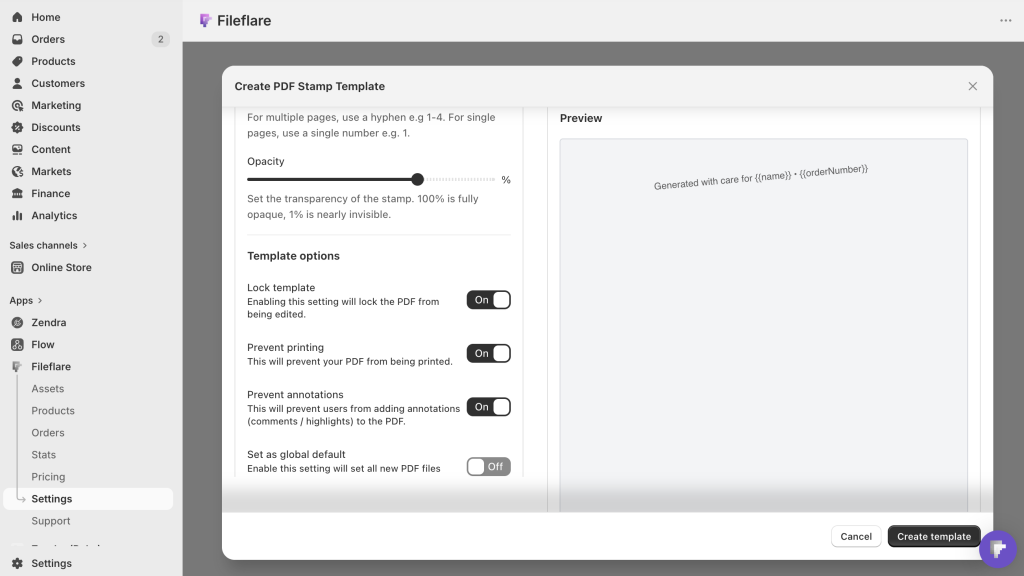
PDF stamping or watermarking is the single highest-leverage protection for ebook sellers. On every page of the PDF, stamp the buyer’s name, email, order number, and optionally their IP address or billing address.
Two things this does:
- Deterrence. A PDF with “Licensed to Jane Smith, jane@example.com, Order #1234” stamped on every page feels different to share. Most buyers won’t want their name and email publicly visible on a file circulated online. Putting the stamp on every page also makes it annoying enough to try to remove it that most would-be sharers will just avoid the work.
- Attribution. If the PDF leaks to a torrent site, you can see whose copy it was. That’s often enough to identify patterns (a particular reseller, a specific country, a specific marketplace).
Fileflare does this natively. You set up a stamp template once (which fields to include, where on the page to place them, font and transparency) and it applies automatically to every PDF delivered with this stamp chosen.

Retroactive stamping can apply the template to existing PDFs in one pass, so previously-sold orders get stamped on their next re-download.
The cost is minimal — an upgrade to the Basic plan — and buyers don’t experience it as a defect. Most don’t even notice unless you make the stamp prominent.
2. Print and annotation lock
PDF stamping can be paired with permission locks that prevent the buyer from printing the file, copying its text, or adding annotations.
- Print lock prevents the buyer from printing the PDF. This is genuinely useful for protecting content you want consumed on-screen (workbooks, certain reference materials), but it’s also mildly annoying for buyers who prefer to read on paper. Use it only with intent.
- Annotation lock prevents the buyer from adding notes, highlighting, or filling in form fields. If your PDF is meant to be a fillable workbook, don’t turn this on. If it’s a finished ebook, it’s low-friction to apply and adds another layer to the attribution puzzle.
Fileflare supports both with PDF stamping. Like stamping, they apply at download time, so you can turn them on or off per asset or globally.
3. IP-address download limits
Instead of capping how many times a link can be used (which strands honest customers whose downloads get interrupted, or use multiple devices), cap how many unique IP addresses a link can be accessed from (we usually recommend 3 to 5).
This gives honest customers plenty of room — their laptop, their phone, their tablet, maybe a friend’s computer — while cutting off an abuse pattern. If a buyer’s link shows up on a piracy forum with fifty people trying to download it, the limit shuts off after the third unique IP and the flood stops.
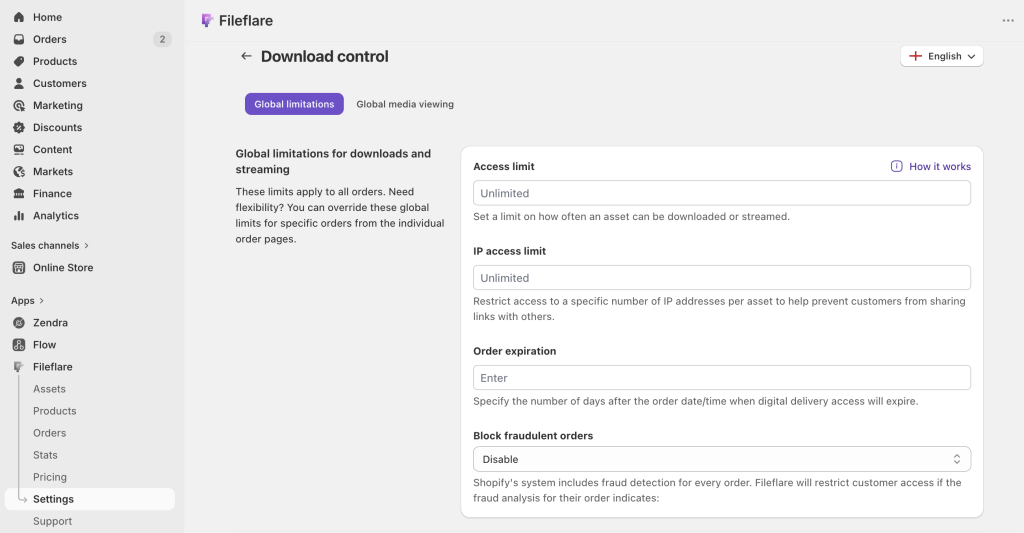
Fileflare does this per-order; competitors vary. It’s significantly more forgiving of legitimate use than per-download limits, and significantly better at stopping abuse.
4. Download expiration
Set download links to expire after a reasonable window — 30 days, 90 days, a year — or on a specific date. After that, the buyer has to request a fresh link (or re-access via their customer account).
The tradeoff: buyers can be surprised by expiration, especially for evergreen products. A friendly “your link expired but here’s a fresh one” email when a buyer hits an expired link goes a long way. Fileflare can trigger that flow automatically.
Aggressive expiration (say, 24 hours) is a stronger deterrent but generates more support load. 30–90 days is a reasonable default for most ebook sellers, and is usually easy for customer to understand: “Oh it’s been a while, my download link must have expired,” is common enough for even low-technical literacy folks to understand; links that expire too quickly feel wrong to everyone.
5. Fraud auto-blocking
Not strictly an anti-piracy measure, but it belongs in the protection conversation. Shopify’s fraud analysis flags orders as medium or high risk based on payment signals, IP mismatches, and other heuristics. Without fraud-sync, a risky order still ships the file before you can cancel — and fraudulent orders are a common source of leaked copies.
Fileflare reads those fraud flags and blocks download access on medium / high-risk orders automatically. The file doesn’t ship until you review. The native Shopify Digital Products app doesn’t do this; it’s one of the bigger operational wins of moving to a dedicated app.
6. Streaming-only mode (for selected content)
For ebooks, streaming-only isn’t usually the right answer — buyers reasonably expect to keep the file. But for specific parts of your catalog (sample chapters, preview content, reference PDFs that are supposed to stay on your site), Fileflare can disable the download button and serve the file only via the in-browser PDF viewer.
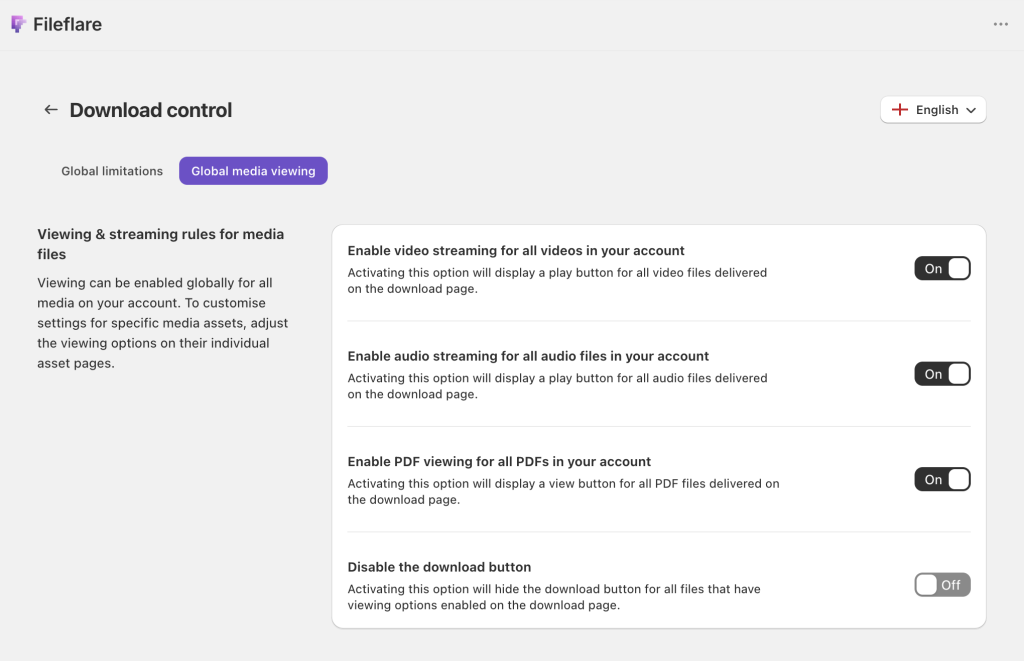
Worth knowing honestly: this is a UI-level restriction, not true DRM. A technically inclined buyer can pull the file URL from browser devtools and download it anyway. It’s a real deterrent for 90%+ of buyers and nothing for the last few percent. Use it where the tradeoff makes sense (preview content, timed-release material) and don’t oversell it.
7. Copyright registration and legal notices
On the paperwork side:
- Register the copyright. In the U.S., registering with the Copyright Office ($45–$65 per work) is a modest cost and gives you standing to claim statutory damages in infringement cases. In other jurisdictions, copyright is automatic but registration still helps evidence.
- Include a copyright page. Place a visible copyright notice inside the PDF (title page or back page) stating the author, the year, and a basic terms-of-use line.
- Set up a DMCA takedown process. When a pirated copy shows up, most major platforms (Amazon, eBay, marketplace sites, Google search) will remove it on a DMCA notice. The legal muscle is easier to use than most authors realize.
None of these prevent anything technically, but they give you leverage after the fact, and the leverage is real and legally binding.
What’s mostly not worth it
There are more protection steps you could take, but they’re usually not worthwhile for merchants. In our experience, these steps generate more refunds or issues for legitimate customers, costing more in real dollars, than what’s saved by piracy.
- Adobe Content Server / hard DRM-encrypted EPUB. Expensive to set up, painful for buyers, breaks for a non-trivial share of legitimate customers (incompatible readers, broken activation, lost license keys). Direct-to-consumer ebook sellers almost universally do better with a plain PDF or EPUB plus watermarking than with hard DRM.
- Device-locked formats. Amazon can do this because they control Kindle; independent sellers can’t, and trying to replicate it with third-party tools creates more friction than it prevents.
- Obscure “protected” PDF formats. PDF has a long history of broken password and permission schemes. Free tools remove most of them in seconds. Rely on stamping and attribution, not PDF passwords.
- Right-click blocking on the download page. We wrote a whole post on why this doesn’t work. Short version: it’s a visual gesture, not protection.
- Hiding the file behind complicated access flows. Requiring SSO, per-session tokens, or elaborate gating usually frustrates legitimate buyers without meaningfully slowing down piracy.
A reasonable default stack
If you’re selling an ebook on Shopify and you want to pick a default protection setup without overthinking it:
- Add a copyright page inside the PDF.
- Register the copyright in your jurisdiction (optional but cheap).
- Stamp every PDF with buyer name, email, and order number at download time. Visible, not hidden.
- Lock annotations but leave printing open (unless you have a specific reason not to) — only if your PDF isn’t meant to be edited. Workbook sellers should skip this.
- Cap downloads per order at 5 unique IP addresses.
- Expire download links after 90 days, with an auto-resend flow for expired-link clicks.
- Enable fraud auto-blocking so high-risk orders don’t ship automatically.
- Skip hard DRM. Trust the deterrents above and the legal backstop.
On Fileflare, this takes about 10 to 15 minutes to configure once and applies to every ebook in your store going forward.
Try Fileflare
Fileflare’s free plan includes 1 GB storage, unlimited products, and unlimited bandwidth. PDF stamping, print lock, annotation lock, IP limits, fraud auto-blocking, and download expiration are all on paid tiers starting at $19/mo.
For the full setup, the Shopify digital products setup guide walks through the setup end to end, and how to sell ebooks on Shopify is the detailed guide for ebook sellers specifically.