
Shopify’s native Digital Products app can upload more than one file to a product or variant. However, the way it does it can be very painful for a surprising number of digital sellers.
If you offer bundles, multi-format ebooks, audio tracks, course resources or other products that need more than one file delivered per purchase, you should understand how the first-party Digital Products app handles these.
Shopify’s app understands files, but not a file library. This is an important distinction! You can’t easily re-use a file across products or variants. So, if you have variants with each single and an entire album, you have to re-upload tracks to bundle them. Or, if you offer bonus ebooks with multiple products, you have to upload that file on every. single. product.
Fileflare lifts that limit. You can attach as many files as you want to a single Shopify product or to an individual variant, on every plan including the free tier. You can also re-use those files across multiple products, linking an asset to as many items or SKUs as you’d like. The buyer gets all of them on one download page after checkout.
When is this a problem?
If you sell digital products where one product = one file, then you may not have this issue. However, a lot of merchants migrate to Fileflare once they realize they don’t need to just manage digital product listings, they are managing a digital library. Here are some common use cases the native Shopify app doesn’t support well:
- Multi-format bundles. One “Complete Keto Guide” listing that delivers PDF, EPUB, and MOBI as variants, + a bundle of all formats so the buyer so they can read on whatever device they prefer. Fileflare lets you simply attach all of the existing formats to the bundle variant; Shopify makes you re-upload everything.
- Sample packs and stem bundles. A producer sells a drum kit that’s really 40 individual WAV files plus a PDF with documentation. Same issue as above: you can upload the files for each track, but when you build your bundle you have to upload again — and wait for all of those uploads to complete again.
- Same goes for Chapter-based content, course resources, software + documentation, or other variant-specific downloads — if you want to re-use the files, you need to re-upload them every time.
- The bigger issue is when you offer bonus files across products, like a Nutrition guide or workout program that’s sent to anyone who buys your apparel or gear. With Fileflare, you can upload once, and attach at will or in bulk — done within a minute or two. With the native app, click into every single product and upload each time — repeating a boring task for potentially hours.
And then of course, what happens when you need to change the file?
Handling file updates
Let’s say I have a bonus Olympic Powerlifting guide I attach to all of my barbell sets as a bonus. I want to update it with new exercises and images.
- With the Shopify app, I’ll need to click into every single product that has the file, remove the old file, and add a new one. This will break download links from old emails, as well, so customers must know they have to use the latest email.
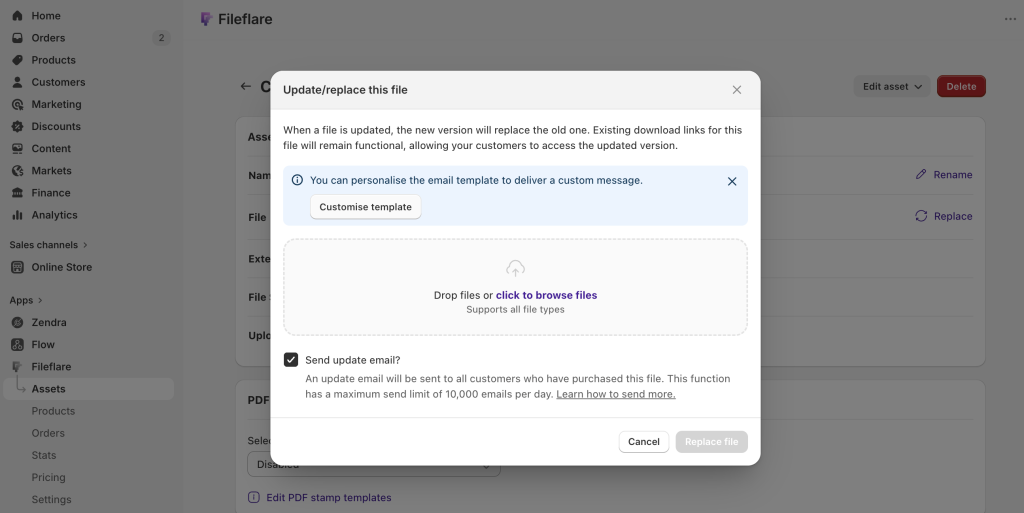
- With Fileflare, it’s simple — replace your existing asset. The relationship to all products is maintained, as well as old download links. You can even send an update email to everyone with access to the file.
Other benefits
Fileflare makes other bulk operations and the download experience for customers better, too.
- The download link sort order is configurable. The order files appear on the download page and in the delivery email can be set by filename, file size, upload date, or attachment date — useful for multi-chapter content where order matters.
- Add advanced protections, depending on file type. Stamp PDFs, lock video or audio to streaming-only, or configure IP address limitations. Every product you create is different, so Fileflare gives you the control you need over how they’re delivered.
If you’re comparing apps
Most dedicated digital downloads apps in the Shopify ecosystem support multiple files per product and file libraries at some tier. The differences worth checking as you compare:
- Gate level. Some apps put multi-product support behind a paid tier. Fileflare includes it on the free plan.
- Variant support. Some apps only attach at the product level, not the variant level. That’s a real limitation if you use variants to sell different bundle tiers.
- Bulk attach. Stores with large catalogs need a CSV or API-based bulk attach path. Clicking through hundreds of products one by one isn’t a plan.
- File count ceilings. A few apps cap the number of files per product at a fixed number (10, 50, etc.). Fileflare has no cap.
The full side-by-side is in our best digital downloads apps for Shopify comparison.
Get started
Fileflare’s free plan is enough to set up multiple files and products, and to run real test orders against it: 1 GB of storage, unlimited products, unlimited bandwidth, and unlimited files per product.
For the full setup walkthrough (product creation, file attachment, delivery emails, download page customization), the complete guide to selling digital products on Shopify has the end-to-end version.