
Templates are one of the easiest digital products to start selling, and one of the trickiest to deliver well. The template product itself is simple: you design a Notion dashboard, a Canva pack, a resume layout, or a font, and buyers pay to skip the work of building it themselves. The catch is that a template is almost never one file — it’s a Notion duplicate link and a setup PDF; it’s a font in OTF, TTF, and WOFF; it’s a resume in Word, Pages, and Google Docs; it’s a mockup pack in PSD and Figma, sold with a personal license and a commercial one.
The real difference between selling templates and something like an ebook is this: one product is usually many files, in many formats, sometimes at more than one license tier. But if you get the delivery structure right, a template shop runs itself. Get it wrong, and you’ll spend your evenings emailing missing files to buyers.
What is a template?
“Template” covers a surprisingly wide range of products, but the delivery needs are similar across most types. Fileflare merchants already sell a variety of templates.
- Productivity templates: Notion systems, Airtable bases, spreadsheet models, project trackers.
- Design tool templates: Canva packs, Figma UI kits, Sketch and Adobe XD component libraries, Photoshop and Illustrator templates.
- Document templates: resumes and CVs, pitch decks, contracts, invoices, proposals.
- Fonts: display faces, serif and sans families, script and niche fonts.
- Presets and actions: Lightroom presets, Photoshop actions, Capture One styles.
- Illustration and craft assets: Procreate brushes, SVG and cut files for Cricut and Silhouette, icon and vector packs, mockup scenes.
They all share the same delivery concepts: multiple files, often multiple formats, and buyers who expect everything to arrive on one page the moment they pay.
For where templates sit against every other digital category, the best-selling digital products overview has the wider map.
One product, many files
Let’s start with the most common structure: a single template that ships as a set of files. This often looks like a Notion CRM sold with a duplicate link + a video walkthrough + a quick-start PDF; a resume template sold in four formats; or a brand kit with logos, fonts, and a style guide.
Fileflare puts no limit on the number of files you attach to a product — attach as many as you need, on every plan including the free tier. Buyers check out once, then land on a single download page on your own domain with everything they purchased. No hunting through multiple emails or wondering whether a random third-party link is legitimate.
Single-page delivery is what keeps a multi-file product from generating support tickets. Buyers shouldn’t have to wonder whether they received everything they paid for. Put everything in one place and that question mostly disappears. If you want the files in a deliberate order — setup guide first, source files below — you can set the asset sort order so the download page reads the way you’d hand the files over in person.
Use variants for formats and license tiers
The goal isn’t really variants — it’s making sure buyers only receive the files they actually paid for. Shopify variants happen to be the cleanest way to do that.
- Format variants. Use variants when the same template is offered for different platforms, such as “Notion vs Google Sheets,” or a font offered as “Desktop vs Web.” The buyer picks the version they need and gets only the file matched to their choice. The other variants’ files stay off their download page, so a Google Sheets buyer isn’t handed a Notion link they can’t use.
- License-tier variants. You can also use variants when the same asset is sold as “Personal license” and “Commercial license,” where the commercial tier includes an extended license PDF (and often a higher price). The tier is the variant, and the license file rides along with it.
Fileflare handles both scenarios through variant-level attachment. You can attach a file to a specific variant, and only that variant’s buyers receive it. Attach a file to the parent product and it delivers for every variant — so shared files (a setup guide, a license readme, a “read me first” note) go on the parent, and the version-specific files go on each variant, with no duplicates when a buyer’s variant inherits both.
That parent-plus-variant inheritance is exactly the structure a license-tiered template wants: everyone gets the common files, and each tier adds its own.

Templates delivered as a link, not a file
Not every digital product starts as a file upload. A Notion template is a duplicate link. A Canva template is a share link. Some sellers keep large source libraries in Google Drive. Fileflare delivers these as URL-based assets: instead of uploading a file, you attach a link, and it appears on the download page next to your uploaded files, delivered through the same order and the same page.
With a link, Fileflare hands the buyer the URL you gave it; it doesn’t manage sharing permissions inside Notion, Canva, or Drive on your behalf. Set your Notion page to “anyone with the link can duplicate,” or your Canva template to “use as template,” before you attach it. Fileflare delivers the link reliably to paying buyers, but the destination’s access settings are yours to configure.
You can easily mix uploaded and URL-based assets, delivering a Notion duplicate link (URL asset) delivered alongside a quick-start PDF and a walkthrough video (uploaded files), all on one download page.
Set up your template product
Once Shopify and Fileflare are both connected, getting a template product live only takes four steps.
Step 1: Create the Shopify product
In your Shopify admin, go to Products » Add product. Setup mirrors any other product, with two digital-specific settings:
- Inventory. Disable the “Track quantity” setting — digital templates don’t run out! (Unless you’re doing a limited drop, in which case track it like a physical product.)
- Shipping. Disable the “This is a physical product” checkbox so Shopify doesn’t ask for a shipping address at checkout. This one trips up first-time digital sellers more than anything else.
For format or license variants, set them up under Variants — Shopify builds the storefront picker automatically.
Step 2: Upload files (or add links) to Fileflare
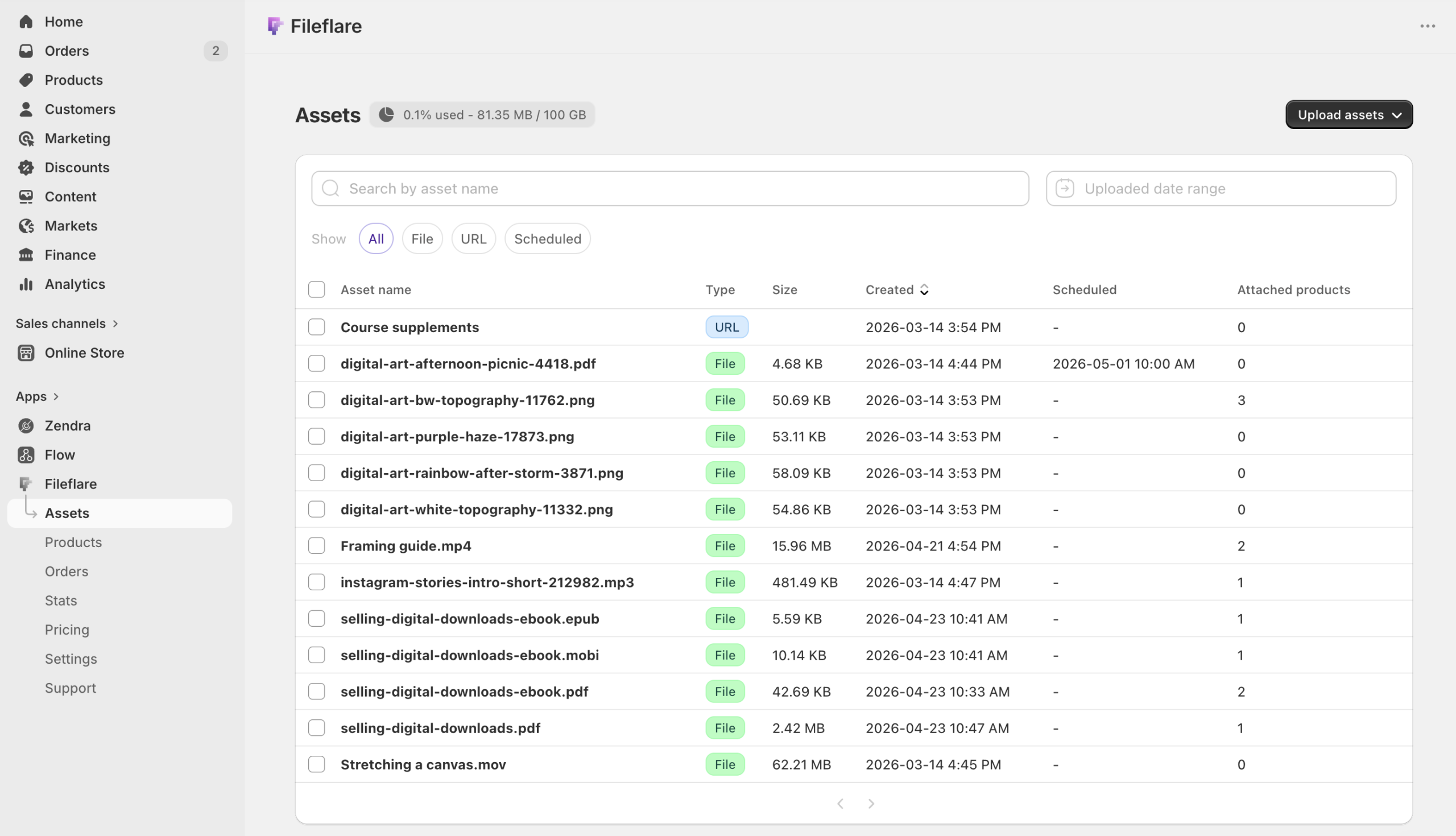
In the Fileflare app inside your Shopify admin, go to Assets » Upload new assets and drag your files in. You can upload any file type, so .notion companion PDFs, .otf fonts, .psd mockups, .brushset Procreate files, and .svg cut files all live in the same library.
For templates you deliver as a link, add a URL asset instead of a file and paste the share link.
If you’re moving a large catalog and your files already live in an S3-compatible bucket (Amazon S3, Cloudflare R2), you can connect that bucket and let Fileflare deliver from it rather than re-uploading everything. (Custom S3 is available on higher plans.)
Step 3: Attach files to the product and its variants
In Fileflare, find your product, click Attach asset, and pick the files from your library. For variant products, attach the shared files to the parent and the version-specific files to each variant.
- A Notion CRM sold as a single product: attach the duplicate link, the setup PDF, and the walkthrough video to the product. The buyer gets all three on one page.
- A resume template sold in Word, Pages, and Google Docs as variants: attach a “how to edit” PDF to the parent (everyone gets it) and each format file to its matching variant (each buyer gets only theirs).
- A mockup pack sold as personal and commercial licenses: attach the source files to the parent and the extended-license PDF to the commercial variant only.
For a large catalog, you can attach files to many products at once, or map files to products by SKU with a CSV import instead of clicking into each product.
Step 4: Customize the download page
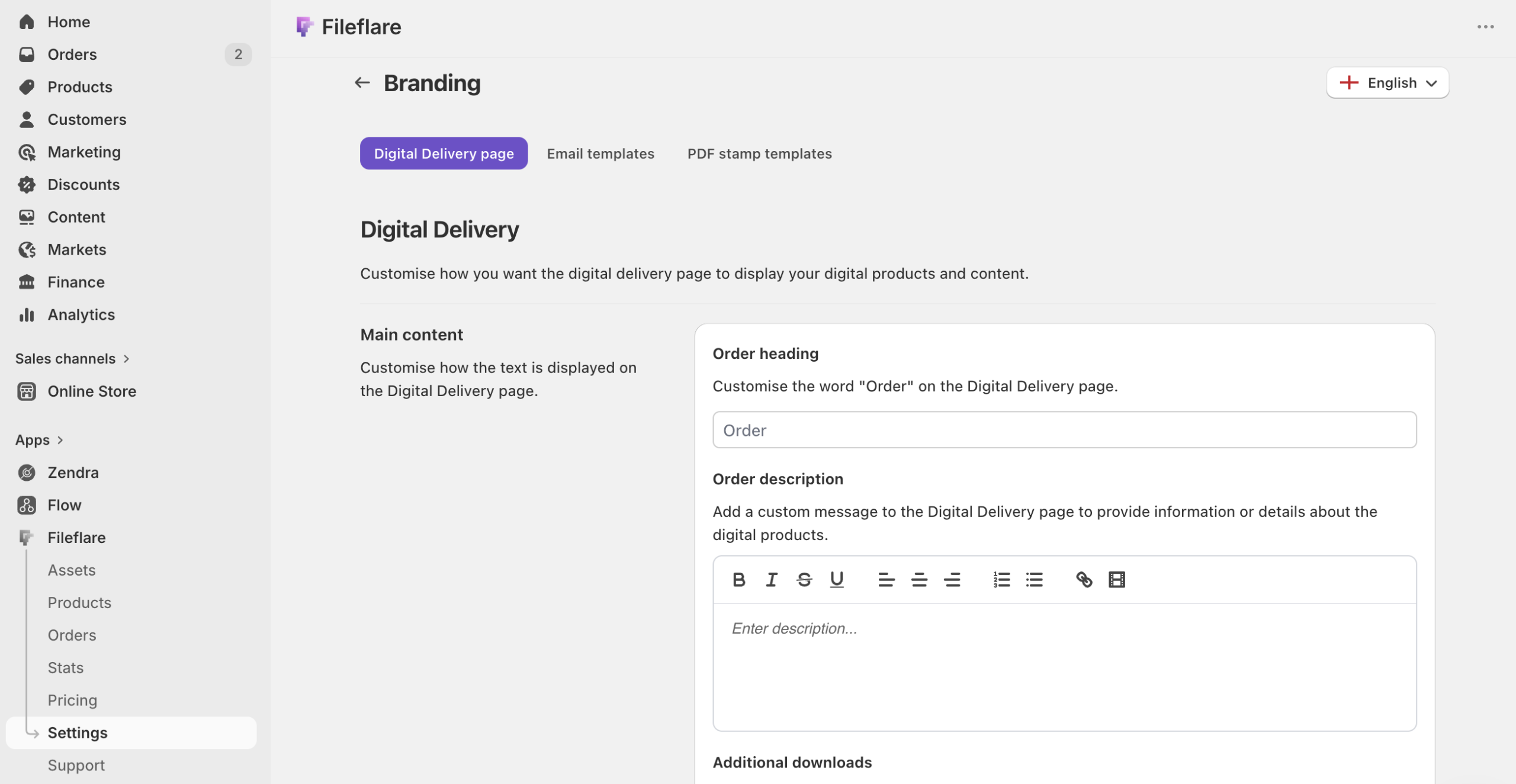
Go to Settings » Branding in Fileflare and set the download page heading, description, and instructions. For templates, a one-line note on what to do first (“open the Notion link and click Duplicate in the top-right”) heads off a chunk of “how do I use this?” tickets.
If your buyers are on iPad — likely for Procreate brushes or Canva templates — turn on the iOS save instructions so iPhone and iPad shoppers see step-by-step guidance for saving files on iOS. It’s a small trust detail that matters for a mobile-heavy design audience.
Bundle templates and stack license tiers
One pattern we see over and over is sellers thinking about individual templates instead of collections. Two merchandising moves fix that.
Bundles. A single Notion template sells for $19. A “freelance operating system” bundling the CRM, the invoicing tracker, and the client-onboarding checklist sells for $49. The design cost is amortized across one purchase instead of three, and the per-customer revenue climbs. Bundle by theme (everything a freelancer needs), by volume (a 30-template pack), or by tier (a free single template as a taster, a mid pack as the upsell, the full collection as the premium option).
License tiers. Sell the same asset at “Personal” and “Commercial” prices as variants, with the commercial tier adding an extended-license file. Designers who’d use your font in client work will pay the higher tier without blinking, and the personal tier keeps the hobbyist buyer. Same file, two prices, one product.
Pricing templates and design assets
Based on what sells well among Fileflare sellers, templates and design assets tend to price a little higher than first-time sellers expect:
- Single templates (one Notion template, one resume layout, a small preset pack): $5 to $40. Below $5 signals throwaway; the sweet spot for impulse buys sits around $12 to $29.
- Bundles and collections (a themed set, a full brand kit, a large SVG library): $50 to $150. The price needs clear value framing on the product page — say what’s inside and why the set beats buying pieces.
- Premium and professional assets (full UI kits, designer font families, agency-grade template systems): $99 and up. The audience is smaller but pays for craft and time saved.
- Commercial licenses: price the commercial variant meaningfully above personal — often two to three times — because the buyer is using your work to make money.
Price based on the value you save the customer, not the hours you spent making it. A template that saves a freelancer a full day of setup is worth real money regardless of your production time. Our guide to pricing digital products goes deeper on anchoring and tiering.
Protect your templates
How much protection a template needs scales with its price and its format.
For PDF-based templates and license documents, PDF stamping puts the buyer’s name, email, or order number on every page at download time. Stamps or watermarks are a real deterrent that won’t bother real buyers, and they’re useful for attribution if a file turns up where it shouldn’t. Stamping is available on the Basic plan and above, and it works only on PDFs you’ve uploaded to Fileflare (not URL assets). The PDF watermarking guide walks through the setup.
Be clear-eyed about the limit, though: fonts, brushes, presets, and design source files can’t be watermarked — there’s nowhere to stamp a name on an OTF file. For those, the practical protection is download limits and IP caps (cap how many times or from how many addresses a link is used, available on paid plans), plus license tiers that make honest commercial use the path of least resistance. No file protection is absolute for non-PDF assets; the goal is to stop casual resharing, not to build an unbreakable vault. The piracy protection guide covers the full layered approach and, just as usefully, what not to bother with.
Where template sellers find buyers
Getting the files to customers is the easy part. Finding those customers is the real work. Most template and design-asset sellers we see run a multi-channel play rather than betting on one source:
- Marketplaces for discovery. Creative Market, Etsy, and the Notion and Figma community galleries put your work in front of people already searching. They take a cut and own the customer relationship, but they’re where cold buyers find you early on. Many sellers list there and drive repeat buyers to their Shopify store, where the margin is better and the customer is theirs.
- Visual social for demand. Instagram, Pinterest, and short-form video suit design work — the product is the marketing. Show the template in use.
- A free taster. A single free template can grow an email list, but note that Fileflare delivers through an order, so set it up as a $0 product rather than an ungated download. The buyer “checks out” for free and gets the file through the same flow as a paying customer, and you’ve got a new subscriber and a warm lead for the paid packs.
Shopify wins on margin and brand control once a buyer comes to you directly, which is the whole reason to run your own store alongside the marketplaces. If you’re leaving Etsy or moving off a marketplace, the Etsy-to-Shopify guide for digital sellers covers what transfers and what doesn’t.
Keep learning
Companion guides for the related pieces:
- Attach multiple files to a single digital product — the deep dive on multi-file and per-variant structure.
- How to sell printables on Shopify — the sibling guide for print-ready design assets.
- How to watermark PDFs automatically on Shopify — PDF stamping setup.
- Best-selling digital products — where templates sit among every other digital category.
- Sell digital products on Shopify — the full setup cornerstone.
When you’re ready to set up delivery for your template shop, install Fileflare from the Shopify App Store. The free plan handles unlimited products, unlimited files per product, and unlimited bandwidth — enough to run a template shop entirely free until you want stamping or more storage.