
“Selling” free digital products on Shopify covers two different jobs:
- Lead magnets — a free ebook, PDF, template, or sample given away in exchange for an email address. No order, no checkout.
- $0 digital products — something that runs through Shopify’s checkout at a price of zero (for promotions, a permanently-free giveaway, or a tripwire offer where the main value comes from upsells).
Shopify supports the second one natively. The first one needs a workaround because Shopify’s digital delivery (including Fileflare) ties files to orders — there’s no “deliver this file to an email address” flow outside of an actual purchase.
This post walks through both, and is honest about the workaround Fileflare specifically requires for lead-magnet style flows.
$0 digital products on Shopify (the easy path)
If you want to give away a digital product through Shopify’s checkout — e.g., “Free download: first chapter of the book” — the setup is straightforward:
- Create the product in Shopify with the price set to $0.00.
- Configure it for digital delivery: disable “Track quantity” and “This is a physical product” in the Inventory section.
- Attach the file using Fileflare (or the native Digital Products app).
- Test your $0 checkout. Shopify does this natively: the buyer goes through checkout, enters an email, and completes a zero-dollar transaction. No credit card is charged.
- Done. The buyer gets the delivery email and download link just like any paid order.
The nice thing about using a $0 product is that you’ll still collect customer details and have a record of all free orders or downloads (which can be helpful to see which free downloaders turn into real customers).
- You still collect the buyer’s email, shipping address (unless disabled), and other checkout fields. The “free” product is really a lead-capture tool with the value of the download as the incentive.
- Buyers can come back to your site to re-download easily. No lost-forever download links if they delete the original email.
- Shopify’s checkout for $0 orders skips the payment step entirely. If you want to collect payment info anyway (e.g., for a future upsell), you’ll need a different setup — typically a $1 tripwire with a post-purchase upsell, not a true free product.
- Download-link abuse is a real concern when the product is free. Someone shares the completed order page on a Reddit thread, dozens of people try to download. Cap the link at 3–5 unique IPs per order to cut that off — how to protect an ebook covers the mechanics.
Lead magnets (the email-for-download flow)
The flow most content marketers mean when they say “lead magnet” is: visitor enters email on a form, receives the download link in an email, never sees a checkout at all. Since Shopify downloads are tied to an order, you’d need to consider an alternative delivery method to give away files without checkout.
Option 1: The $0-order workaround
The simplest approach. Create a $0 product in Shopify, set up the delivery in Fileflare (same as above), and link to the product from a landing page. When a visitor hits your site, they go through a normal Shopify checkout — enter email, complete the $0 order — and receive the download.
Benefits:
- Uses only Shopify + Fileflare. No extra apps or integrations.
- Captures the email in Shopify’s customer records, which you can then sync to any email marketing tool.
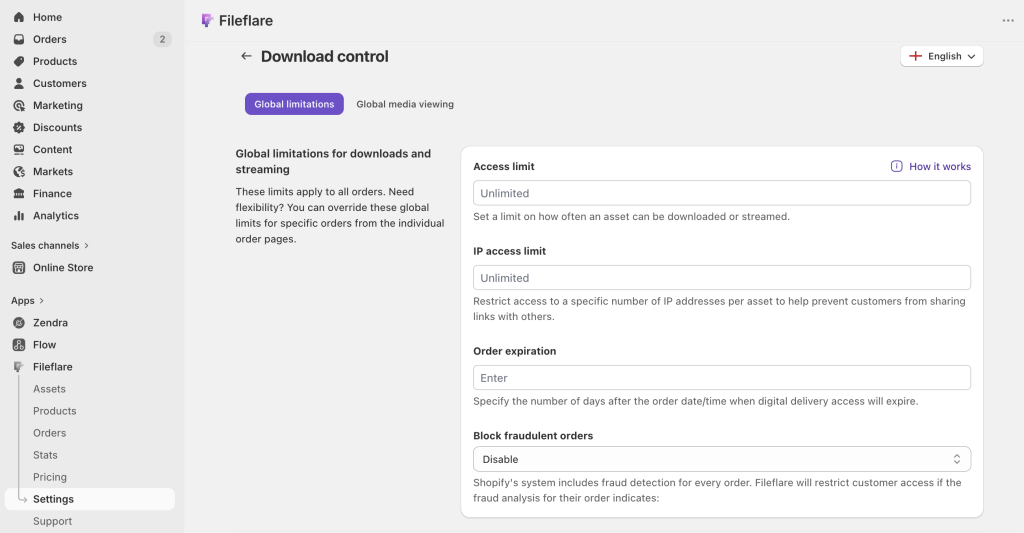
- Ties the download to a real order, which means Fileflare’s protection features (IP limits, expiration, fraud blocking) all work.
Tradeoffs:
- The checkout step adds friction vs. a simple “enter email” form. Most merchants see 10–20% lower conversion through Shopify checkout than through a dedicated form.
- You’re asking for a full shipping address by default (you can disable that in Shopify’s checkout settings for digital products, but it’s an extra configuration step).
- Not every email-marketing platform syncs cleanly with Shopify customer records; the integration depends on the tool.
Option 2: A dedicated form + separate file delivery
If you want the cleaner “just an email field” experience, bypass Shopify for the lead magnet and use a dedicated tool instead:
- A Klaviyo, Mailchimp, or ConvertKit form with a delivery automation that sends the file directly via email. The file can be attached to the automation email, or linked to a CDN / Dropbox / S3 URL you host separately.
- A landing page tool (Leadpages, Unbounce, Carrd) with the same email + delivery automation pattern.
- A dedicated lead-magnet service (ConvertBox, OptinMonster, Thrive Leads).
This is the cleaner merchant experience and usually converts better. The tradeoff is you lose Fileflare’s protection features — the file lives on whatever host the automation points to, and you can’t IP-limit or fraud-block access.
For low-value lead magnets (a generic PDF checklist, a short ebook excerpt) this tradeoff is fine. For higher-value lead magnets (a substantial ebook, a full template library) the lack of protection may matter.
Option 3: A hybrid — Shopify for the file, form for capture
A slightly-complex setup that combines the two: use a form tool to capture the email, then use Shopify’s API to create a $0 order programmatically on behalf of the visitor. The order triggers Fileflare’s delivery email as normal, with IP limits and expiration intact.
This is the most protection-rich approach and preserves the form-first experience, but it requires custom glue — usually a Zapier or Make automation, a Shopify Flow (some apps can create orders, triggered by a customer entering the Email Subscribers segment), or a small bit of code. Most stores don’t bother unless the lead magnet is genuinely high-value.
What we’d actually recommend
For most digital-product stores, Option 1 (the $0-order workaround) is the right default. It’s the least fragile setup, uses tools you already have, and keeps the same protection infrastructure you use for paid products. The friction cost of the checkout is real but small — and the email you capture is higher-quality (buyers who complete a full checkout are more engaged than buyers who just typed an email into a popup).
If you specifically want the lightest-weight form-first experience and the file doesn’t need protection, Option 2 is fine. Keep the Shopify-native approach for anything valuable enough that unauthorized sharing would be a problem.
Get started
Fileflare’s free plan is enough to set up a $0 digital product and test the delivery flow end to end. 1 GB storage, unlimited products, unlimited bandwidth.
For the full setup, the complete guide to selling digital downloads on Shopify covers everything from product creation to access controls.