
Audio is one of the broadest digital product categories on Shopify. Sellers in this space include audiobook authors, podcasters monetizing premium feeds, sound designers selling SFX libraries, language teachers selling lesson packs, and meditation creators selling guided tracks. Each subcategory has its own setup quirks, but the underlying Shopify flow is the same.
For producer-facing audio (beats, sample packs, stems, loop libraries), the music and beats guide goes deeper on licensing tiers and DAW-friendly delivery patterns. This post covers everything else.
What’s selling well in audio
Based on our Fileflare install base, we’ve seen successful Shopify stores covering:
- Audiobooks — independent authors, niche publishers, language-instruction creators. Mostly MP3 (320 kbps) or M4B for chapter markers.
- Premium podcasts — single episodes, full back catalogs, or subscriber-only series. Sellers often pair Shopify with a private feed using a service like Hello Audio or Supercast, but a downloadable archive on Shopify works for one-off episode sales.
- Sound effects and foley libraries — sold to filmmakers, game designers, and podcasters. Usually ZIP archives with hundreds of WAV files plus a metadata document.
- Meditation, sleep, and ambient tracks — sold individually or as bundles. MP3 dominates here because most buyers play on phones.
- Language lessons and accent training — multi-track packs, frequently with companion PDFs.
- Sermons and lecture series — high-volume audio archives sold by churches, lecturers, and conferences.
Format choices, by use case
If you sell audio in your store, you should know the “default” formats for your industry — customer expectations matter to keep support and refund rates low.
- MP3 (320 kbps) is the safe default for end-listener audio: audiobooks, meditations, sermons, language lessons. Universal compatibility, small enough for mobile, good enough quality for spoken-word and most music.
- M4B is worth considering for audiobooks specifically. It’s an MP4 container that supports chapter markers and bookmarking — the format Audible uses. iOS treats it as a “real” audiobook in Apple Books rather than a music file.
- WAV is the producer-facing default — sound effects, samples, mastering-quality content. Uncompressed, universally supported in DAWs, treats the audio the way a working professional expects.
- FLAC sits between WAV and MP3 — lossless quality at roughly half the file size of WAV. Niche but valuable for audiophile content, audiobooks where file size matters, or sellers shipping large libraries.
- OPUS is excellent technically but has weaker iOS support; we don’t recommend it as a primary delivery format unless you know your audience runs Android or desktop only.
You can attach multiple formats to one Shopify product (MP3 + WAV + FLAC delivered together, for example) without extra costs, because Fileflare offers unlimited bandwidth. We also support unlimited files per product on every plan, including the free tier, so multi-format delivery doesn’t need a pricing upgrade.
Setting up an audio product on Shopify
The mechanical setup for an audio product is pretty standard:
- Create the product in Shopify. Disable the “This is a physical product” setting (no shipping). Disable “Track quantity” (no inventory limit on a digital file).
- Upload your audio to Fileflare. Files can be MP3, WAV, FLAC, M4B, OGG, or pretty much any audio format. Single files, ZIP archives, or batches of individual tracks all work!
- Attach files to the Shopify product. For a single track, attach one file. For an album or a multi-episode bundle, attach multiple files. Fileflare delivers everything attached to the product when the order completes.
- Place a test order with a 100 percent discount code to verify the delivery email reaches your inbox and the files download correctly.

Based on your subcategory, you may want to double-check your setup:
- For audiobooks, consider attaching an M4B chapter-marked version alongside the MP3 set. Buyers on iOS will often prefer the M4B; buyers on Android or desktop will reach for the MP3s.
- For SFX libraries, ZIP the whole library into a single archive plus a separate documentation PDF (BPM, file naming conventions, license terms). Attach both to the product.
- For language lesson packs, name the files in a sortable order (
01-introduction.mp3,02-greetings.mp3) so they appear in sequence on the buyer’s download page. - For premium podcasts, decide whether you’re selling a one-off episode (single MP3) or a private subscription feed (out of scope for Shopify alone — pair with a podcast hosting service). A back-catalog ZIP is the simplest version.
Streaming previews on the product page
Most audio buyers want to hear something before they pay. The standard pattern our merchants use is to put a 30-to-60-second preview MP3 on the Shopify product page, streamable via the storefront’s audio player or an embedded player from a Shopify app. Keep the preview separate from the un-watermarked full version — buyers will notice if you ship the same file you previewed.
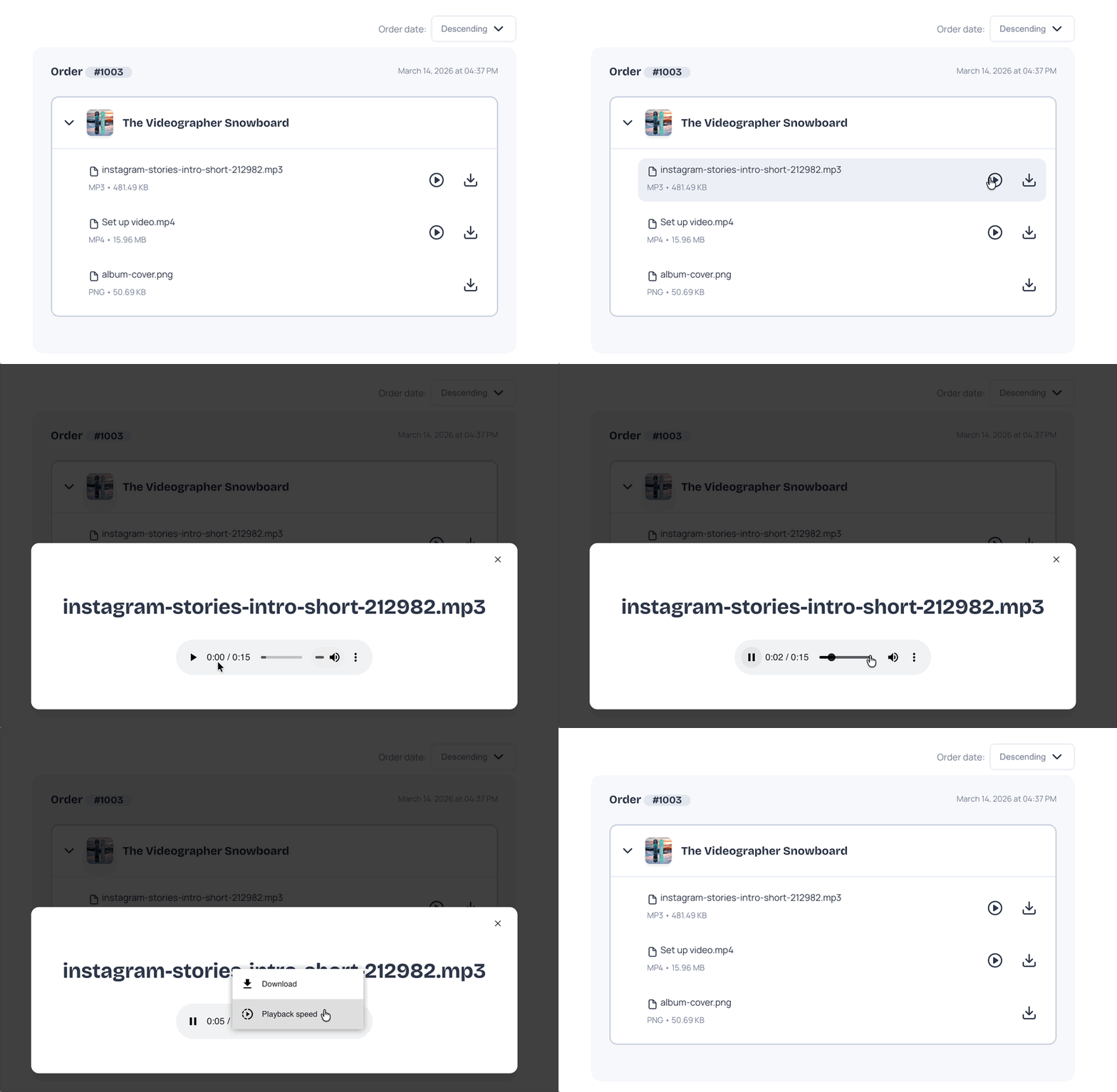
After purchase, Fileflare’s download page has a built-in HTML5 audio player. Buyers can listen to their MP3, WAV, or M4B files in the browser before saving them locally — useful for stream-only confirmation, audiobook previews, and sermon archives where most buyers listen straight from the download page rather than transferring to another app.
Protection and piracy
Audio piracy is real, but DRM doesn’t realistically work for files you ship to a buyer’s device. The protection layers that work better in the real world are sharing deterrents:
- IP-based download limits. Cap a single order’s downloads to 3 to 5 unique IP addresses. Buyers can re-download from multiple devices; a link shared on a forum shuts off after a few unique attempts.
- Order expiration. Set downloads to expire 30 to 90 days after purchase. Honest customers won’t hit it; scrapers crawling for old links will.
- Fraud auto-blocking. Shopify’s fraud analysis flags risky orders; Fileflare reads those flags and blocks delivery on medium and high-risk orders automatically.
- Watermarking previews. For subcategories where stripping the preview is a real risk (music, premium audio), use a voice tag or audible watermark on the preview only — never on the delivered version.
Other strategies don’t always work — while they may seem “better” on the surface, we don’t think they’re work implementing. You don’t control the buyer’s player, so DRM on audio files causes more issues than it’s worth; encrypting streams for purchased content isn’t feasible if buyers need files in a player or DAW; per-listener tracking is more complex than any issues it solves.
Delivery emails and customer experience
For a great customer experience, there are a few “last mile” configurations you can check out, too.
- Email from your own domain. Configure custom SMTP or SendGrid (Fileflare supports both on premium tiers). Emails from
files@yourdomain.comland in inboxes more consistently than emails from a generic Shopify-owned sender. - Customize the download page text. The download page is the buyer’s first interaction with your product post-purchase. A short note (“Thanks for buying — your tracks are below. Reach out if anything sounds off.”) is worth more than the default placeholder.
- Set realistic re-download limits. For audio especially, buyers re-download more often than for PDFs (different devices, accidental deletions, lost phones). 5 unique IPs per order is a reasonable starting point.
Try Fileflare
Fileflare’s free plan has 1 GB storage, unlimited products, unlimited bandwidth — enough to set up a real audio store, run test orders, and confirm delivery before scaling up.
For the full setup, the complete guide to selling digital downloads on Shopify covers the whole stack end to end.