
A digital product is anything a customer buys and receives as a file or online access — no shipping, no warehouse, no stockroom. You create it once, and it sells an unlimited number of times without running out. A digital product gets more profitable the more you sell it — there’s no marginal cost of goods for each order, and it’s what makes the economics so different from physical goods.
The rest of this post walks through what counts as a digital product (the categories are broader than most people think), how the economics actually work, and where to start if you’re thinking about selling one.
What counts as a digital product
The broadest possible list — if you can deliver it as a file or a link, it’s a digital product:
- Ebooks and PDFs. Novels, non-fiction, workbooks, cookbooks, comics, illustrated guides, how-to manuals. By volume, this is the biggest category.
- Printables. Wall art, planners, coloring pages, worksheets, party decor, sheet music, invitations, labels, stickers. Usually PDFs or high-res image files the buyer prints themselves.
- Templates. Notion templates, Canva templates, Figma files, resume templates, social media templates, spreadsheet templates, presentation decks. Often sold in bundles.
- Audio. Music, beats, loops, sample packs, sound effects, audiobooks, podcasts, meditations, language lessons. Delivered as MP3, WAV, FLAC, or similar.
- Video. Video courses, tutorials, stock footage, LUTs, motion graphics, stock b-roll. Delivered as MP4 or hosted via a video platform.
- Digital art. Illustrations, Procreate brushes, Photoshop actions, Lightroom presets, fonts, icons, logos, mockups.
- Software. Apps, plugins, scripts, themes, web templates, game mods, 3D assets.
- Patterns. Sewing patterns, knitting patterns, crochet patterns, cross-stitch charts, woodworking plans, embroidery files.
- Access-based products. Online course enrollments, membership tiers, private community access, one-off workshops, coaching sessions. Technically not a file, but delivered digitally and sold the same way.
If it doesn’t ship in a box, it’s a digital product.
How the economics differ
The reason digital products show up everywhere is that the margins and the mechanics are fundamentally different from physical goods. A few ways:
- Zero marginal cost per sale. A PDF sells to one customer and the next thousand customers without you lifting a finger. Physical inventory has a cost per unit; digital inventory doesn’t.
- No shipping, no warehousing, no stockouts. You can’t run out of a file (unless you want to!). You can’t accidentally ship it. You don’t need a fulfillment partner.
- Instant delivery. The buyer gets the file within seconds of paying, not three to five business days. Bonus: Immediately cut out, “Where’s my package?” customer service.
- Global reach without logistics. A customer in Tokyo gets the same download as a customer in Toronto. No customs, no VAT math on shipped goods (though VAT on digital sales is its own topic — see below).
- Higher margins, different pricing psychology. A $15 PDF feels expensive to some buyers even though it might have more real utility than a $50 physical item. Digital products are priced on perceived value, not on raw production cost.
The tradeoffs are real, too:
- Piracy is easier. A PDF can be screenshotted, a video can be ripped, a template can be copied. PDF stamping, download limits, and IP restrictions help, but they’re deterrents, not locks.
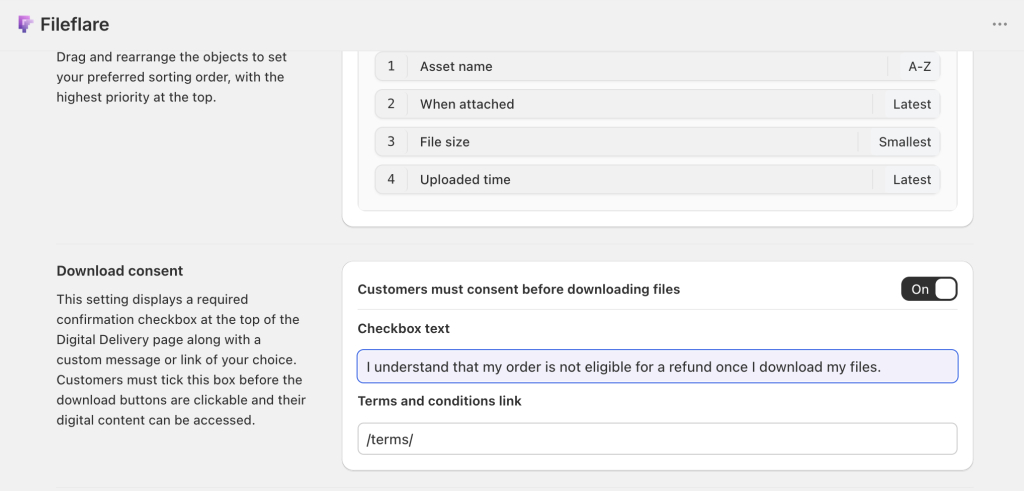
- Returns and refunds are harder to prevent. A customer who requests a refund after downloading still has the file. Most digital sellers set no-refund policies for this reason, and Fileflare offers consent gates to prevent download until this policy is acknowledged.
- Discovery is the bottleneck. With no shelf space to compete for, the hard part becomes getting found. SEO, social, and email lists do the work that retail shelves used to do.
- VAT on digital sales has to be handled for customers in the EU, UK, Australia, and a handful of other jurisdictions. Most e-commerce platforms (including Shopify) can calculate and collect it automatically if configured right.
Where people actually sell digital products
A few of the most common paths, each with different tradeoffs:
- Your own Shopify store. Most control, strongest branding, lowest fees once you’re past the subscription cost. Pair Shopify’s checkout with a digital downloads app (Fileflare, or one of the alternatives) for delivery, protection, and email handling.
- Etsy. Good for discovery; weaker for branding and margins. Fees are substantial (listing + transaction + payment processing adds up to about 10 to 12% on each sale), and you’re competing on a crowded marketplace. The Etsy-to-Shopify migration is common once sellers hit a certain volume.
- Gumroad, Lemon Squeezy, Payhip. Dedicated creator-economy platforms. Simple setup, built-in discovery for some niches, but fee structures vary and you’re locked into their checkout experience.
- Teachable, Thinkific, Podia. Built specifically for online courses. Worth the premium if you’re selling a structured course with lessons, quizzes, and student tracking.
- Your own website (WordPress, Webflow, etc.). Maximum control, most technical overhead. Usually involves pairing a no-code builder with a checkout tool like Shopify Buy Buttons or a dedicated digital sales platform.
A few practical first steps
If you’re starting from zero and thinking about selling a digital product, a reasonable first sprint:
- Pick something small to ship first. A single PDF, a template, a short audio file. Don’t try to launch a full course or a 30-product shop day one.
- Decide on a platform. For most first-time sellers, Shopify + a digital downloads app gives the cleanest path from idea to live store without needing to stitch a bunch of services together.
- Price it higher than you think. First-time digital sellers almost always underprice. A $29 price point frequently outperforms a $9 one, because buyers read low prices as signals of low quality on unknown sellers.
- Set up delivery properly. Email delivery that looks like spam is the #1 post-purchase complaint. Use an app that sends from your own domain and gives the buyer a download page on your own site (not a generic third-party URL).
- Plan for protection if piracy matters. Watermark your PDFs with buyer details if you’re selling anything premium. Cap download-link access to a sensible number of IPs. These aren’t paranoia — they’re basic hygiene once you’re selling enough to be worth copying.
Try Fileflare
If you’re setting up a digital-products store on Shopify, Fileflare handles the delivery, protection, and download-page parts of the stack. The free plan includes 1 GB storage, unlimited products, unlimited bandwidth — enough to test a real store before upgrading.
For the full setup end to end, the complete guide to selling digital downloads on Shopify covers product creation, file attachment, delivery emails, download page customization, and access controls.