
Printables are one of the easiest digital products to start selling — and one of the hardest to grow past a few hundred dollars a month if you don’t know what you’re doing.
The product side is straightforward: you design the file (or already have one), you sell it, the buyer downloads it and prints it. Coloring pages, wall art, planner inserts, party printables, worksheets, wedding stationery, recipe cards — the format is everywhere because it works.
The platform side is where it gets interesting. Most printable sellers start on Etsy, where the marketplace’s built-in audience makes the first 50 sales much easier than building a Shopify store from scratch. Etsy’s fee structure and rule changes over the past few years have pushed a lot of sellers to look at Shopify as the long-term home, especially anyone past about $2,000 a month in sales.
This guide is about the second path — we’ll talk about how to set up a Shopify store that works for printables, what’s different from selling other digital products, how to deliver and protect your files, how to price them, and how the migration from Etsy fits in if that’s where you’re coming from. The mechanics work the same way whether you’re a one-person printable shop or a team running a hundred-product catalog.
Why printable sellers are moving to Shopify
The Etsy-versus-Shopify decision keeps coming up because it’s a real tradeoff. Both platforms work, but they reward different things.
Etsy’s strength is built-in traffic. A new printable shop on Etsy can get a sale on day one because Etsy’s marketplace puts your product in front of people already searching for printables. You don’t have to build an audience; Etsy lends you its audience in exchange for fees and rules.
Shopify’s strength is ownership. Your store, your domain, your customer email list, your branding, your control. Nobody can suspend your store for a policy violation that a reviewer interpreted unfavorably. Nobody changes the algorithm in a way that tanks your sales overnight. The cost is that nobody is sending you traffic — you have to bring it yourself.
For most printable sellers the math runs roughly like this: under $1,000 a month, Etsy is the easier path. Between $1,000 and $5,000 a month, the choice depends on how much you’ve invested in audience-building outside of Etsy (Pinterest following, email list, blog traffic, etc). Above $5,000 a month, Shopify usually pays back the work.
The fee structure piece matters, too. Etsy charges a listing fee, a transaction fee, a payment processing fee, and an offsite-ads fee on top of standard payment processing. The compounding effect is real — a $10 printable sale on Etsy nets significantly less than the same sale on Shopify after fees. Across thousands of orders, the difference funds a lot of marketing.
If you’re moving from Etsy specifically, our Etsy-to-Shopify migration guide for digital sellers walks through the transfer in detail. The rest of this post is the platform-agnostic answer to “how do I set up a Shopify store for printables?”
What makes a good printable file
The biggest mistake new printable sellers make is shipping files at the wrong resolution. A printable that looks fine on a phone screen at 72 DPI will look terrible printed at 8 by 10 inches. The buyer prints it, sees pixelated text and blurry edges, and asks for a refund.
Here are a few file-prep rules that save support tickets:
- Resolution. Anything intended to be printed should be exported at 300 DPI. Some buyers print on home printers; some take files to a print shop. 300 DPI looks crisp on both. 600 DPI is overkill for almost all consumer printable use cases — file sizes balloon and the visible quality difference is minimal.
- Format. PDF is the universal default for printables with text or layouts (planner pages, worksheets, wall art with quotes). Buyers know how to handle PDFs and most home printers handle them well. JPG works for image-only printables (photographs, illustrations without text overlays); the file sizes are smaller and the format is friendlier to image editors. PNG is occasionally useful for printables with transparent backgrounds (overlay elements, stickers). SVG is the right format for cut files (Cricut, Silhouette) where the buyer needs vector paths rather than a raster image.
A common pattern is to ship multiple formats per product: PDF + JPG + PNG, or PDF in multiple paper sizes (US Letter + A4 + 5×7). Multi-format products are easy to handle on Shopify with a delivery app like Fileflare. - Color profile. RGB for screen-based printables (digital wall art that buyers might display on a tablet); CMYK for files going to commercial print shops; sRGB as the safe default for files that will print on home printers. If you’re not sure, go with sRGB.
- Bleed and margins. For anything meant to be cut after printing (party printables, bookmarks, gift tags), include 0.125 inch of bleed and a clear cut line. Buyers using home printers without bleed support will appreciate a margin guide; buyers going to a print shop will appreciate the bleed.
- Embedded fonts. Always embed fonts in your PDF exports. A printable that references an installed font on your computer will look different on the buyer’s computer if they don’t have that font — usually substituted with something ugly. Embedded fonts travel with the file.
Those are all the “do’s”, but there are also “don’ts”. Specifically, don’t try to make a single printable cover every possible use case. A planner insert at 8.5 by 11 inches in the US doesn’t need to be the same file as the A4 version for European buyers. Sell each as its own product or attach both as files to a single product. The buyer who needs A4 will appreciate the dedicated file; the buyer who needs Letter won’t notice it’s a separate file.
Multi-format and multi-size delivery
Most printable products that sell well aren’t single files, they’re packs or bundles:
- A coloring page bundle with 12 individual PDFs
- A wedding stationery suite with invitation, RSVP card, menu, and place card files
- A planner insert pack with 30 individual page templates
- A wall art print sold in three sizes (5×7, 8×10, 11×14)
Fileflare has no limit on the number of assets you deliver per product: attach as many files as you want to a single product, on every plan including the free tier. Customers see all the files on a single download page after checkout.
For variant-level differences (the same printable in three sizes, or in two color schemes), attach files to specific variants. The buyer picks the variant they want, and gets the file matched to that variant. The other variants’ files don’t show up on their download page.
We have a deeper post on attaching multiple files to a Shopify product if the file structure on a complex product is what’s blocking you. (Or reach out to our team! We’re always willing to help with set up.)
Set up your printable product
Once Shopify and Fileflare are both ready, you have a few steps to launch.
Step 1: Create the Shopify product
In your Shopify admin, go to Products > Add product. The setup is mostly the same as for any other product, with two differences worth flagging:
- Inventory. Disable the “Track quantity” setting — after all, digital products don’t run out! (Unless you want to offer a limited drop or run — in which case, track the quantity like a physical product.)
- Shipping. Disable the “This is a physical product” checkbox so Shopify doesn’t ask the buyer for a shipping address at checkout. Skipping this trips up first-time digital sellers more than anything else.
For variants (different sizes, different formats, different color schemes), set them up under Variants — Shopify handles the storefront UI for variant pickers automatically.
Step 2: Upload files to Fileflare’s asset library
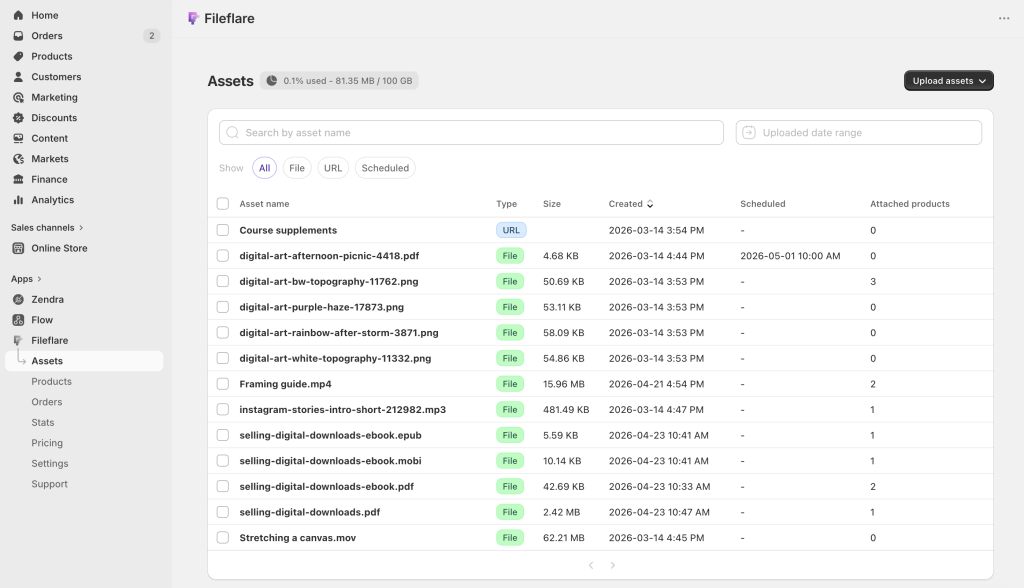
In the Fileflare app inside your Shopify admin, go to Assets > Upload new assets and drag your files in.
If your files already live in an S3 bucket or an S3-compatible storage provider, you can connect that bucket to Fileflare instead of re-uploading: the files stay where they are, and Fileflare delivers them from your bucket. (On the Growth plan and above)
Bringing your own S3-compatible bucket (like Cloudflare R2) matters if you have a large catalog (hundreds of files) where re-uploading would be a chore.
Step 3: Attach files to the Shopify product
In Fileflare, find your product, click Attach asset, and pick the files from the asset library. For multi-variant products, attach files to specific variants if the file differs per variant.
- For a 12-page coloring book sold as a single product: attach all 12 PDFs to the product. The buyer gets all 12 on one download page after checkout.
- For a wall art print sold in three sizes as variants: attach the 5×7 PDF to the 5×7 variant, the 8×10 PDF to the 8×10 variant, and so on. Each buyer sees only the variant they purchased.
Step 4: Customize the download page
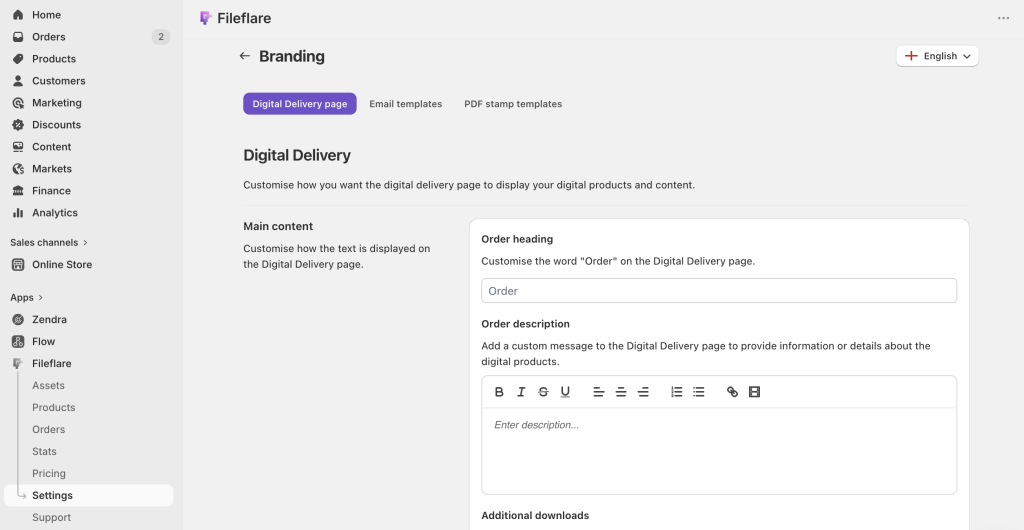
Go to Settings > Branding > Digital Delivery page in Fileflare and customize the heading, description, and any custom instructions. For printables specifically, a short note on printing recommendations (“we recommend printing at 100% scale on letter-size paper”) prevents a chunk of “the file printed weird” support tickets.
The default settings work, but five minutes of customization reads as more professional than the default and is worth the time.
Bundling printables
Printable sellers underuse bundles, but they’re one of the highest leverage merchandising moves you can make.
A single coloring page sells for $3 to $5. A 12-page coloring book sells for $19 to $29. A 30-page coloring collection sells for $49. The unit economics flip: a bundle’s design cost is amortized across one purchase rather than 30 individual transactions, and the per-customer revenue is dramatically higher.
Bundles work well in a few patterns:
- Themed bundles. Group assets by topic or theme — put all Halloween printables in one $25 pack. Or, all wedding stationery in one $49 suite. Theme coherence justifies the bundle price.
- Volume bundles. Quantity itself can be a value proposition, via a “30-day printable workbook” or “12-month planner pack”. Using volume is best for products where buyers work through them sequentially.
- Tier bundles. Offer a free single-page printable as a lead magnet, a $9 small pack (3 to 5 files) as the upsell, a $29 full collection as the higher tier. Tiers let buyers self-select their commitment level, and some buyers will just always go for the highest value offered, boosting your AOV.
Whether you create separate products for bundle tiers or variants depends on your structure. Variants can work for “single vs. set” pricing if the difference is just file count, but separate products give you more flexibility on titles, descriptions, and SEO if the tiers are substantially different.
Pricing printables
Based on successful sellers using Fileflare, printables sell well when priced a tad higher than you might think.
- Single-page printables (coloring pages, wall art, worksheets, printable labels): Sell for $3 to $12. Volume sellers discount further on bundles.
- Small packs (5 to 10 files, themed): $9 to $29. This is a sweet spot for impulse buyers.
- Larger collections (15 to 30 files): List for $19 to $49. Note that a more expensive bundle demands clear value framing — what’s the buyer getting, why this much? Make sure you spend a bit of time on your product pages!
- Premium designer printables (wedding suites, professional templates, high-design digital art): Typically sells for $39 to $99. Th audience for these products is smaller but willing to pay for design quality.
- Niche-professional printables (intake forms for therapists, intake checklists for wedding planners, classroom curriculum packs): List these for $49 to $199. The audience is narrow but the alternative is custom-designing the same thing in-house, so the value is pretty clear even at a higher price.
Which brings me to the final pricing note: anchor prices on value to the buyer, not on what feels “fair” for a digital file. A 30-minute design that saves a stressed bride two hours of frustration is worth $29, regardless of how long it took you to make.
Protect your printables
For low-priced printables ($3 to $12), the protection bar is low — the cost of any individual buyer sharing is minimal. Download limits and IP caps cover the basics.
For premium printables and bundles ($29+), the case for stamping gets stronger. Each downloaded PDF gets the buyer’s name on every page. The deterrent effect is real, the buyer experience is unaffected for honest buyers, and the attribution helps if the file shows up somewhere it shouldn’t.
The deep dives are in two companion posts:
- How to protect digital products from piracy on Shopify — the layered protection framework, including download limits, IP caps, and what not to do.
- How to watermark PDFs automatically on Shopify — the deep dive specifically on PDF stamping setup.
For printables, in short: stamp the PDFs in your premium products; download limits and IP caps for everything else.
Bringing your Etsy shop with you
Most printable sellers shopping the Shopify path are coming from Etsy. We have a full migration playbook on Etsy to Shopify for digital sellers — it covers what transfers, what doesn’t, and the realistic timeline for replacing Etsy traffic.
If you’re migrating to Shopify, there are three things specific to printables worth knowing.
- Your file library is already digital. Unlike physical product sellers, you don’t have to recreate inventory or photograph anything. Your existing PDFs and JPGs go straight into Fileflare’s asset library, get attached to recreated Shopify products, and you’re delivering. The transfer itself is fast.
- Your descriptions probably need a rewrite. Etsy’s listing copy is heavily keyword-optimized for Etsy’s internal search algorithm, which is different from Google’s. Shopify product descriptions that work well lean conversational and benefit-focused rather than tag-stuffed. Plan to rewrite, not copy-paste.
- Your traffic strategy changes. On Etsy, the marketplace surfaces your product. On Shopify, you surface yourself to interested buyers. Pinterest is still the printable seller’s best friend (visual content, evergreen pin lifespan), and long-tail SEO works for printable categories, so invest in your blog. And of course, your email list growth via free lead-magnet printables is the highest-leverage, long-term tactic.
Plan for 3 to 12 months for Shopify to replace Etsy revenue — your audience growth won’t happen overnight, or even over your first month.
Marketing printables on Shopify
Digital printable sellers usually have good success building Shopify traffic with a few key channels.
- Pinterest. Still the most effective single channel for printables. Visual content matches the platform, evergreen pins keep producing traffic for years, and printable buyers actually use Pinterest to discover products. Plan to commit to it for at least 6 months before assessing — Pinterest rewards consistency.
- SEO with long-tail printable searches. “Free printable wedding ceremony script” is a good long-tail keyword to win, and offer an upsell to a premium version. Terms like “Printable Christmas gift tags” have natural upsells to a multi-pack.
Long-tail queries have lower volume each but high commercial intent and limited competition compared to broad printable terms. - Email list growth via free lead magnets. A free printable behind an email signup builds your audience. Klaviyo or Shopify’s native email tool handles your list and the follow-up sequence; the lead magnet itself is delivered through Fileflare just like a paying customer’s purchase.
Many printable sellers start on the “trendy” platforms, but these don’t always bring leads relevant to your industry. TikTok can be hard to convert printable browsers into buyers; paid ads on Google or Meta costs can be hard to work (the AOV-to-CPA math rarely works for sub-$30 digital products); Instagram works for the design aesthetic, but is harder to drive actual conversions.
Keep learning
The companion guides cover related topics:
- Etsy to Shopify for digital sellers — the full migration playbook
- How to sell PDFs on Shopify — for PDF-specific products
- How to protect digital products from piracy on Shopify — protection layers for premium printables
- How to watermark PDFs automatically on Shopify — PDF stamping deep dive
- Best-selling digital products — broader category overview
When you’re ready to set up delivery for your printable shop, install Fileflare from the Shopify App Store. The free plan handles unlimited products, unlimited files per product, and bandwidth — enough to run a printable shop entirely free until you decide you want stamping (Basic plan) or higher storage tiers.