
Digital art and printables make up one of the largest digital product categories on Shopify, and they span a wide range:
- digital prints buyers print themselves (wall art, nursery decor, quotes, maps)
- Procreate brushes and Photoshop actions
- illustrations and clip art
- Lightroom presets and LUTs
- SVG cut files for Cricut and Silhouette machines
- coloring pages
- digital planners
- stickers for iPad note-taking apps
And more — we’ve seen an amazing array of printables sellers replace their incomes or grow substantial businesses on Shopify.
The mechanics are similar across all of these: deliver a file, protect it reasonably, price it well, and make the product page convert. The differences are in format choices, licensing, and what buyers actually do with the file once they have it.
This post covers the practical pieces, and assumes you’ve read or skimmed the complete guide to selling digital downloads on Shopify as the setup foundation.
What kind of “digital art” are you selling?
The right file formats and pricing differ by product type. “Digital art” or printables can cover:
- Print-at-home wall art and decor. Nursery prints, quote posters, wedding art, map prints. The buyer prints on paper at home or at a print shop. Delivered as high-res PDF and / or JPEG. Usually multiple sizes (5×7, 8×10, 11×14, 16×20) or a “scale to any size” vector file.
- Planners, journals, and digital stickers. Used in iPad note apps (GoodNotes, Notability). Deliver as PDF with hyperlinks (planners) or PNG with transparent backgrounds (stickers). Different buyer than wall-art purchasers — they’re iPad users, not home-printers.
- SVG cut files. For Cricut and Silhouette craft machines. Deliver as SVG. Sometimes paired with PNG, DXF, or EPS for other cutting software. Craft-oriented audience, often dedicated Etsy buyers (the Etsy vs Shopify comparison matters specifically for this segment).
- Procreate brushes, Photoshop actions, Lightroom presets. Tools used inside creative software. Format is specific to the target app (.brushset, .atn, .xmp, etc.).
- Illustrations and clip art. Sold individually or in themed bundles. PNG with transparent backgrounds is the default; AI or EPS for buyers who want editable vectors.
- Coloring pages, worksheets, activity printables. Typically PDF. Often sold in packs by theme or grade level.
Each has its own niche, its own pricing norms, and its own mix of buyers.
Decide on your file format
Buyers expect a familiar format, depending on your product type — sometimes we see sellers use a non-standard format, and it results in increased support for customers asking for different options. It’s best to use convention, depending on your vertical:
- Print-at-home wall art. Deliver at 300 DPI minimum, in common U.S. and ISO paper sizes. PDF for consistent print scaling, JPEG as a backup for buyers whose print shop doesn’t take PDF. If you want to support arbitrary sizes, include a vector (AI or EPS) version.
- Digital planners. PDF with working hyperlinks. Test on GoodNotes and Notability specifically — these are the two most-used apps, and hyperlinks sometimes break in one but not the other.
- SVG cut files. Include SVG as primary, plus PNG (for preview and backup), and optionally DXF (for Silhouette users). A readme with import instructions reduces support tickets.
- Procreate brushes. Deliver as .brushset (the bundle format). Individual .brush files are unusual.
- Lightroom presets. Deliver .xmp (modern Lightroom and Lightroom Mobile). Old .lrtemplate format is deprecated.
- Photoshop actions. Deliver .atn, plus a PDF or video showing how to install and use them.
Fileflare supports unlimited files per product on every plan (including free), so bundling multiple formats or multiple sizes into one product is free — no upgrade needed. See how to attach multiple files for the setup.
Licensing & allowed use
Most first-time digital-art sellers forget to include licensing terms. Then the first buyer resells their purchase on Etsy and everyone’s confused about what’s allowed.
A minimal license statement should cover:
- Personal use: usually unlimited. Buyer can print for their own home, make their own copies, adjust sizes.
- Commercial use: usually restricted. Buyer can’t resell the file, can’t include it in a product they sell, can’t redistribute it. You can offer an “extended commercial license” at a higher price if you want to sell commercial rights.
- Sharing: explicitly not allowed. Per-buyer license only. The file stamps identify who bought it.
- Refund policy: usually no refunds on digital products (they can’t be “returned”). State this explicitly.
Include the license as a PDF in the delivery bundle, or as a text section in the product description, or both. Shopify’s product description field is a reasonable place, and so is an included license.pdf file in the ZIP.
Pricing your digital art
Digital art pricing varies wildly by niche. Here are a few benchmarks based on our users:
- Wall art prints: $5–$15 single prints, $15–$40 sets of 3 to 6.
- Procreate brushes: $5–$20 individual sets, $30–$80 bundles.
- Digital planners: $10–$50 depending on complexity and page count.
- SVG cut files: $2–$8 individual files, $10–$40 bundles.
- Photoshop actions / Lightroom presets: $10–$30 for small packs, $40–$100 for comprehensive sets.
- Clip art / illustration bundles: $5–$40 depending on scope.
First-time sellers almost universally price too low. Buyers read low prices as signals of low quality on unknown sellers. Price where your work earns the margins it deserves and use sales or discounts to attract first buyers, rather than permanently pricing low. (And give the discount as part of an email capture, so you can market to these folks later!)
Protecting the files
Digital art is one of the more-pirated categories on the internet — design resources get redistributed constantly. You can add a few practical protections to deter sharing:
- PDF stamping with buyer details. For any PDF deliverables (wall art, planners, coloring pages), Fileflare stamps the buyer’s name, email, or order number (among other options) on every page. Stamping makes leaked copies identifiable and makes sharing feel uncomfortable. See how to protect an ebook for the layered approach — it generalizes to any PDF.
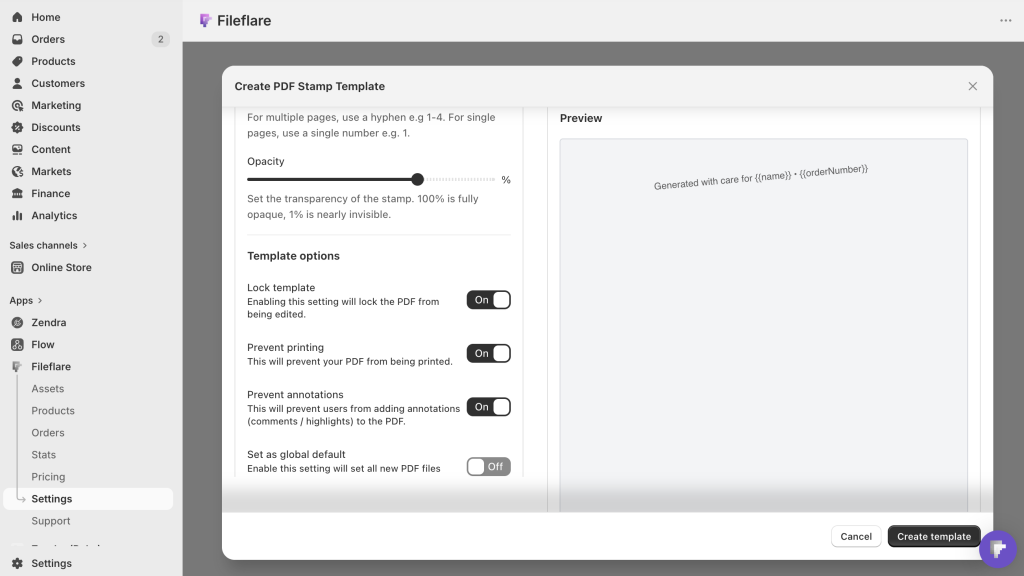
- IP-based download limits. Cap each order’s link at 3 to 5 unique IPs. Buyers can re-download from multiple devices; a link posted on a piracy forum shuts off after a few grabs.
- Download expiration. Set links to expire after 30–90 days. Honest customers who’ve already downloaded the file aren’t affected; automated scrapers hitting old order pages are cut off.
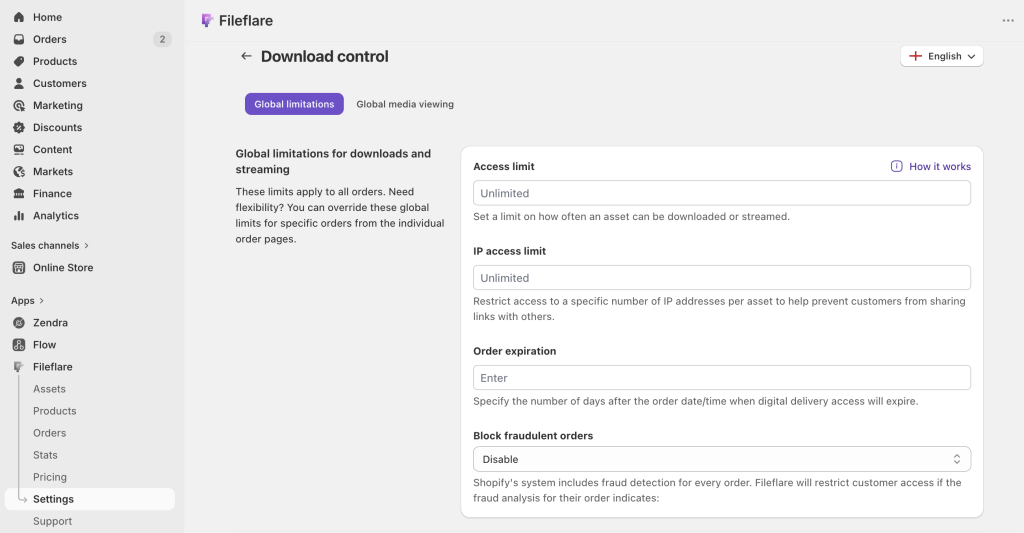
- Fraud auto-blocking. High-risk orders (fake cards, IP mismatches) are a common source of leaked files. Fileflare blocks download access on Shopify-flagged orders automatically until you review.
- Watermark any previews you show on the product page. If you sell wall art, the preview image on the listing should be visibly watermarked — not the clean version buyers receive.
What doesn’t work: obscure PDF passwords (trivially cracked), right-click blocking (covered in this post — short version: don’t bother), or “uncopyable” image formats (they don’t exist).
Creating a conversion-focused product listing
We see a lot of digital art sellers, and here are a few specific things that tend to move conversion for digital art listings:
- Include a “how this looks in a room” mockup if you’re selling wall art. Mockup tools like Smartmockups or manual Photoshop compositing work. You can also try ChatGPT or Nano banana first — they’re getting much better at generating product imagery these days! Buyers need to picture the art on their wall.
- Specify sizes clearly. “5×7, 8×10, 11×14, 16×20 (all four sizes included)” beats “multiple sizes.” Explicit is better than implicit.
- Call out print quality up front. “300 DPI, prints crisply at all included sizes” or “Scales infinitely — print at any size you need” removes the main quality question buyers have.
- Link to recommended print services. Walmart Photo, Costco Photo, Vistaprint, local shops. Buyers who don’t have a home printer appreciate this more than you’d think.
- Include installation instructions for tool-specific products (Procreate brushes, Photoshop actions). A short “open the .brushset file in Procreate; it’ll import automatically” is all most buyers need but prevents support tickets.
Get started
Fileflare’s free plan includes 1 GB storage, unlimited products, unlimited bandwidth — enough to launch a real digital-art shop with a few starting products. PDF stamping, IP limits, and fraud auto-blocking are on paid tiers starting at $19/mo.
For the full setup, the complete guide to selling digital downloads on Shopify covers everything end to end.