
Shopify’s checkout extensibility is the modern way apps add content to the thank-you and order status pages. Fileflare’s download blocks plug into it directly — no theme code, just drag and drop in Shopify’s checkout customizer. This is the only path on Shopify’s current checkout (legacy checkout has been deprecated).
Available on all plans (the underlying thank-you-page download feature requires Basic+). All Shopify stores have been migrated to checkout extensibility.
When you’d use this
- You’re enabling thank-you page or order status page downloads for the first time.
- You moved the Fileflare block by accident and need to put it back.
- You changed checkout configurations and want to re-add Fileflare.
Add the Fileflare app block
- Shopify admin → Settings → Checkout.
- Click Customize on your active checkout configuration.

- In the page selector at the top, switch between Thank you, Orders, and Order status. Each is a separate page where you can add the Fileflare block.

- Click Add app block in the section where you want Fileflare to appear.
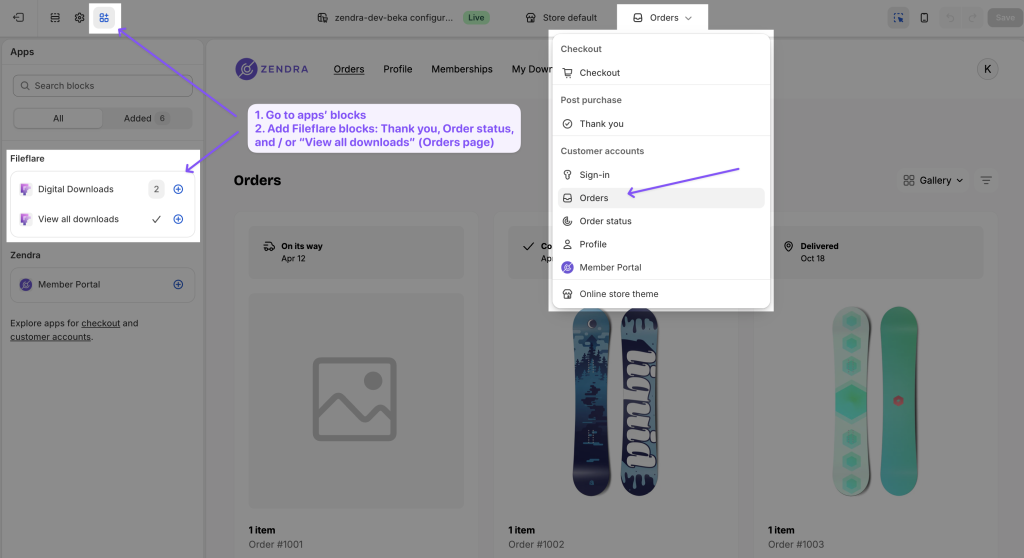
- Drag the Fileflare block to your chosen position on the page.
- Repeat for the other pages (Orders, Order Status) if you want downloads visible there too.
- Save.
Common issues
- I don’t see Fileflare in the app block list — confirm Fileflare is installed and active. Reload the customizer page.
- Block appears in customizer but not on the live page — make sure you saved the customizer (it doesn’t auto-publish).
- Block shows but downloads are blank — order isn’t Paid, or the products on the order don’t have assets attached in Fileflare. Both are required.
- I want different blocks on different pages — supported. Each page (Thank you, Orders, Order Status) is independent. You can mix block placements per page.