
A lot of successful digital-product stores on Shopify are run by producers, musicians, and sound designers. Beats, sample packs, stems, loop libraries, one-shots, vocal tops, sound effects, audiobooks — all of it fits cleanly into Shopify’s product model once you’ve got the delivery layer right.
This guide walks through the setup end to end: how to structure your catalog, what licensing options to consider, how to let buyers preview before they buy, and how to protect your files from the kind of sharing that kills beat-selling businesses. It assumes you’ve read or skimmed the guide to selling digital products on Shopify as the foundation — this post goes deeper on the audio-specific pieces.
What you’re selling
A quick map of the most common product types, because the right setup differs:
- Beats / instrumentals. Single tracks sold to artists, typically with multiple license tiers (non-exclusive MP3, non-exclusive WAV, trackouts / stems, exclusive). The tier structure is the business.
- Sample packs. Bundles of loops, one-shots, and stems grouped around a theme (drill drums, 80s synths, trap 808s). Usually one flat price per pack, no tier structure.
- Stem packs and trackouts. The multi-track source files for finished songs, sold to remixers, DJs, or licensing clients. Can be standalone or bundled with a beat as its top tier.
- Sound effects and foley. Non-musical audio sold to filmmakers, podcasters, game developers. Usually large libraries (hundreds to thousands of files).
- Audiobooks, meditations, language lessons. Spoken-word audio sold to end listeners. Different audience from producer-facing products, different distribution concerns.
- Sheet music and lead sheets. Actually PDFs, not audio — but music sellers often carry both. The how to sell PDFs on Shopify post covers the PDF side.
Each of these works on Shopify, and the setup patterns overlap a lot. We’ll focus on beats and sample packs since they’re the highest-volume category, with notes on the others.
File formats and delivery defaults
A few decisions to make up front:
- WAV is the default for producers. Uncompressed, universally supported, treats audio the way a producer wants to treat it. Ship WAV for beats, stems, sample packs, one-shots — anything where a working producer will load the file into a DAW.
- MP3 is for end listeners and for preview tracks. A 320 kbps MP3 is fine for the “audio-only” tier of a beat (no stems, no mix sessions). It’s also the right format for streaming preview players on your store.
- FLAC is useful for audiobooks and audiophile content. Lossless but compressed, smaller than WAV. Most producer-facing audio ships WAV by convention even though FLAC would be smaller.
- MIDI files for melody / pattern packs. Some sample packs include MIDI alongside audio so buyers can modify the notes. Small files, easy to bundle.
Attach multiple formats to one product when it makes sense (WAV + MP3 + MIDI delivered together). Fileflare supports unlimited files per product on every plan, including free, so multi-format delivery doesn’t need a pricing upgrade.
Licensing tiers for beats
The standard industry structure for beats is three to four tiers that differ in what the buyer gets and what they can do with it:
- Basic / MP3 lease. 320 kbps MP3, non-exclusive, limited use rights (e.g., up to 5,000 streams, non-commercial or low-budget commercial). Cheapest tier, $15–$40.
- Premium / WAV lease. Uncompressed WAV, non-exclusive, broader use rights (e.g., up to 50,000 streams, commercial use allowed). $30–$100.
- Unlimited / stems. WAV plus trackout stems, non-exclusive, unlimited use rights. $75–$300.
- Exclusive. Full rights transfer — buyer owns the beat outright. $300–$5,000+ depending on the producer’s reputation and the beat itself.
Implement tiers on Shopify using variants. One product per beat, with the tiers as variants, and each variant can have a different set of files attached in Fileflare. The MP3 variant delivers the MP3 only; the WAV variant delivers WAV + MP3; the stems variant delivers WAV + MP3 + trackouts + the mix session.
There are some hidden bonuses to using Fileflare vs a simpler app, like the free Digital Products app:
- The “Unlimited / stems” variant is where a shared asset library earns its keep. In Fileflare, the stems variant reuses the already-attached WAV and MP3 files (plus the stems folder) — one file, attached to multiple variants. Shopify’s native Digital Products app can attach to variants, but it doesn’t have a shared library. You’d have to re-upload the WAV and MP3 files again against the stems variant. Tolerable for a small catalog; painful once you have 50+ beats, each with 3–4 tiers (especially for huge uploads that eat up bandwidth!).
- When a buyer upgrades (buys the WAV tier after already buying MP3), you’d typically issue them the WAV file separately rather than expecting them to navigate upgrade flows. A manual file attachment to their existing order is one way to do this; most producers do it via a separate “upgrade” SKU.
Sample packs usually don’t need tiers — one price, one bundle, done.
Streaming previews on the product page
For beats especially, buyers want to hear the track before they pay. The standard pattern:
- Put an MP3 preview (watermarked, optionally tagged with a voice drop like “Prod. by [you]”) on the product page. Streamable via the storefront’s audio player or an embedded player (Shopify apps or custom theme code).
- The preview is a separate file from the unwatermarked full version. Don’t reuse the preview MP3 as the delivered MP3 — buyers will notice the voice tag and ask why.
- Consider a shorter clip if you’re worried about the preview itself being scraped. 30–60 seconds is enough to sell the beat without giving away the full track.
Fileflare doesn’t handle front-of-site audio samples (yet! It’s on our roadmap), but for buyers after purchase, the download page has a native HTML5 audio player. Buyers can listen to their WAV or MP3 files without downloading if they want — useful for quick confirmation and for stream-only tiers.
Protecting your catalog
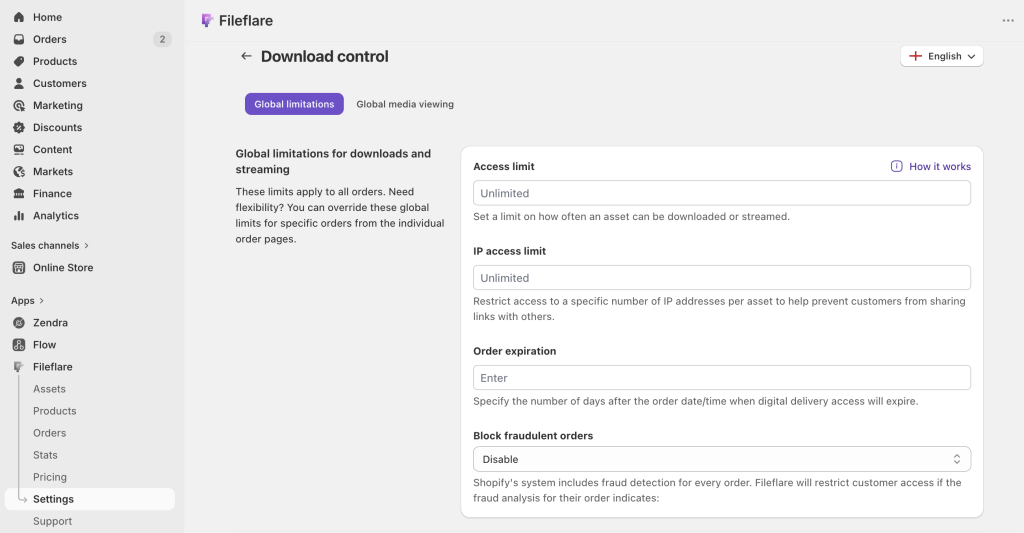
The piracy math for beats and sample packs is serious. A single $40 beat leaked on a file-sharing forum can lose you dozens of legitimate sales. The protection layers that work best for audio:
- IP-based download limits. Cap downloads per order to 3 to 5 unique IP addresses. Buyers can re-download from multiple devices; a link shared on a forum shuts off after a few unique attempts. Covered in more depth in how to protect digital downloads (the ebook post generalizes to any file type).
- Order expiration. Set downloads to expire 30–90 days after purchase. Honest customers won’t hit it; scrapers crawling for old links will.
- Fraud auto-blocking. Shopify flags high-risk orders; Fileflare reads those flags and blocks download access on medium- to high-risk orders automatically. Fraud tools are particularly relevant for beats, where fraudulent high-dollar orders are a recurring scam pattern.
- Watermarking previews. Keep the voice-tagged preview on your product page; never use the clean version as your preview. Anyone ripping the preview gets a tagged version they can’t easily use.
- For a preview, try something like The Ghost Production. We’re considering audio tags or watermarks for the Fileflare roadmap, get in touch if you’re interested.
What mostly doesn’t work for audio:
- DRM on audio files. Apple and Spotify can do this because they control the player. You can’t replicate it for files a buyer reasonably downloads into a DAW. Don’t try.
- Stream-only delivery for purchased beats. Buyers need the file in a DAW; you can’t hold it back without creating a unusable product.
Volume delivery: sample packs and large libraries
For sample packs (often 200+ individual WAV files bundled together), we have a few operational notes:
- Zip the pack into a single archive for delivery. Buyers expect this — it’s the industry convention. Individual file download or delivery is unusual.
- Keep the zip file well under any platform file-size caps. Most sample packs are 500 MB to 2 GB zipped, which fits fine on any dedicated app.
- Include documentation. A PDF or text file listing BPM, key, and file-naming conventions makes the pack more useful and reduces “what key is this?” support tickets.
- Consider a second product for the “stems” or “construction kit” version. Buyers who want the MIDI and stem files separately from the finished loops will pay more for that tier.
For really large libraries (tens of GB), uploading files to Fileflare’s managed storage works fine on paid tiers. For catalogs reaching into the terabytes, custom S3 / R2 storage (connect your own AWS or Cloudflare bucket) is cheaper at scale and effectively unlimited — or use the Fileflare Scale plan for enterprise-sized storage.
Practical setup tips
We’ve covered the nuts and bolts of selling audio files, but we’ve also seen a lot of what works and what doesn’t! Here are some common practices among successful sellers:
- Pricing psychology. First-time beat sellers almost always price too low. $15 beats signal low quality to serious buyers. $20–$40 for the MP3 tier is a more credible starting point, with clear value jumps as you go up the tiers.
- Genre tagging. Shopify collections organized by genre (drill, trap, afrobeats, R&B, boom bap) dramatically improve discoverability. Use the same pattern for sample packs — buyers usually search by genre, not by producer.
- Preview-audio performance matters. Slow-loading previews on a product page tank conversion — speed matters more than top-level audio quality for a preview. Use reasonably compressed MP3s (192–256 kbps is fine for a preview) and host them on a CDN if your theme doesn’t already.
- Delivery email from your own domain. Emails from a
files@yourdomain.comsender land in inboxes consistently more often than emails from generic Shopify senders. Worth the 10-minute custom-SMTP setup on any paid Fileflare tier.
Try Fileflare
Fileflare’s free plan has 1 GB storage, unlimited products, unlimited bandwidth — enough to set up a real beat store and run test orders through the full flow. Variant-level file attachment and multi-file delivery work on every plan, including free.
For the full setup, the complete guide to selling digital downloads on Shopify covers everything end to end.