
Most Etsy-to-Shopify migration guides are written for physical product sellers, covering inventory transfers, shipping rate setup, and fulfillment integrations. They leave digital sellers in an awkward spot — the same migration arrow points to Shopify, but the steps that matter are very different.
This guide is for the digital seller’s path: offering printables, PDFs, ebooks, audio, video, design assets, anything that ships as a file rather than a box. The mechanics, the tradeoffs, and the timeline are all different in ways worth being explicit about, including the part most sellers underestimate: replacing the Etsy traffic that brought you to Shopify in the first place.
Why digital sellers leave Etsy
The reasons sellers actually leave aren’t the marketing-headline reasons. They’re a mix of fee pressure, control concerns, and platform risk that compounds over years.
- Fee structure. Etsy charges a listing fee per product, a transaction fee per sale, a payment processing fee, an optional offsite-ads fee on top of standard processing, plus listing renewals every four months whether the product sold or not.
The compounding effect is real on volume — a $10 sale on Etsy nets meaningfully less than the same sale on Shopify. Multiply by thousands of orders and the difference funds a non-trivial amount of marketing. - Algorithm dependency. Etsy decides who sees your shop. The marketplace’s internal search algorithm has changed multiple times over the past few years, sometimes in ways that tank long-established shops overnight. You have no recourse and limited visibility into what changed. Shopify gives you a domain, a storefront, and the obligation to drive your own traffic — but at least the rules don’t change unpredictably.
- Customer relationship ownership. Etsy doesn’t give you direct customer email addresses. The customer’s email is masked behind Etsy’s messaging system. You can collect emails through file inserts, post-purchase messages, or follow-up files, but Etsy actively discourages it.
On Shopify, the customer’s email is yours from the moment they check out. Your email list compounds; on Etsy, you’re starting over with each marketing push. - Branding and storefront control. Your Etsy shop is one of millions on a marketplace. The buyer journey is “I’m shopping on Etsy and I happened to find your products.” On Shopify, your store is a destination of its own — branded, designed, structured around your product line rather than Etsy’s templates.
- Policy risk. Etsy regularly suspends shops for policy violations interpreted by automated systems and reviewers. The recourse is limited, the appeals process is slow, and a suspension during peak season can cost a year’s worth of growth. Shopify has its own policies, but the relationship is direct — you’re the customer, not a renter on someone else’s marketplace.
None of these are deal-breakers individually. Together, they explain why so many established Etsy digital sellers eventually move.
What you give up
To be equally honest the other direction: migrating costs you things, and the things it costs are real.
- Etsy’s discovery engine. A new printable shop on Etsy can sell on day one because Etsy puts your products in front of people already shopping for printables. That built-in audience is real. Shopify shoppers don’t browse “all Shopify stores” — they land on individual stores that have driven them there through search, social, ads, or word of mouth. You give up the marketplace audience.
- Your Etsy reputation. Reviews don’t transfer. Your shop’s review count, average rating, and social-proof history stay on Etsy. On Shopify, you start with zero reviews. There are workarounds (review-request emails, integrated review apps), but the reputation reset is real.
- Your search ranking inside Etsy. Whatever ranking you’ve earned for “wedding stationery printable” in Etsy’s internal search doesn’t migrate. Your product listings on Etsy keep their ranking until you delist; once you do, the ranking is gone.
- Day-zero traffic. This is the big one. Your first 90 days on Shopify will be slower than your last 90 days on Etsy — maybe much slower.
When migration is worth it
Migration isn’t always the right move; some sellers move and regret it, and some stay on Etsy and shouldn’t. The time to migrate depends on your business’s growth stage and how you want to operate.
- Revenue scale: Below about $1,000 a month, the fee math doesn’t move enough to fund the migration costs. Between $1,000 and $5,000, the choice depends on what else is true. Above $5,000 a month, Shopify usually pays back the work.
- Audience outside Etsy: If you’ve built a Pinterest following, an email list, an Instagram audience, a blog with traffic, or any other off-Etsy audience you can drive to a new store, migration gets meaningfully easier. If 100% of your sales come from Etsy’s internal traffic, migration is a much steeper climb.
- Time tolerance: Are you willing to invest 1 to 3 months of focused work building Shopify traffic before you see it pull its weight? If the answer is no, stay on Etsy until you can. It’s also fine to launch on Shopify and do this work in parallel.
- Email list collection so far: If you’ve been collecting buyer emails through your Etsy file inserts (post-purchase thank-you with a free bonus, lead-magnet PDFs that capture emails), you have a launch audience for your Shopify store on day one. If you haven’t, your Shopify launch starts cold.
- Catalog complexity: A 5-product shop migrates in a weekend. A 200-product shop is a project. The work isn’t proportional to the count, but it’s not free either.
If you’re below $2,000 a month and don’t have a meaningful off-Etsy audience, migration is probably premature. Build the audience first, then move when the math works.
What transfers and what doesn’t
Let’s take a clear-eyed view of what makes the trip with you to Shopify. You can cleanly transfer:
- Your product files (PDFs, JPGs, images, audio, video — whatever you’ve been delivering)
- Your product images and thumbnails
- Your buyer email list, if you’ve been collecting one off-platform
You’ll need to redo:
- Product descriptions. Etsy’s listing copy is keyword-optimized for Etsy’s internal search algorithm, which is different from Google’s algorithm and from Shopify shoppers’ reading patterns. Plan to rewrite product copy for Shopify rather than copy-paste.
- Pricing. You’ll probably want to revisit pricing during migration — you don’t have to absorb Etsy’s fees anymore.
But you’ll lose some things that won’t transfer.
- Your Etsy reviews and shop reputation
- Your search ranking inside Etsy
- Your Etsy follower count (if you have one)
- Your customer messaging history
Conditional:
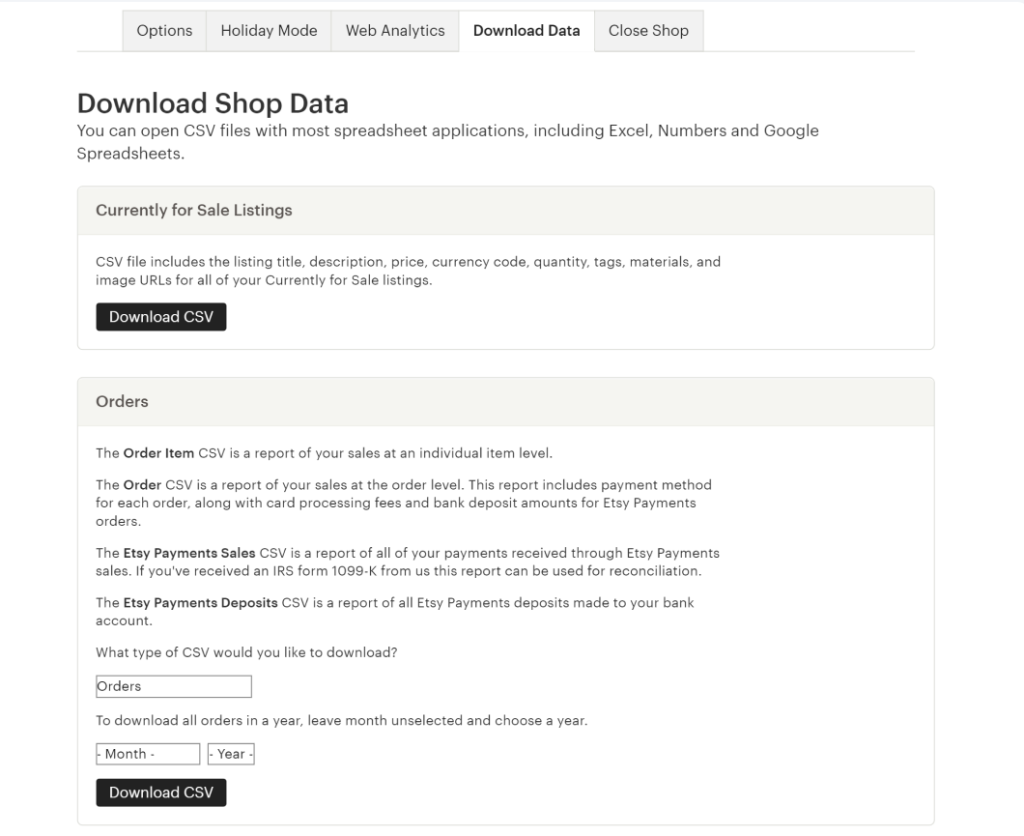
- Order history. Etsy lets you export your sales history as CSV; you can import that into Shopify (or a spreadsheet) for tax records. You can’t directly migrate the orders themselves into Shopify in a way that gives the original customers Shopify accounts, but Fileflare’s historical order import lets past Etsy buyers regain download access through your Shopify store if you keep their order data and email addresses (more on this in the customer migration section below).
Pre-migration checklist
Before you create the Shopify store, you should do some prep work in Etsy.
- Export your Etsy listings. Etsy lets you download a CSV of your active listings from your shop manager. The export includes titles, descriptions, tags, prices, and SKU mappings. You’ll use this as your reference document for recreating products in Shopify, not as a direct import — Etsy’s CSV format isn’t directly compatible with Shopify’s import tool.
- Download all your digital files from Etsy. Etsy doesn’t have a bulk export for digital files. You’ll need to manually download each file from each listing. For a small shop this is an afternoon of work; for a 200-product shop it’s a multi-day project. Make a folder structure that mirrors your products as you go — it’ll save time later.
- Export your sales history. From the Etsy shop manager, download orders as CSV. Keep this for tax records and as the source of truth for past customer emails (within the limits of what Etsy exposes — emails are partially masked).
- Pull together your existing email list. If you’ve been collecting buyer emails through file inserts, post-purchase messages, or any off-Etsy channel, consolidate them into one list. This is your launch audience for the Shopify store.
- Decide on your Shopify plan. For digital-only stores, the Shopify Basic plan ($39/mo as of writing) is the right starting point. Shopify Lite ($9/mo) doesn’t include a storefront, which you need.
- Pick a domain. Your Etsy shop name with
.com,.shop, or.storeif available. Don’t overthink it — the domain doesn’t drive traffic, your marketing does. - Decide on a launch date. Pick a launch date that gives you time to set everything up properly without creating an artificial deadline. For most sellers this means 2 to 6 weeks of setup work before the public launch.
Set up your Shopify store for digital products
The Shopify setup for digital products differs from the physical-product default in a few important ways.
Step 1: Pick a theme that works for digital sellers
Not all Shopify themes work well for digital stores. Many themes assume you’re selling physical products and surface things like “free shipping over $X” banners, inventory countdowns, and shipping calculators that don’t make sense for digital files.
Look for a theme with clean product page layouts, good image gallery support (printables and design assets sell on visuals), and minimal physical-product-specific UI. Dawn (Shopify’s default free theme) works fine after disabling the shipping-related elements. Themes like Sense, Crave, and Refresh are also popular with digital sellers.
Step 2: Disable inventory tracking globally
Go to Settings > Inventory and turn off the default “Track quantity” setting. Digital products don’t run out, and tracking inventory creates support tickets when buyers see “out of stock” messaging that shouldn’t apply.
Step 3: Configure shipping
For digital-only stores, go to Settings > Shipping and delivery and remove the “Domestic shipping” zone or set up a single zone with a free “no shipping required” rate. Shopify’s checkout will skip the shipping address request if no shipping is needed for any product in the cart.
Step 4: Install Fileflare for digital delivery
Go to the Shopify App Store, install Fileflare, and follow the approval flow. The free plan covers unlimited products and unlimited files per product, which is enough to migrate any size of Etsy catalog.
For the digital delivery setup itself, our complete guide to selling digital downloads on Shopify covers the configuration in depth.
Step 5: Set up payment processing
Shopify Payments + PayPal is the right combination for most digital sellers. Etsy buyers are familiar with PayPal (Etsy supports it as a checkout option), and Shopify Payments handles credit cards and digital wallets natively. Stripe also works as an alternative to Shopify Payments depending on your region.
Step 6: Configure store policies
Digital sellers need policy pages that are different from the physical defaults:
- Refund policy. Most digital sellers offer no refunds on digital products as a default, with exceptions for genuine technical issues. Be explicit about it on the policy page and on the product pages themselves to avoid disputes.
- Terms of service. Standard digital purchase terms covering what the buyer is licensed to do with the file, what they’re not, and your redistribution policy.
- FAQ. Cover what to do if the download doesn’t work, how to access purchases later, what file formats to expect, and printer recommendations for printable shops.
The policy pages are a low-traffic area of your store but they protect you when the rare dispute happens — it’s worth spending an hour or so to draft your baseline copy with Sidekick (Shopify’s AI assistant).
Migrate your products
The actual product migration runs through three phases:
Phase 1: File migration. Upload your downloaded Etsy files into Fileflare’s asset library. For a large catalog, the bulk-upload via drag-and-drop selection of multiple files works; for very large catalogs, the CSV bulk import (Growth plan and above) speeds things up.

Phase 2: Product creation. Recreate listings in Shopify. You can use Shopify’s CSV import tool with a properly formatted file, but most sellers find that recreating products manually produces better results than batch import — Shopify’s listing copy benefits from rewriting for the platform anyway.
For each product, you’ll set up:
- Title (cleaner than Etsy’s keyword-stuffed title format)
- Description (rewritten for Shopify shoppers — more conversational, benefit-focused, less keyword density)
- Images (upload from your existing files, ideally with consistent crop/style)
- Pricing (revisit; you don’t have to absorb Etsy’s fees anymore)
- Variants (different sizes, formats, colors, etc.)
- Tags (Shopify uses tags for navigation/collection grouping, not for search ranking like Etsy)
Phase 3: File attachment. In Fileflare, attach your uploaded files to the recreated Shopify products. For multi-file products and variant-specific files, attach files to specific variants rather than the parent product.
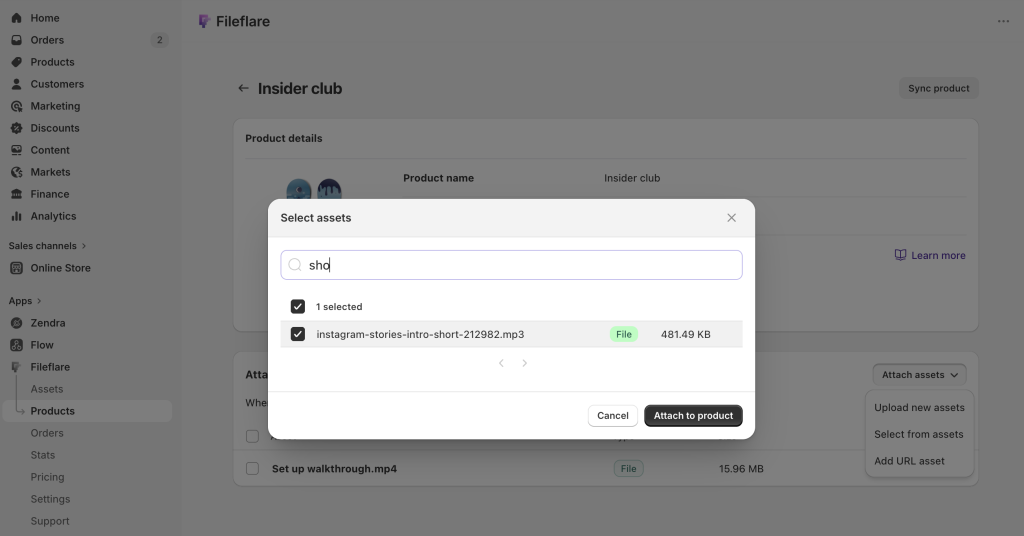
For shops with hundreds of products, the CSV bulk-attach feature in Fileflare maps SKUs to asset names and assigns files to products in one operation. The setup time is meaningful (creating the SKU-to-asset map takes a couple of hours for a 200-product catalog) but it beats clicking into each product individually.
Handle existing Etsy buyers
You don’t owe your Etsy buyers anything past the original purchase — they bought on Etsy, that’s the contract. But there are good reasons to invite them along anyway.
Send a “we moved” email. To your collected email list (the one you’ve been building outside Etsy’s masked email system), send a short announcement about the new Shopify store. Include a discount code for a fast win, mention any new products available only on the new store, and link to the Shopify URL. Most established Etsy sellers see a 10 to 30% conversion rate on this email if the audience is genuinely engaged.
Address ongoing access commitments. If you sold a 12-month update commitment (“buy this template now, get all updates for the next year free”), you need a path for past Etsy buyers to keep getting updates after you’ve migrated. You have two options:
- Manual Shopify orders. Create a $0 Shopify order for each past Etsy buyer, attach the relevant product (with current files), and use Fileflare’s manual delivery to send them access. This is tedious for large lists, but doable for small ones.
- Maintained Etsy listing. Keep the Etsy listing live but mark it “fulfilled” for ongoing-access buyers; deliver updates to those original Etsy buyers through Etsy messaging. This set up is awkward, but doesn’t require manual Shopify order creation.
The right answer depends on how many ongoing-access buyers you have and how much manual work you can absorb.
Replace your Etsy traffic
This is where most Etsy-to-Shopify migrations stall. The setup is fast; the traffic-building is slow. There are a few channels that work well for digital sellers:
- Pinterest. Still the most effective single channel for printable, design, and visual digital products. Visual content matches the platform, evergreen pins keep producing traffic for years, and printable buyers actually use Pinterest as a discovery layer. Plan to commit for 6+ months before assessing — Pinterest rewards consistency.
- Long-tail SEO. Write blog posts that target search queries for your product category. “Free printable wedding ceremony script” lands buyers searching for that specific thing; you upsell to a premium version. “Printable Christmas gift tags ideas” lands buyers shopping for inspiration; same upsell pattern. Long-tail queries have lower volume each but commercial intent and limited competition.
- Email list growth. Free lead-magnet products behind an email signup are a solid long-term growth tactic. The buyer gets a free file, you get an email address; your follow-up sequence converts a percentage to paying customers over time. Klaviyo or Shopify’s native email tool handles the list and the sequences.
- Content collaborations. Guest posts on adjacent blogs, podcast appearances, YouTube features, partnerships with other digital sellers in non-competing categories. None of these scale individually, but together they build domain authority and direct traffic.
The honest timeline runs 3 to 12 months for Shopify to replace Etsy’s revenue level. Some sellers hit it faster; some take longer. Plan for the long end and treat anything faster as upside.
Should you keep your Etsy shop running?
For most digital sellers, yes. Use a two-platform model:
- Etsy stays open as a discovery layer. New buyers find you through Etsy’s marketplace; you fulfill them through Etsy.
- Shopify is the owned-customer relationship and higher-margin sales. You drive returning customers and email-list buyers to Shopify.
The product files don’t change between platforms; you upload to both Fileflare (for Shopify orders) and Etsy’s digital file system separately. Some products you might list only on Shopify (premium bundles, customizable products, anything where you want full control); some products you keep on both.
Closing the Etsy shop entirely makes sense once Shopify-driven revenue meaningfully exceeds Etsy-driven revenue. Until then, the dual-platform model captures both audiences.
Keep learning
Companion guides for the digital seller’s path on Shopify:
- How to sell printables on Shopify — printable-specific setup and operations
- How to sell PDFs on Shopify — PDF-specific delivery
- How to sell ebooks on Shopify — multi-format ebook delivery
- How to protect digital products from piracy on Shopify — protection layers worth turning on
- How to add digital products to Shopify — the broader cornerstone setup guide
When you’re ready to set up file delivery for the new store, install Fileflare from the Shopify App Store. The free plan handles the migration for any size catalog; paid plans add storage, stamping, and protection layers as your store grows.