
Quick reference for the four ways customers can receive Fileflare downloads — what each looks like, and how to enable it. Use this when designing your delivery flow or showing a customer what to expect.
Surface availability depends on plan. Email is on every plan; thank-you page and customer accounts on Basic+; Shopify order-confirmation integration on Basic+. Most stores combine 2-3 of these for redundancy.
When you’d use this
- Designing your delivery flow and want to see what each surface looks like.
- Explaining to a teammate or partner what the customer experience is.
- Choosing which surfaces to enable based on your customers’ habits.
The four delivery surfaces
1. Fileflare download email
The default. On every plan. Sent automatically after each paid order with download links and a button to the download page.
- Customizable via email templates (Growth+).
- Two layouts: a button that links to the download page, or a bullet list of direct download links — controlled by the global delivery setting.
- Toggle on/off in Settings → Emails.
2. Shopify order confirmation email — embedded download button
Adds a download button into Shopify’s own order confirmation email. Available on Basic+. Customers click the button and land on the Fileflare download page.
Why use it: Shopify’s email has very high deliverability. Embedding the download button reduces dependency on Fileflare’s own email being delivered.
See add downloads to Shopify’s order confirmation email.
3. Thank-you page / Order Status page
Available on Basic+. Customers see a download box on Shopify’s thank-you page (right after checkout) and on the Order Status page (linked from order emails). Inherits Shopify’s checkout styling.
Layout options:
- Button only (compact).
- Button + title + description (more context).
- Bullet list of direct download links (no extra page).
Configurable in customize download box. Setup walkthrough in thank-you page downloads.
4. Customer accounts
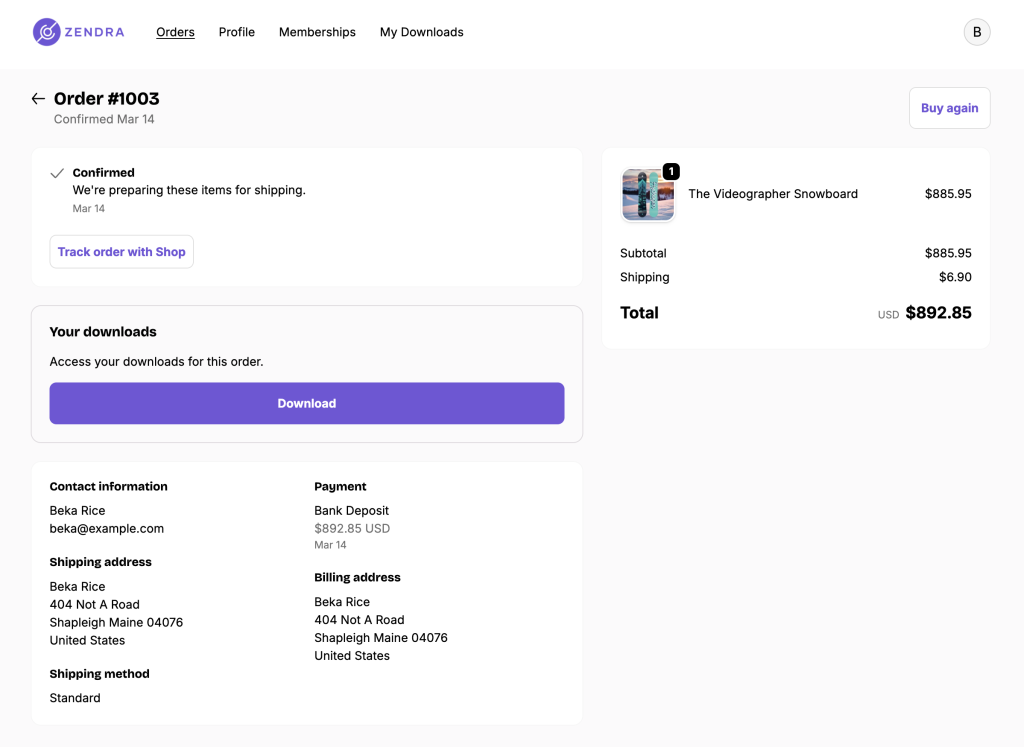
Available on Basic+. Downloads appear in the customer’s account — both in each individual order page and (optionally) on a “View all downloads” page covering all their orders. Works with both Shopify’s New and Classic customer accounts, plus integrations with CustomerHub and Froonze.
Best for repeat-access scenarios (subscription deliveries, software updates) where customers want to find their files weeks or months later.
See customer account downloads.

The download page (where the buttons lead)
All four surfaces above lead to (or display content from) Fileflare’s central download page — a Shopify-domain page that lists each file with a download icon. The page inherits your theme’s typography automatically; you can also customize it heavily — see style the download page.

Saving files on iPhone and iPad
iOS handles downloads differently from a desktop browser — tapping a file in Safari often opens a preview instead of saving it, which trips up shoppers who expect a “download” to land in a folder. To smooth this over, the download page shows iPhone and iPad shoppers a collapsed help note below the order description — they tap the heading to expand short save instructions that walk them through getting each file onto their device. Only iOS visitors see it; everyone else gets the normal page.
You control this from Settings » Branding » Digital Delivery page, under iOS download instructions — edit the heading and wording to match your voice, or clear the instructions to remove the section entirely. And because these are previews rather than real downloads, iOS preview taps don’t burn a customer’s download limit — only an actual save counts.
Mix and match
Most stores enable email + thank-you page (so customers have an instant access path even if email goes to spam). Paid users often add customer accounts for the long-tail re-access case. Stores with a strong email deliverability story sometimes disable Fileflare emails and use only Shopify’s order confirmation + thank-you page.